
One controllable and fully compliant way to promote videos and the channel as a whole is paid video advertising through Google Ads. Top creators use it, and so do businesses that treat YouTube as a source of customers.
This method can deliver a lot of views, hundreds of thousands on a single video. People see the ad as a banner among recommended videos or between the clips they are already watching.
Why you should put money into YouTube channel ads
Remember this: paid ads let you scale YouTube video promotion predictably and complement the channel’s organic growth.
The internet is full of tips on packing keywords and tags so a video ranks. Even if you do all of that, you will not get many views, up to about 1,000. For a business owner who treats the channel as a place people come from to buy, that is far too little.
You can treat YouTube as a toy: spend a lot of time, keep pouring money in, and expect little back. Then you do not need to ask how to advertise the channel. But if YouTube is a tool that should bring in money, treat ads as an investment in the brand and the business. That is the path that actually moves the needle.
How to set up video ads for a YouTube channel
You set video ads up in Google Ads. The address is ads.google.com. Every tool you need to advertise a YouTube video sits there.
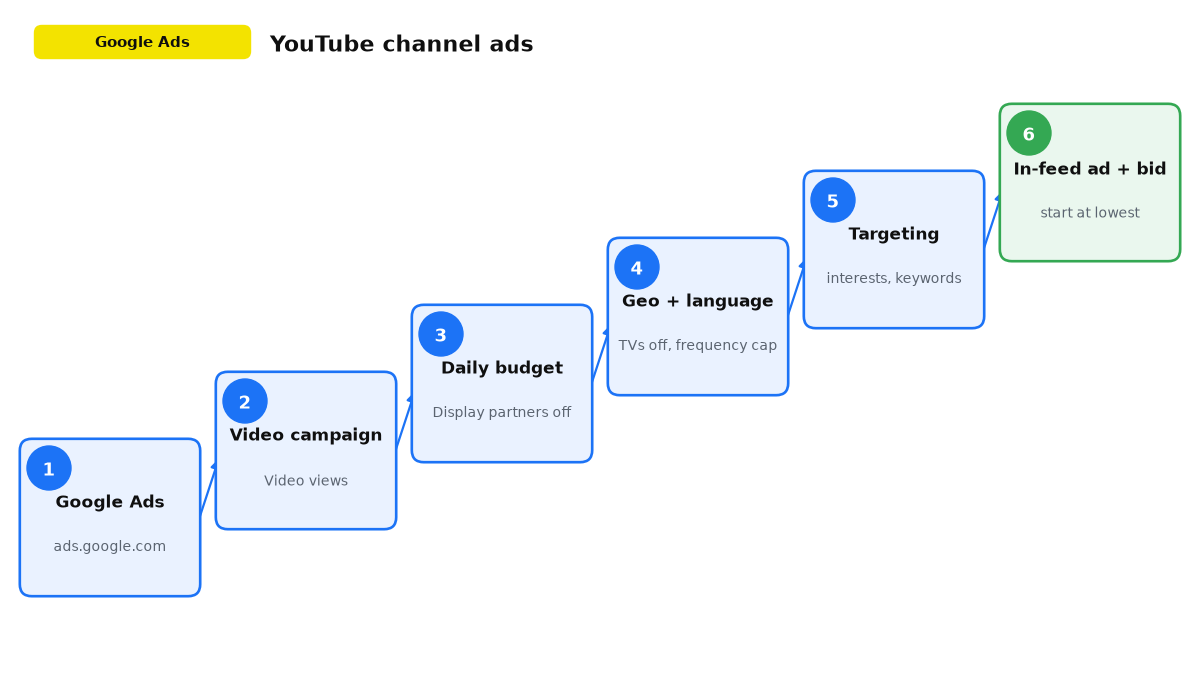
Start with account registration. It is fast and free. To create a campaign, click “+” and choose “New campaign”. Then every setting that matters for video ads:
- Google asks for a goal. Choose “Create a campaign without a goal’s guidance”. That unlocks the widest set of settings.
- Campaign type: Video.
- Campaign subtype: Video views.
- Give the campaign a name that is clear to you.
- Pick a daily budget if the video should keep running, not a short burst. Enter the amount you are willing to spend each day on impressions.
- In “Networks”, turn off video partners on the Google Display Network if you do not want to burn money on low-quality views.
- Choose the countries where you want to advertise the product and the languages your potential customers speak.
- In additional settings, among devices, turn off TVs and set a view frequency cap per user (about 3 per week, or even per month). These two moves save you about 50% of the budget.
- Enter an ad group name.
- Set targeting, who should see the ads:
- demographics: gender and age;
- audience segments: interests (what people search for) and intent (what they want to buy);
- content targeting: placements (targeting other people’s YouTube channels usually gives a small reach), topics, keywords (what people type in YouTube search, or words in titles and descriptions of videos next to which your ad will show).
- Create the video ad:
- Paste the link to the video on your YouTube channel that you want to advertise. Important: as the format, choose an in-feed ad (in-stream will cost much more).
- Choose an image, the video thumbnail you will advertise. Add a headline and descriptions.
- Set the bid, meaning the maximum you will pay for a view. For example, 1 cent, or another small amount in the account currency. I recommend starting at the lowest price and raising it until you get the number of views you need.
Once the campaign is built this way, you already have a working test: in-feed format, a daily budget, TVs off. Do not stare at pretty view counts. Watch which audience actually subscribes and what one new viewer costs.
Why ads are the safe way to grow a YouTube channel
When you choose how to advertise a YouTube channel, keep this in mind: views you buy through ads are never disputed or stripped, and the channel will not get banned for them.
Any fake views, likes, or subscribers are illegal. There are plenty of cases where a creator bought the first 1,000 subscribers, later gained a lot of real ones (say, 50,000), and the channel still got banned because of that early fake boost. So I strongly recommend staying with legal methods only: advertise the channel in Google Ads.
How promoting the channel differs from promoting one video
If the goal is not one video but the channel itself, here is how you get a lot of subscribers.
To get people to subscribe, it is better to shoot a separate video that is not sitting on the channel. The videos that usually take off on a channel are the ones that go deep on one topic, and those are a poor fit for advertising the channel. Long videos do not move a cold audience. They do not push people to buy or subscribe, so they are a weak way to attract new subscribers.
What makes an ad video different
To advertise a YouTube channel, the video should be:
- short and fast-paced;
- maybe with an entertainment hook;
- always with intrigue and a reason to subscribe;
- with a call to action.
This video runs only as an ad. It can repeat the useful parts of videos already on the channel. People who already subscribe should not see it. Exclude that group from targeting.
Sample scripts that advertise a channel with a short video and push people to subscribe:
- Want me to show you how to cut 80% of the ad budget starting today? In the next videos on my channel I will walk through the full method. Subscribe so you do not miss it. (For paid search and ads)
- Want to harvest 3 times more from the same field, same seed, same fertilizer, just a new method? I will break down my method in the next videos. Subscribe and hit the bell so you do not miss it. (For agribusiness)
Important: the answer to the intrigue must not be short enough to fit in one video. Unfold the topic over time, so the person needs to watch the next videos, which means they need to subscribe.
One more point: if you are advertising the channel itself, use an In-feed video ad. To optimize for subscriptions, choose the YouTube engagements goal in Demand Gen; in-stream is usually weaker at getting subscriptions.
How to set targeting when you advertise a YouTube channel
What works best is targeting audiences by interests, by intent, and by content (similar channels, topics, keywords).
Say you are thinking how to advertise a YouTube channel about “bookkeeping for small business” and you are choosing where the ad video should run. The steps look like this:
- pick every channel on that topic;
- find channels on adjacent topics: website builds, advertising, management accounting, hiring, everything else your audience is likely to care about;
- add keywords: a business channel may have a single lesson on bookkeeping;
- target by user interests: Google has an audience of people interested in small and mid-size business.
Takeaways on advertising a YouTube channel
- YouTube is a huge platform with a massive audience (more than 2 billion people). You can use it to promote a brand and services online. Advertising the channel is how you do that on purpose.
- Besides shooting and uploading videos, decide the channel strategy: who the posts are for, and whether the tone is educational, entertainment, or promotional. Study competitors, YouTube search keywords, and similar channels.
- YouTube will recommend a video when it is relevant, gets real engagement (comments, likes), and matches people’s interests and search history.
- Watch the trends, plan the content, and protect video quality while you hunt for fresh ideas. Work with other creators and channels. That is how you pull in more viewers and advertise the channel more effectively.
- To lift engagement, build topic playlists and put the videos on the site, on social, and in email newsletters. Give each video a strong thumbnail, and give the channel a cover people actually notice.
- For optimization, use the analytics in Google Ads and YouTube. Try different ways to grow the channel and compare which advertising path works better.
- Use the tactics above to promote the channel, and you will see YouTube as a real platform for growing the business.