
I have noticed that many advertisers use a localised Google Ads interface. Their account defaults to their native language, which initially feels easier. The tradeoff is that translated settings can lose part of their meaning, while new features may reach localised versions later.
I recommend the English interface to anyone who wants to take paid search seriously and improve campaign performance. This includes:
- business owners who manage their own paid advertising;
- PPC specialists and marketers who manage accounts for clients.
Why English works better for the Google Ads interface
Google Ads was created in English, so English is the source language for the product and its terminology.
Why I use the English interface
I keep Google Ads in English because the original setting names are easier to compare with documentation. I also notice new features sooner and reduce the risk of losing meaning through translation.
Google confirms that you can choose the interface language separately in account settings. This choice does not change which ads users see.
Some menu items and settings are not translated precisely. Small differences can distort what an option actually controls. English makes it easier to understand the system’s logic and connect Google Ads terms with the business metrics they represent.
For me, the language setting is more than a preference. Experience has shown me how much it affects the speed and accuracy of daily work in Google Ads.
A more precise understanding of Google Ads
A translation error can mislead an advertiser about what a setting does. The English interface makes the purpose and business effect of each option easier to understand. Over time, that helps you configure campaigns with more precision.
Earlier access to new features
New Google tools, experimental options, and beta features appear in English first. Localisation can lag behind. Early testing is often most useful while few PPC specialists have adopted a feature.
Faster learning in Google Ads
The terms in your account will match those used in English-language courses, videos, help pages, and professional discussions. That makes it easier to search for answers and apply what you learn.
There is also more current Google Ads information available in English. Working in the same language helps you follow product changes and bring useful ideas into your own campaigns sooner.
The practical benefit is straightforward: clearer terminology, earlier visibility of changes, and easier learning from original sources.
How to change the Google Ads interface language to English
Open Admin in the left menu, then select Settings.
Find Interface language and number format. Open the Interface language field and choose English.
Google offers three English options: Australia, the United States, and the United Kingdom. There is no major difference for this purpose. I normally use United Kingdom English, although United States English also works.
Save the setting and wait for the page to reload. The Google Ads menus should then appear in English.
The process is simple, although accounts linked with several other Google Ads accounts can sometimes behave unexpectedly.
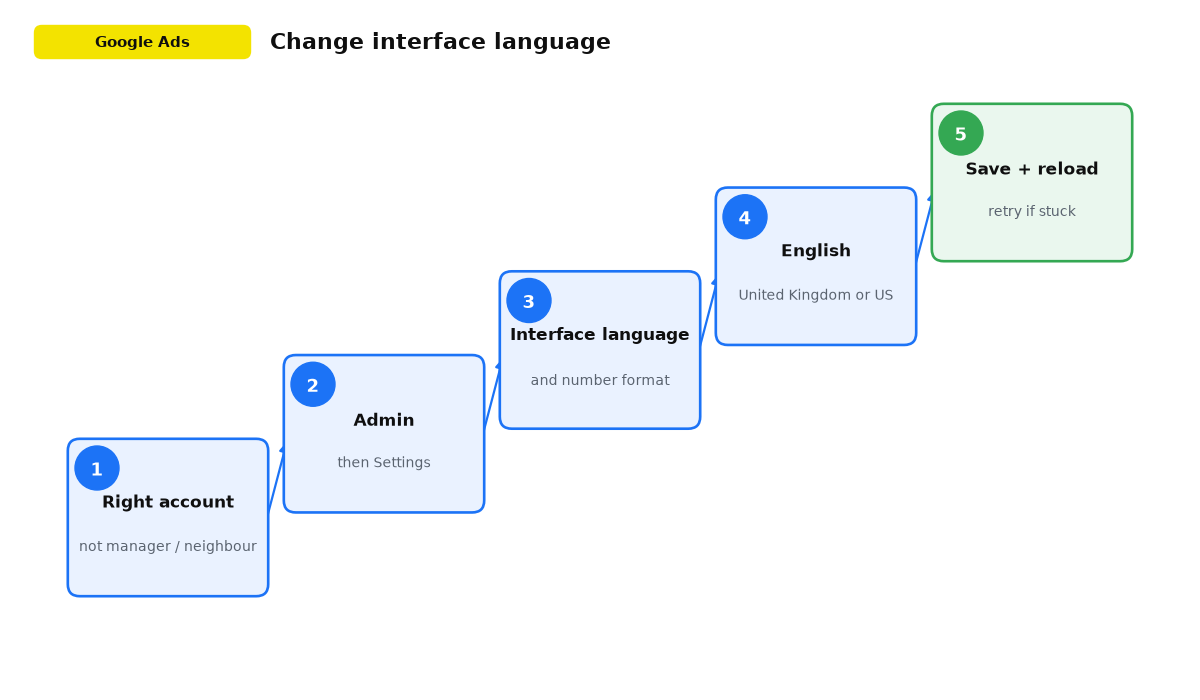
Checklist for changing Google Ads to English
- Open the correct Google Ads account, not the MCC or a neighbouring client account.
- Go to Admin and then Settings.
- Find Interface language and number format.
- Choose English: United Kingdom or English: United States.
- Save and wait for the interface to reload.
- If the language does not change, save any other language first and then select English again.
- Review the names of important reports, bid strategies, audiences, and conversions so the original terminology becomes familiar.
Student question: language audiences in the United States
“What is the best way to reach Russian-speaking immigrants in the United States with video ads if selecting Russian as a language does not seem to solve the problem?”
In my projects, campaign language settings do work. I have tested both Russian and Ukrainian with United States location targeting. Start with the United States as the location and the required campaign language. If performance is poor, the issue is more often the audience, creative, or budget than the language control itself.
The next layer is location targeting around areas with a high concentration of immigrants. Brighton Beach in New York and Ukrainian Village in Chicago are typical examples. Combining language with specific areas can increase the concentration of the audience you want to reach.
▶ Live answer: watch from 1:20:07, Q&A broadcast from April 2026.
Student question: locations for a brand campaign
“An online project is launching a small-budget brand campaign for the creator’s name. Should it target the whole world or use narrower locations?”
Narrow the locations. Worldwide targeting is a poor choice on a small budget. It includes Bangladesh, India, and Pakistan, where people may search for the creator’s name in several languages. You can pay for impressions and clicks that have little connection with your real audience.
Brand searches are particularly vulnerable to irrelevant geography because a name can be entered from anywhere, while paying customers are concentrated in particular countries. Select the countries where you actually want leads and sales. A narrow market produces cleaner signals and more useful statistics when the budget is limited.
▶ Live answer: watch from 1:20:43, Q&A broadcast from April 2026.
Student question: separating Germany and Austria
“Ads run in Germany and Austria. Should the two countries use separate campaigns?”
I would separate them. If Austrian German differs noticeably from German used in Germany, separate campaigns are essential. Wording, speech in the ads, and the response to an offer can differ even when the broad language label is the same.
Even if the language is similar, the countries are likely to differ in prices, competition, customer behaviour, and seasonality. One campaign mixes those signals and makes bids, messages, and conclusions harder to control. Separate campaigns make it easier to see where the money produces results.
▶ Live answer: watch from 0:37:50, Q&A broadcast from September 2025.
Problems when changing the language and how to fix them
Sometimes the account menus remain localised even though Interface language already shows English. Saving the setting appears to do nothing.
This can happen when you use more than one Google Ads account and other accounts are already set to English. A newer account may display another language while its setting still says English.
Select any other language and save it. After the page reloads, choose English again and save once more.
What to do next
Conclusion
Interface language is an important working choice, particularly for specialists. I recommend moving to English early so you can use original terminology and follow product changes without waiting for localisation.
The terms may feel unfamiliar at first, but they repeat often. The Google Ads account contains no more than 500 of them. As they become familiar, you can understand settings and metrics more accurately and adapt your work faster after Google updates.