
When advertising stops paying for itself, raising the budget or replacing the agency can feel like the obvious next move. I start by checking what the account actually records: which searches cost money, what counts as a lead and whether those leads reach the business.
You know the 80/20 principle. In our research dataset of 31 advertising accounts, the concentration was stronger: the median share of conversions generated by just 1% of search terms was 62%. This does not prove the rest of the budget was wasted. It shows that results depend on a narrow group of searches worth protecting, while the remaining traffic deserves close examination.
The diagnostic tree: five areas to investigate
Start with the symptom and follow the relevant branch. These five areas cover the main places to investigate when advertising appears to waste money.
| Symptom | Branch | First check |
|---|---|---|
| Clicks but no enquiries | 5, then 1 and 4 | Tracking first, then search terms and the landing page |
| Enquiries arrive but cost too much | 1 or 3 | Share of spend on search terms with no conversions |
| The budget runs out by lunchtime | 2 | Devices, locations and ad schedule |
| Enquiries dropped without any deliberate changes | 5, then 3 | Whether conversions are still being recorded |
| Everything looks healthy in the account but there are no sales | 1 and 4 | Search terms and landing page speed |
Search terms
What you actually pay for.
Check: search terms sorted by cost.
Settings
What Google can change automatically.
Check: devices, locations and automatically applied recommendations.
Bids and automated bidding
The target compared with the result.
Check: actual cost per conversion against the target.
Landing page
Where a click fails to become an enquiry.
Check: speed and relevance to the search.
Conversion tracking
Whether you can see enquiries at all. Check this first: other conclusions are premature while the data is unreliable.
Check: a test enquiry reaches the report.
Branch 1. Search terms: what you actually pay for
Open the search terms report and sort by cost. In the research dataset, groups of queries containing words such as free, download or online accumulated between $0.4 million and $2.6 million in spend per group in commercial accounts, without a single recorded conversion. Other phrases to examine include “DIY” and “what is”. Read them in the context of what your business sells.
The number of negative keywords tells you little on its own. In the sample, the correlation between negative keyword list size and the share of wasted spend was approximately zero. An account with tens of thousands of negatives can waste as much as one with none. The useful habit is a weekly review of search terms, sorted from highest to lowest spend.
Branch 2. Settings that quietly consume budget
Check which automatic changes the account has been authorised to accept. Automatically applied recommendations can allow Google to add keywords or change bidding targets. Review those permissions and disable recommendations you do not want applied automatically.
Then compare devices. In the sample, mobile received a median 72% of the budget, but its cost per lead was higher than desktop in 24 of the 28 accounts where the comparison was possible. Check geography too. The default “Presence or interest” location option can reach people interested in your area as well as people there. A local business should compare that with “Presence”.
Branch 3. Bidding: compare the target with reality
An automated bidding target is not a guarantee. Among campaigns using target CPA in the sample, only 34% achieved an actual cost per conversion within ±10% of the target. An audit therefore compares the actual cost per conversion over the last 30 days with the target, rather than simply noting which target was set.
A persistent gap greater than 20-30% is a reason to investigate whether the strategy serves your business. Review the bidding strategy alongside its actual results before deciding to increase spend.
Branch 4. Landing pages: where clicks stop becoming leads
If the search terms are relevant but enquiries do not follow, look at what happens after the click. Two common problems are a slow mobile page and a mismatch between the search and the page’s offer. Check whether the visitor reaches a page that answers the question behind their search.
Branch 5. Tracking: can you see the enquiries?
Advertising can look unprofitable because conversions are missing, or look better than it is because they are counted twice. Check three things: the conversion action has an active status, only valuable actions are marked as primary, and a test enquiry reaches both the CRM and the conversion report. Until tracking is reliable, conclusions about the other branches are premature.
You now have a sequence for separating a tracking problem from a traffic, bidding or website problem. If you want to learn how to apply it to your own account, use these five checks as the starting point for a practical Google Ads review.
My e-book “19 Google Ads Secrets”: how to get the most out of Google Ads without draining your budget, drawn from real campaigns and tests.
See the book →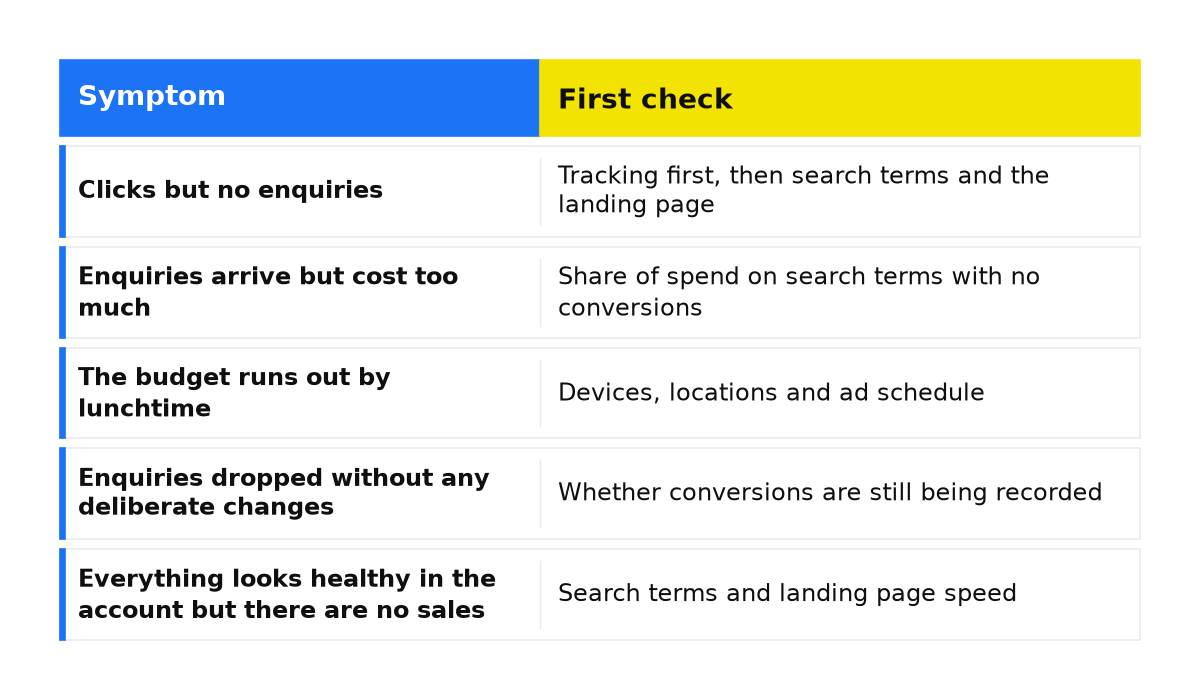
A seven-point audit checklist
- Submit a test enquiry from a phone and check that it reaches both the CRM and the conversion report. Until tracking is reliable, conclusions from the remaining checks are premature.
- Open search terms for the last 30 days, sort by cost and read the top 20. How many genuinely relate to your product?
- Check the share of spend on search terms with no conversions. More than a third of the budget is a warning signal.
- Break results down by device and compare mobile with desktop cost per conversion.
- Review locations for spending in areas where you do not sell.
- Read the last 90 days of change history. Is anyone actively managing the account?
- Compare actual and target cost per conversion over 30 days.
These seven checks can uncover common problems. A full audit goes further, examining the findings in detail and building a plan for corrections.
Audit it yourself or commission a review?
| Decision point | Audit it yourself | Commission an audit |
|---|---|---|
| When it fits | You run the ads yourself or want to check your provider’s work | You spend from $1,000 a month and have little time to investigate |
| What you need | Account access and 2-3 hours to work through the checklist | Guest access for the auditor |
| What you get | A better understanding of your account and its obvious problems | Findings, estimated losses and a plan for corrections |
If you want to learn to find these problems yourself, I demonstrate the process in my free Google Ads masterclass. If you would prefer my team to review the account, you can commission an advertising campaign audit.
Common questions about Google Ads audits
How often should you audit the account?
Run the checklist monthly and a full audit every six months or after changing providers. Review search terms weekly: in the research sample, just 1% of those terms accounted for a median 62% of conversions.
How much wasted spend is normal?
A zero figure is not a realistic expectation: testing new searches takes money. The problem is when terms with no recorded conversions consume more than a third of the budget for months and nobody investigates.
Can you audit without account access?
No. Screenshots and presentations show only what the provider chooses to include. At least read-only access is needed to inspect search term reports and change history without changing the account.
My conclusion
Across years of audits, I have rarely found that weak creative or a small budget explains the main problem on its own. Losses often sit in unread search term reports, automatic settings and unreliable tracking. Work through the checklist and resolve any tracking problems before deciding what to do about the budget or the provider.
Keep the wider business picture in view too: sales profitability and the ability to turn website visits into purchases matter alongside the advertising account.
What to check next
- Clicks without enquiries: return to tracking, search relevance and the landing page.
- Ads not appearing: investigate ad delivery before judging lead generation.
- Suspected competitor clicking: investigate the suspected activity before treating it as the explanation for wasted spend.
- A suspended account: establish the reason for the suspension and the steps needed to address it.