

One day, a banner appears in your account asking you to verify the advertiser’s identity. Ads are still running, so most business owners leave it for later. Then a second notice arrives with a deadline, and a routine admin task suddenly feels urgent.
What it is and who it affects
Advertiser verification is not a penalty or evidence that you have broken a rule. Google states that the requirement is gradually being rolled out to all advertisers. It is part of a transparency program that helps users see who paid for an ad.
Requests tend to reach financial services advertisers first, along with accounts where Google has detected unusual activity and accounts that have previously been suspended. The request itself, however, does not mean that anything is wrong.
What Google will ask you to provide
The exact tasks vary by account. In most cases, Google asks a few questions about your organization, requests a document confirming an individual or business identity, and asks what the business actually does. Individuals and registered companies follow different paths, which is a normal part of the process.
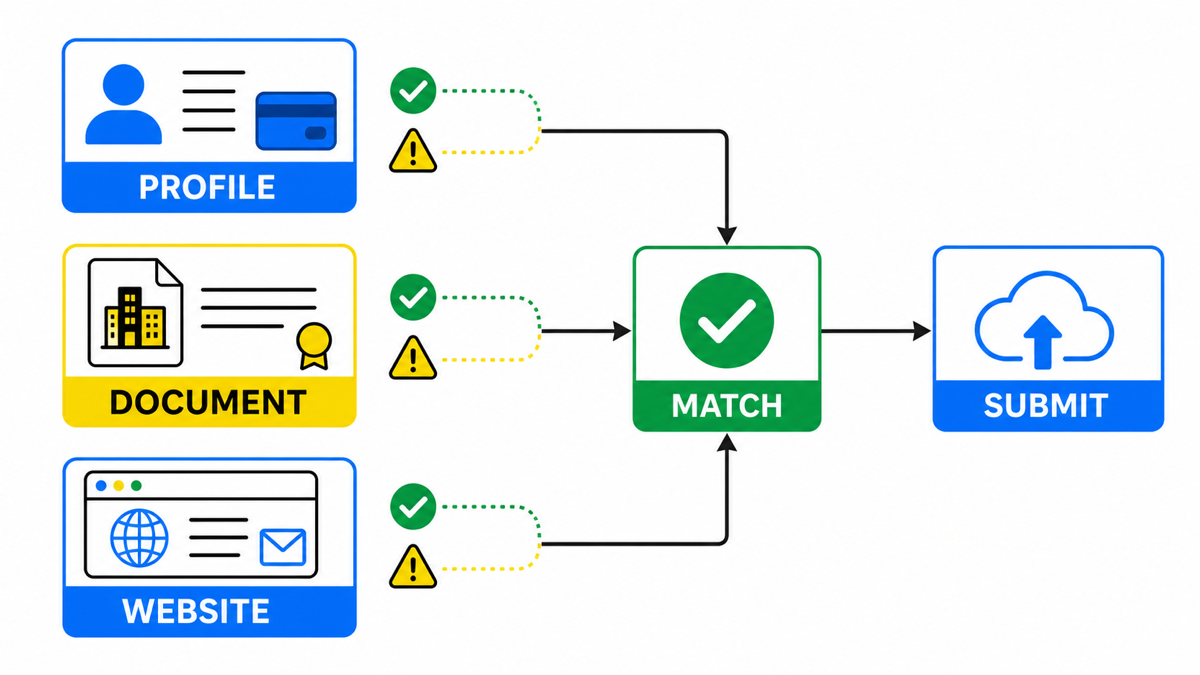
One rule matters above all: the details in your account, supporting document, and website must match. Most rejections are caused by inconsistencies rather than fake documents. The payments profile shows one name, the document shows another, and the website uses a third.
How long it takes and what happens to your ads
Google’s documentation says that the verification status can take up to 5 business days to update in your account. Some ads may be restricted until the process is complete, and the restrictions become more serious if you miss the deadline.
The practical lesson is simple: do not wait until the final day. Five business days is nearly a full week. If a minor mismatch forces you to submit a document again, one week can easily become two.
My e-book “19 Google Ads Secrets”: how to get the most out of Google Ads without draining your budget, drawn from real campaigns and tests.
See the book →The right order for completing verification
- Compare three sources first. Check the name and address in your Google Ads payments profile, the document you plan to submit, and the contact details on your website. Fix any discrepancy before submission, not after a rejection.
- Confirm who owns the account. The person or company named on the payments profile must complete verification. If an agency created the account under its own company, you will need to resolve the issue with the agency.
- Submit everything in one session. An incomplete submission extends the process because each new review can take up to another 5 business days.
- Avoid changing account details during review. Editing the payments profile or legal information midway through the process can send you back to the beginning.
- Wait for the status to update. The change is not instant. Submitting again simply because nothing appears to be happening can create more confusion.
Frequently asked questions
Will my ads stop during verification
Not necessarily. Google says it may restrict some ads rather than disable the entire account. If the deadline passes before verification is complete, however, the restrictions become stricter.
Can I complete verification in advance
Google initiates the process, so you cannot start it yourself. You can still prepare by checking the payments profile, identity document, and website details in advance. Mismatches between those sources are what usually cost advertisers extra weeks.