
The search query “google ads manager” almost always means one of two things. First: a Manager account (MCC), the technical controlling account from which you can see and run several ad accounts. Second: a person or agency you hand your advertising over to. These are different things, and confusing them costs you access, history, and budget.
Below we start with structure, because structure determines whether the algorithm can actually learn on your money. Then the Manager account. Then the human manager: which questions to ask and which answers are already a red flag. Material current as of August 2026. The system’s baseline context is collected in Google Ads: The Complete 2026 Guide.
The quantitative findings below rest on a corpus of accounts; each slice is given with its own denominator, because data availability varied.
Two different “managers” in one query
Manager account (MCC) is a Google Ads account created specifically for managing other accounts. Google’s help documentation describes it as a single point from which an agency or an in-house marketer sees several client accounts, budgets, campaigns, and access rights (About manager accounts). It is an access and overview tool, not a “better” way to spend money.
A human manager is a specialist or agency that makes decisions every day: structure, bids, negative keywords, creatives, reporting. MCC by itself optimizes nothing. A person without MCC can run a single account well. MCC without a strong person only speeds up access to chaos across several accounts at once.
If you searched for “google ads manager,” first decide which of the two you need. The text below serves both scenarios, because in reality they converge at one point: who owns the account and how its structure is assembled.
Account hierarchy: account, campaign, ad group, ad
Google Ads is built as a tree. The help documentation lists three main viewing levels: account, campaign, ad group (Account, campaign, and ad group performance). Below those sit ads, keywords, assets, and audiences.
| Level | What gets set here | Why it matters |
|---|---|---|
| Account | Currency, time zone, billing history, conversions, users and permissions, links to Analytics/Merchant | Currency and time zone cannot be changed “on the fly” after creation. Account-level conversions feed every campaign |
| Campaign | Budget, campaign type, geo, languages, ad schedule, bid strategy, networks, some audience restrictions | This is the unit of learning and spend. This is where it is decided where and how much money works |
| Ad group | Theme, set of keywords or other targets, base bid (if manual), the group’s ads | The group holds relevance: one intent, one message, one landing page logic |
| Ads and keywords | RSA copy, headlines, descriptions, URLs, keywords, negatives at group/campaign level | This is where the algorithm sees what to show; the search terms report shows what you actually pay for |
A campaign is not a folder for tidiness in the interface. It is a container inside which the system collects statistics, builds a model, and learns. If you split one intent across ten campaigns “to keep it neater,” each one gets too little signal. If you dump different geos, budgets, and schedules into one, the algorithm blends different economics into one average failure.
An ad group organizes similar targets and ads under a shared theme (How ad groups work). The practical rule: one group = one buying intent + the matching ad + the matching page.
How many campaigns you actually need
A new campaign is justified when it needs its own budget, its own geo, or its own schedule. Sometimes also its own type (Search separate from Performance Max) or separate economics (brand versus non-brand, test versus core). “It looks neater in the list” is not a reason.
A working order for small and mid-sized businesses:
- One type of demand, one set of economics, one budget “wallet” → one campaign.
- Different countries or cities with different margins or logistics → separate campaigns, because geo lives at campaign level.
- Different operating hours (a call center working business hours only) → a separate campaign or a separate schedule, otherwise you buy clicks nobody will answer.
- Brand and non-brand → almost always separate: different CPAs, different bids, different roles in the funnel.
- Testing a new offer → the Campaign Experiments tool, which properly splits traffic between variants and does not stop the main campaign’s learning.
The over-splitting mistake looks tidy and kills results. Twenty campaigns with three clicks a day each will never learn: Smart Bidding, and even manual analysis, need volume. The merging mistake looks “simple” and also hurts: one budget across two different markets means the cheaper or louder market eats the money of the more expensive one.
If a campaign is permanently in limited-by-budget status, first check whether that is a symptom of an underestimated cap, not a reason to spawn five more clones. The logic of that status is broken down separately: campaign limited by budget.
What gets set at campaign level: the most expensive settings
Campaign level holds the decisions that are hardest to “tweak later,” because changing them breaks comparability and often resets learning.
Budget. It limits how much the system can spend per day in this unit. An over-fragmented budget = starvation everywhere. One fat budget on mixed economics = the algorithm optimizes the average, not the profit.
Geo and languages. This is the market filter. A mistake here costs more than a weak headline: you pay for clicks from a region you do not ship to, or in a language you do not sell in.
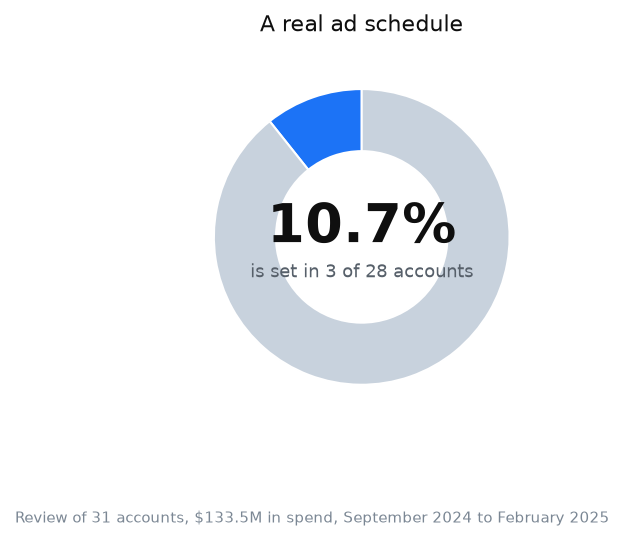
Ad schedule. In theory, dayparting saves you from nighttime budget drains. In practice the lever is almost dead. In the campaign settings slice, a real schedule (not “all day”) exists in only a handful of accounts and on only 104 of 15,168 campaign rows (0.7%). In other words, across the corpus from September 2024 to February 2025, almost nobody trims hours. Without a proven daily wave of sales or a working sales team, a schedule does not rescue structure. If your call center runs 9 to 6, you need a schedule. If you are e-commerce with overnight orders, “all day” can be a fine default.
Bid strategy. This is where the most common structural illusion lives: “everything is set up because we chose Maximize Conversions.” One strategy across the whole account is not structure. It is concentration of risk. In the bid strategy slice, the median account puts 89.7% of its budget on a single strategy; almost half of accounts hold ≥90% of spend on one. If the conversion signal is crooked, almost the entire budget scales one mistake. Structure should leave room for different goals only where economics genuinely differ.
Audiences at campaign level. Observation, remarketing, exclusions. Useful when they cut off people who already bought, or strengthen the hot layer. Harmful when they narrow search down to a size where the algorithm sits without data again.
Bottom line: at campaign level you set the rules of the game for the algorithm. Groups and ads play inside those rules. If the rules are mixed, no strong headline will pull the economics out. The quality of the conversion signal these rules learn on is covered in the material about conversions in Google Ads.
Manager account (MCC): who needs it and who it hurts
MCC is worth setting up when you genuinely run several accounts: several businesses, several brands with separate reporting, or agency work. Google explicitly points manager accounts at those who manage many accounts from one place (About manager accounts).
MCC is unnecessary when you have one business, one account, and one person at the computer. Then a manager account adds a layer of permissions and invitations with no benefit. Better to spend that time on conversions and structure.
How not to lose your account (market practice)
One scenario repeats across client audits and contractor changes. A business launches ads “through an agency.” The agency creates the account inside its own MCC. A year later the relationship sours. Access disappears. History, pixels, audiences, and campaign learning stay “over there.” The business starts from an almost empty place, despite paying with its own money for years.
Market practice worth demanding before the start:
- The ad account belongs to the business. It is created on your email / your Google account, or you immediately receive owner-level administrative access.
- The agency or freelancer gets access to YOUR account, not the other way around. Their MCC links on top for convenience, but does not become the only point of entry.
- You have your own login with administrator rights, regardless of who “runs” things day to day.
- The payment profile and billing are tied to you or transparently described in the contract: who pays Google, who reimburses whom, what happens at separation.
- Before changing contractors you review the user list and remove excess access, rather than hoping “they will log themselves out.”
This is not legal advice. It is insurance for operational continuity. The algorithm’s learning and conversion history live in the account. Losing access costs more than what you save on a “quick start in their dashboard.”
If a contractor says “it is more convenient in our MCC, we will hand it over later,” ask: when, and in what form, do you retain full control already on day 1.
How to hire a human manager: interview questions
You hire a person not for pretty ROAS screenshots, but for how they think about structure, data, and accountability for the account.
- “Show me with an example when you create a new campaign versus a new ad group.”
Red flag: “We always make a campaign for every service, city, or keyword, it is neater that way.” That is fragmentation for aesthetics.
2. “Who owns the account and what access do you request?”
You should be wary of: “We only work inside our MCC, you do not need separate access.” You are buying dependency.
3. “How will you know within 30 days that the structure works?”
A bad answer boils down to Google’s “optimization score” alone, or “Excellent” ad strength, without CPA, margin, and conversion volume.
4. “What will you do if campaigns are not gathering enough conversions to learn?”
A dangerous simplification: “We will just turn on Performance Max or broad match and wait.” There is no signal plan, no budget plan, no stop criterion.
5. “How do you separate brand, non-brand, and tests?”
A weak answer: “Everything in one campaign, Google will figure it out.” On small budgets this often hides a drain under a pretty average.
6. “Show me a case where you advised NOT to increase the budget.”
Be cautious if the person has never proposed a pause. Sometimes the right move is to stop and fix measurement, the offer, or the landing page.
Bonus: “Who will hold administrator access after we part ways?” If the answer is vague, access structure matters more than campaign structure.
My e-book “19 Google Ads Secrets”: how to get the most out of Google Ads without draining your budget, drawn from real campaigns and tests.
See the book →When this does not apply
You do not need MCC if you have one brand, one account, one responsible person. An extra layer does not add sales.
Rebuilding a live structure “by the book” is not worth it when campaigns already bring stable profit and you only want to “tidy up the naming.” A big rebuild often resets learning: new entities, new statistics, a period of chaos. Migrate gradually instead: a new core alongside, the old one faded out after proof.
A new account is cheaper than heroic repair when the history is poisoned: crooked conversions for months, hundreds of dead campaigns, and zero analytics. Sometimes a clean start with proper measurement and 3-5 campaigns costs less than six months of digging. But a new account does not cure a weak offer and a weak site.
When an account is suspended, never create a new one. The only path is an appeal. Trying to bypass a suspension with a new account violates Google’s policy, leads to the new account being suspended, and can end in a lifetime ban from advertising.
Fragmentation “for departmental reporting” hurts when every department wants its own campaign, while the total budget across all of them delivers less learning than the algorithm needs. Auction economics first, org chart second.
Hiring a manager will not close the gap if you do not give access to margins, the CRM, and the definition of a lead. The person will be tuning clicks. The business still will not know whether those clicks are worth anything.
FAQ
What is google ads manager: an account or a person?
Both variants live in search. A Manager account (MCC) is a technical account for managing several accounts. A human manager is a specialist or agency. First define what you need: access and overview, or daily decisions on bids and structure.
How many campaigns should a small business make in Google Ads?
As many as you need separate budgets, geos, or schedules. Often that is 2-6 campaigns at the start (brand, non-brand, sometimes a separate region or a test), not 20 “tidy” folders. Fewer entities with a normal click volume beats many starving ones.
Is a Manager account (MCC) mandatory?
No. It is convenient for agencies and for those running several accounts. For one business with one account, MCC is usually unnecessary. What matters more is that the account and admin access are yours.
What matters more: account structure or creatives?
Structure determines what the algorithm learns on and how the budget splits. Creative affects CTR and quality. A weak structure with strong copy still mixes economics. A strong structure with weak copy loses the auction. Fix measurement and the frame first, then scale the copy.
How do I check whether an agency has “taken” my account?
Log in under your own credentials. Check Admin and user access: are you an administrator, can you see billing, can you add another user without the agency. If you can only get in “through them,” that is already an operational risk.
Should the structure be reworked every year?
Not by the calendar. Review it when the business changes: new geo, new margin, new type of demand, a persistent learning failure, a change in the conversion model. Cosmetic renames for fashion rarely pay back the loss of history.
Sources
- Google Ads Help. About manager accounts. https://support.google.com/google-ads/answer/6139186?hl=uk (accessed: 10.08.2026)
- Google Ads Help. Account, campaign, and ad group performance. https://support.google.com/google-ads/answer/2404036?hl=uk (accessed: 10.08.2026)
- Google Ads Help. How ad groups work. https://support.google.com/google-ads/answer/2375404?hl=uk (accessed: 10.08.2026)
- Google Ads Help. About campaign types. https://support.google.com/google-ads/answer/2567043?hl=uk (accessed: 10.08.2026)
- Google Ads Help. About ownership of client accounts (manager accounts). https://support.google.com/google-ads/answer/7456532?hl=uk (accessed: 10.08.2026)