
Most business owners think they are losing in Google Ads because of a small budget. But money does not fix weak participation in the auction. At scale, the main limitation should often be looked for in Ad Rank, not in the daily budget.
Methodology: this is an internal descriptive breakdown of data from September 2024 to February 2025. The dataset covers $133.5 million in spend, and 24 million rows of search terms, daily campaign statistics, ads, landing pages, and other Google Ads exports.
Our percentages describe a cross-section of specific verticals. This is not the US market norm and not a forecast of results for every reader.
Additional budget might simply buy the same expensive clicks faster. The cause should be sought in the ad rank, landing page quality, conversion signals, bids, and search term relevance.
Below, Google Ads is analyzed as a single system: auction, campaigns, keywords, bids, ads, budget, and conversions. If one element is set up incorrectly, the rest will not save the unit economics.
What this guide covers
This guide compiles the logic of the entire system and the diagnostic process. Detailed settings are separated into individual materials on Performance Max, keywords, budget constraints, and conversions.
GA4, Google Tag Manager, and technical tracking setups are not duplicated here. There is a separate material for installing Google Analytics 4 via Google Tag Manager.
What Google Ads is and what you actually pay for
Google Ads is an advertising system that connects human intent, business offerings, and an auction. In search, a user formulates a need, advertisers bid to show their ads, and Google determines whose ad is allowed and where to place it.
The highest bid does not necessarily win. Google calculates the Ad Rank of each advertiser individually based on their bid, ad and landing page quality, search context, minimum thresholds, and the expected impact of ad assets. Your position is determined by comparing your result with the results of other auction participants. Therefore, the maximum bid does not equal the actual cost per click. Higher quality often yields a lower CPC and a better position under the same conditions.
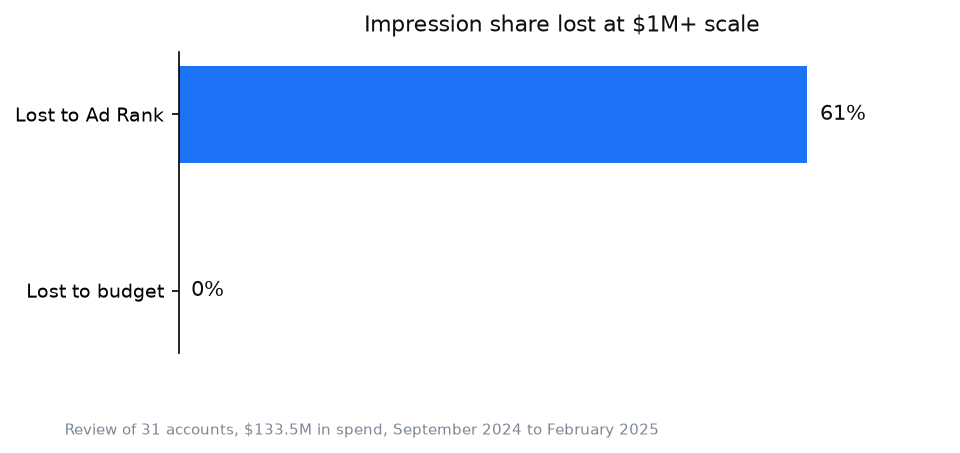
The gap between losing impression share due to Ad Rank and due to budget shows that you first need to diagnose the auction, and only then add money.
| What you pay for | What you do not pay for |
|---|---|
| For a click in pay-per-click campaigns | For the mere fact of creating an account |
| For impressions or views if the corresponding billing model is selected | For simply participating in the auction |
| For a conversion if the campaign uses the corresponding billing model | For a guaranteed permanent first place |
| For interactions that passed your settings | For a sale as such if only the click is tracked |
Google does not sell a client. Money is charged for a click, impressions, a view, or a conversion depending on the billing model. The platform can find a person with the right search term, show the ad, and bring them to the site. But the offer, price, trust, page speed, and sales department performance remain on the business side. That is why a good CTR does not yet mean profitable advertising.
Advertising in Google Ads starts bringing in money not when the ad is shown. It brings in money when the allowable customer acquisition cost is higher than the actual one.
Campaign types in Google Ads
The campaign type determines where the ad will appear, what data you control, and what decisions you hand over to the algorithm. Google describes format capabilities in the campaign types documentation.
| Type | Where it shows | When it is appropriate | When it is a mistake |
|---|---|---|---|
| Search | Google search results | There is established demand and clear search terms | The product is new and no one is searching for it yet |
| Performance Max | Search, Shopping, YouTube, Gmail, Discover, Maps, display networks | You have clean conversions, creatives, a feed, or a strong landing page | There is no analytics, and the business needs control over every placement |
| Demand Gen | YouTube, Discover, Gmail, Maps, and Google Display Network | You need to build demand, scale visual creatives, or work with audience signals | There are not enough creatives, no clear campaign role, and no way to measure acquisition quality |
| Display | Google sites, apps, and properties | Remarketing, reach, bringing back a familiar audience | You expect hot leads from it immediately like from search |
| Video | YouTube and video partners | You need to explain the product, build demand, or bring back an audience | There is no strong video and no way to measure impact |
| Shopping | Search and shopping tab based on product feed | An ecommerce store has correct prices, inventory, and a Merchant Center | The feed is messy, margins are unknown, products lead to weak pages |
One account is not obligated to use all formats. Every new campaign creates another place where the budget can dissolve without answering the main question: what demand are we testing. First, give each campaign a specific role. Search catches formed intent. Video explains. Display advertising brings people back. Shopping sells a specific product. Demand Gen works with visual product discovery and audiences on Google properties.
In our cross-section, 75% of all Demand Gen spend went to campaigns that eventually ended up in Paused or Removed status, compared to about 8% on average for other types. This does not prove the format does not work: paused campaigns could include seasonal runs and planned experiments. But Demand Gen should be launched as a controlled test, not as a guaranteed scaling channel.
You should not start with the format Google promotes most actively. Start where buyer intent can be tested most affordably. Performance Max received a median of only 2.8% of the account budget, and more than a third of accounts spent nothing on it. Detailed launch logic is available in the article on Performance Max in Google Ads.
Keywords and match types
A keyword is a rule for participating in the auction. A search term is what a person actually typed. Money is spent on search terms, so you need to optimize the search terms report, not a pretty list of keywords.
Google Ads has three keyword match types:
| Type | What it allows | Main risk |
|---|---|---|
| Exact | The narrowest reach of closely related queries | The name does not mean a literal word-for-word match |
| Phrase | Broader reach of queries with preserved meaning | The system might expand semantics further than expected |
| Broad | Maximum use of context and account signals | Without clean conversions and search term control, it is easy to buy the wrong intent |
Exact match has long ceased to be a literal match. It also covers close variants and queries the system considers identical in meaning.
The working cycle looks simple. You group words by intent, write a specific ad for each group, lead the person to a relevant page, and check the actual search terms. You exclude irrelevant ones. You protect profitable ones from accidental budget cuts. You test new phrasings separately so the experiment does not take money away from the proven core.
The calculation covers accounts: at the median, 62% of conversions came from just the top 1% of search terms with the highest spend. Therefore, the primary task is not to inflate semantics, but to find the core that already generates results, protect it with budget, and test the rest separately. Practical selection steps are broken down in the article on keywords for advertising.
Bids: manual versus automated
A bid answers the question of how much the system can offer in a specific auction. A bidding strategy answers another question: what goal it should pursue.
| Approach | Where it is strong | Where it is weak |
|---|---|---|
| Manual CPC | New account, little data, transparent demand testing is needed | A human does not account for all signals of every auction |
| Maximize Clicks | You need to quickly gather traffic and search terms | The system looks for clicks, not profitable leads |
| Maximize Conversions | You have correct tracking and need maximum conversions within budget; target CPA can be set optionally | Without a realistic target CPA or control over actual costs, a conversion can break economics |
| Maximize Conversion Value | Real sales value is passed; target ROAS can be set optionally | Identical or made up values teach the algorithm flawed economics |
*This data during this period was recorded under the then current Google Ads API classification with the old strategy taxonomy, so historical categories may differ from the current table.*
The calculation covers accounts: the median account places 89.7% of its budget on a single bidding strategy, and almost half of accounts keep at least 90% of their spend on one. This is risk concentration. If the conversion signal is wrong, almost the entire budget scales a single mistake.
Why Smart Bidding does not guarantee a target CPA
Smart Bidding uses signals from a specific auction and predicts conversion probability. This is stronger than a manual bid when the data is clean. But the target remains a guideline, not a contract.
In a subset of 1950 campaigns ($42.2 million spend) across 7 verticals, only 34% of campaigns stay within ±10% of the declared target CPA, while 36% exceed the goal by more than 20%. Planning profit solely by the target CPA is dangerous. Look at the actual CPA, its variance, lead quality, and post-sale margin.
Automation should be turned on when it makes sense, not because it is trendy. It requires the right goal, a sufficient flow of signals, and a threshold beyond which a lead becomes unprofitable.
Ads: what truly determines quality
A responsive search ad consists of headlines and descriptions that Google combines for the auction. Its goal is not to collect every possible phrase. You must accurately answer the intent, differentiate the offer, and prepare the person for the landing page.
The interface pushes you to bring Ad Strength to Excellent. This rating helps check the completeness and variety of ad assets but is not an auction signal and is not part of Ad Rank. It should also not be used as a proxy for profit. Official Google documentation clarifies the role of Ad Strength.
In accounts where Excellent and Average RSAs could be compared by CTR, Excellent won in only 11 cases out of 20, which is 55%. In our comparison by CTR alone, this is practically a coin toss, not a reliable signal of results.
Check ads in the same context. Do not compare a branded ad with a cold generic query. Look at which text brought a relevant click, whether the page continued its promise, how many people completed the target action, and how many inquiries turned into sales. This chain is what determines quality.
Ad assets and extensions
Ad assets, formerly called extensions, add links, callouts, images, prices, addresses, phone numbers, and other useful information to your ads. They increase the ad’s surface area and give the user more ways to take the desired action.
Most often, practical roles are filled by sitelinks to specific pages, callouts with benefits, structured snippets of categories, images, prices, promotions, and phone numbers. Not all available assets work, only those that answer the query’s intent and help take the next step.
A common mistake is adding the same set at the account level. As a result, the user sees irrelevant links, outdated promotions, or a phone number during hours when no one answers. Check the content, URLs, schedules, and attachment levels of every asset.
Budget: a spend limit, not a performance engine
The budget determines how much Google can spend. It does not fix a weak Ad Rank, wrong queries, a poor page, or fake conversions.
In a cross-section of large accounts with $1M+ spend, the median lost impression share due to Ad Rank was 61%, while the loss due to budget was close to 0%. This is a median for a specific dataset, not a law for all accounts spending over $1M. Official impression share metrics separate Search lost IS (rank) and Search lost IS (budget), so these reasons can be checked rather than guessed.
Before increasing the budget:
- Look at what portion of the impression share is lost due to budget and what portion due to rank.
- Check the actual CPA and sales quality, not just the number of conversions.
- Make sure an additional client leaves a positive margin.
- Raise the limit where the campaign has already proven its economics.
A small account can indeed hit a budget limit. But even then, an increase only makes sense for a campaign where additional spend buys profitable demand. If the campaign is already bringing in unqualified inquiries, a larger budget will not create a different audience. It will give the algorithm more opportunities to find the exact same people.
If the interface shows a limitation, separately check why the campaign has a “Limited by budget” status.
Conversions: why the algorithm does the wrong job
A conversion is an action that the business has deemed a useful result and passed to Google. A purchase, a qualified lead, or a confirmed call can be primary conversions. Opening a form, clicking a number, and viewing a page are best left as secondary if they do not yet mean a real inquiry. Google separately explains the role of primary and secondary actions in conversion goals.
Smart Bidding optimizes for what you named success. If the primary conversion triggers on a button click, the system will look for people who click buttons. It does not know if a manager answered, if the lead was qualified, or if payment occurred.
The best signal is located as close to the money as possible. For a store, this is a paid purchase with real value. For services, this could be a qualified lead or a sale returned from a CRM. If you do not have such data yet, start with a real inquiry, but do not equate every micro action on the site to it.
Across 4425 landing pages, speed was tied to results: pages with a mobile speed of 9-10 converted 3.65% of clicks, while those with a value of 1-5 converted only 1.28%. Mobile speed in this calculation is an evaluation of the landing page’s mobile version speed on a scale from 1 to 10, extracted from a Google Ads landing pages export. Therefore, a lack of leads is not always cured within the ad account. A complete scheme for choosing goals is in the material on conversions in Google Ads.
Common mistakes that cost money
- Optimizing campaigns for micro conversions. Google buys more cheap button clicks, and the business pays for traffic without a proportional increase in leads.
2. Confusing a keyword with a search term. Everything looks relevant in the list, but the budget is drained by broader actual phrasings.
3. Launching Performance Max without clean data. The algorithm distributes money across channels faster than the owner can figure out where poor quality traffic came from.
4. Treating target CPA as a guaranteed price. The sales plan relies on a desired number, while a cash gap is created by the actual CPA.
5. Improving Ad Strength instead of the ad. Headlines become more varied for the indicator but weaker for the specific intent. You pay for clicks from people the offer does not suit.
6. Raising the budget before diagnosing Ad Rank. A higher limit scales expensive clicks, even though the problem was in quality, bids, or the landing page.
7. Counting all leads equally. A cheap unqualified form looks like a success in the report, after which automation spends even more on similar users.
Each of these mistakes has one financial consequence: Google executes the settings literally, and the business pays for the difference between a technical conversion and real profit.
FAQ
How much does Google Ads advertising cost?
Google Ads does not have a single price list. The price depends on competition in a specific auction, Ad Rank, ad and page quality, geography, campaign type, and customer value. Calculate the allowable CPA, not a comfortable budget. If a client brings in less margin than their acquisition costs, a cheap click saves nothing.
What is Google Ads?
Google Ads is Google’s paid advertising system. It provides access to search, YouTube, display networks, Shopping, Gmail, Discover, and Maps. The advertiser sets goals, budget, targeting, assets, and conversion data, and the system runs an auction for every impression opportunity.
Is it worth launching on my own?
You can, if a total loss of the test budget does not threaten the business, and you are capable of independently checking search terms, conversions, bids, and sales economics. Otherwise, no. A self launch becomes especially dangerous when the budget is already noticeable for the business, and you cannot explain for which queries and goals the system is spending money.
How soon will there be results?
Impressions and clicks can start after the ads are approved. A business result appears when enough real leads or sales are accumulated for a conclusion. Do not evaluate a campaign just by the first clicks. First check the search terms, conversion tracking, and lead quality, then the CPA.
How does Google Ads work?
A user enters a search term or falls into an audience context. Google checks relevant ads, separately calculates their Ad Rank, compares the results, and shows the winners. After an interaction, conversion data returns to the system and influences subsequent automated bids.
What budget is needed for Google Ads?
One that allows you to buy enough relevant traffic without breaking your margin. Start from the allowable CPA, expected sales conversion, and available demand volume. If these three metrics are missing, any starting amount will be a guess, not a budget.
When this does not apply
There is no established demand. A search campaign will not create mass demand for a product whose name people do not know and whose problem they do not formulate. Here you first need video, content, partnerships, or other ways to explain the category.
The margin cannot sustain the CPC. If the allowable acquisition cost is lower than the market price for the necessary volume of traffic, settings will not change the math. You must increase the average check, sales conversion rate, repeat purchases, or change the channel.
There is no landing page that continues the promise. An ad might win the auction, but a page without a clear offer, trust, speed, and a convenient action will turn clicks into expenses.
The business does not process inquiries. Missed calls, slow replies, and a lack of qualification are not fixed by bids. Google can bring intent. Your system completes the sale.
There is no correct tracking. Without a link between the ad, the lead, and the payment, the algorithm learns on surrogates, and the owner does not see which campaign generated profit.
My e-book “19 Google Ads Secrets”: how to get the most out of Google Ads without draining your budget, drawn from real campaigns and tests.
See the book →SOURCES
- Google Ads Help: About Ad Rank. Accessed: 10.08.2026.
- Google Ads Help: Choose the right campaign type. Accessed: 10.08.2026.
- Google Ads Help: Google Ads keyword matching. Accessed: 10.08.2026.
- Google Ads Help: About Smart Bidding. Accessed: 10.08.2026.
- Google Ads Help: About Ad Strength for responsive search ads. Accessed: 10.08.2026.
- Google Ads Help: Get impression share data. Accessed: 10.08.2026.
- Google Ads Help: About conversion goals. Accessed: 10.08.2026.
- Google Ads Help: Channel controls in Demand Gen campaigns. Accessed: 10.08.2026.
- Google Ads Help: About assets. Accessed: 10.08.2026.