
A 400% ROAS in Google Ads does not mean cash arrived in the business. The number parts ways with reality in specific places, and Google describes each of them in its own help center. The product warns you honestly. Almost nobody reads the warning.
Brand queries and repeat buyers inflate the reported figure relative to new demand. That is not a verdict on the ads, and it is not proof that those sales would have happened without the ad. It is checked by breaking ROAS down by campaign: brand on its own, everything else on its own. Below are five places you can check in a single evening, plus currency and tax in value, and the campaign breakdown itself.
What ROAS is as a number, and how to calculate your own break-even threshold, lives in the companion piece on ROAS in Google Ads. This article has a narrower job: find where reported return on ad spend parts ways with money that actually landed.
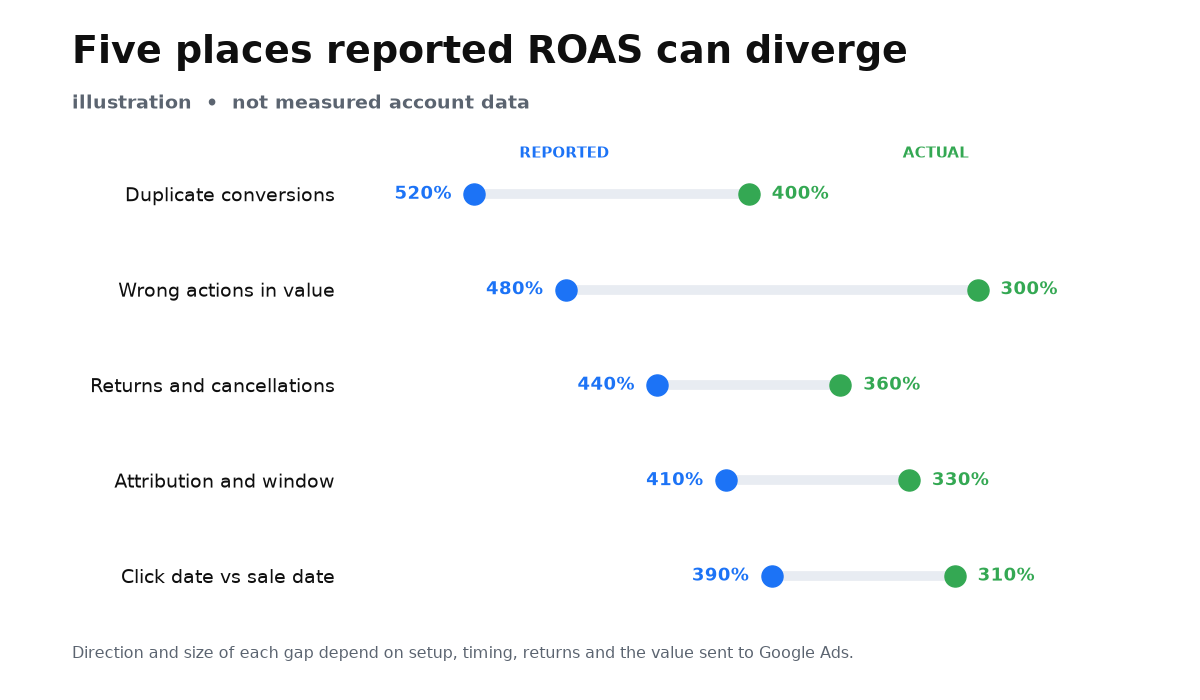
Place one. One purchase is counted twice
Google counts a repeat of the same purchase if a unique transaction ID was not passed. A customer can return to the conversion page or reload it, and the same tag can fire again. If a unique ID already went out with the first event, the repeat is discarded as a duplicate. Without an ID, or with the same static ID, that protection does not work.
The fix is not the “count one conversion per click” setting. Help says this in a separate sentence: adding a transaction ID to the event snippet is not the same as changing Count to one conversion. “One per click” hides the customer’s next real purchase. A transaction ID drops only the duplicate of the same order and keeps the next genuine payment.
How to check tonight. Transaction IDs are not shown in the Google Ads interface: the conversion action card will not reveal the live value from a real purchase. Make a test purchase and inspect the event in Tag Assistant or the conversion ping. Then make a second test purchase and confirm that the ID changed. A static ID is technically “passed”, but later genuine payments are then discarded as duplicates. Separately, compare conversions for a week with paid orders in your CRM or checkout. If the account shows clearly more conversions than payments, look for a duplicate on the thank-you page, not for a “weird algorithm”.
Place two. The wrong actions sit in conversion value
ROAS does not take “business money”. It takes the value you assigned to actions and included in the Conversions column. If a page view or add to cart is set as Primary with an assigned value, conversion value inflates. That is not an agency opinion. Google’s own page on data discrepancies says it: if conversion values look too high, make sure non-purchase actions are not set as Primary with assigned values.
In a service business the same trap looks different. A clinic, garage or law firm assigns average-order value to a form lead, even though no invoice has been paid. Every lead spins ROAS as if the cash is already in. Target ROAS then learns on that noise and buys more of the same “valuable” enquiries.
How to check. Open goals and list every Primary action that carries a value. That is not enough. In current help, an action enters bidding not merely because it is Primary, but with the campaign Marketing Objective and the campaign-specific conversion goal. Open the specific Target ROAS campaign and see which actions are assigned to it. Keep in training only what is real money or an honest estimate of a closed deal. Move page views, add to cart, and phone clicks with no payment to Secondary, or strip their value. If you first need the conversion action itself to be trustworthy, start with Google Ads conversion tracking setup before you celebrate a high ROAS on page views.
Place three. Cancelled orders still drive ROAS
A customer returns a product, cancels a booking, or walks away after a deposit. Until an adjustment is sent into Google Ads, that deal stays in conversion value and inside ROAS bid strategies. Help splits two moves: restate the value after a partial return, and retract the conversion entirely. A retract sets the value to 0.00, removes the conversion from the count, and affects CPA and ROAS strategies.
Online conversions can be adjusted only if you sent a transaction ID. Without it, the account cannot tell which event to retract. A store with returns, or a service with frequent cancellations, then spends months bidding against money that is already gone.
How to check. Take last month’s returns and cancellations and ask your contractor, or yourself, whether an adjustment went into Google Ads. If it did not, reported ROAS for that month is inflated by exactly those deals. Google walks through the process in its help article on conversion value adjustments.
Place four. Attribution and the conversion window move the number
The attribution model assigns shares of credit across interactions. It does not necessarily pick one click. Data-driven attribution, the default for most actions, can split one conversion across several ad interactions. That is why the Conversions column can show decimal values. Those shares change the Conversions and Conversion value columns, and Target ROAS learns from those columns. Google says it directly: if you use an automated bid strategy such as Target ROAS, the attribution model you select affects how bids are optimized.
Next to that sits the conversion window. It is measured from the ad interaction, not from the customer’s first enquiry. If you do not change it when you create the action, the default click-through window is 30 days. Anything later than that interaction and outside that window never enters the report or the bid strategy. A later click inside a long sales cycle opens its own window. The length of enquiry-to-payment therefore does not, by itself, prove that Google Ads missed the sale. The window only decides whether an event is eligible to be recorded after an interaction. It does not measure whether the ad caused the purchase.
How to check. Open the conversion action and write down the attribution model and the window. Compare the window with the typical time from the last ad click to payment, not only with a calendar from first enquiry to cash. If more than 30 days regularly pass between the click and the money, the default window honestly cannot see part of the sales. Google states the 30-day default in its help article on conversion windows.
Place five. ROAS is booked on the click date, not the sale date
The primary conversion columns, and ROAS with them, are calculated on the time of the click, not the time of the purchase. Someone clicked last week and paid this week. Both the click and the conversion are reported back to last week, because ad spend is also booked on the click. A bank feed usually looks at payment date. That is a different time assignment for the columns, not a guarantee that every comparison will diverge. If the click and the payment fall in the same period, the totals can match. On a long aggregated stretch, the shifts can offset. Columns by conversion time reduce this timing gap. Other methodological differences can still remain.
Help also mentions a processing delay of 24 to 48 hours. That delay is about Google Analytics and Google Ads synchronizing and processing data before you compare results. It does not make the till or the bank feed an unfinished column. The advertising report is the side that may still be writing.
How to check. For a finance reconciliation, switch on the columns by conversion time and still allow a day or two for the advertising report to process. If you break a calendar month “the way the bank does”, do not be surprised that the Google Ads total sits on other dates. This is the place owners most often call “the account is lying”, even though the rule is public in the help article on conversion columns.
A short add-on. Modeled conversions keep moving the number for days
The Conversions column holds both observed and modeled conversions. Google estimates events it cannot see directly, and conversion values can rise retroactively for several days. Modeled conversions can take up to 5 days to fully process and stabilize. Looking at yesterday’s ROAS is early. The figure can still move.
Again, this is not hidden magic. Without modeling, the report would show only the observable slice, not an estimate of campaign performance. Help does not promise that this particular dip will rise, or that it will do so tomorrow. Some accounts and conversion types do not receive every kind of modeling. Do not make decisions on a fresh day, and do not scold a contractor for a moving number while the stabilization window is still open.
Currency and tax inside conversion value
Google always reports conversion value in the account billing currency. If the tag sends another currency, the amount is converted at the average daily rate. If the currency code is missing or is not an ISO 4217 code, the tag ignores that currency and uses the currency of the default value. ROAS then compares cost in one currency with a value that may have landed in another.
Tax creates a second quiet gap. If VAT sits inside conversion value while the till or CRM looks at the net amount, the columns diverge even with a perfect tag and the right window. The same happens with shipping, discounts, or fees that exist in one report and not the other. Before the evening reconcile, write down the billing currency, the code in the tag, whether tax sits in value, and whether it sits in the till.
How to break ROAS down by campaign
A blended account ROAS hides the mix. Brand and repeat buyers pull the reported figure up relative to campaigns that look for new demand. The check is this.
- In campaigns for the same period, turn on Cost, Conversion value, and Conv. value / cost.
- Set brand campaigns aside: the exact company name, its transliteration, the branded domain.
- Calculate brand ROAS on its own and the rest on its own. Do not divide the value of every campaign by non-brand cost only.
- If you have returning-customer labels, customer match audiences, or separate remarketing campaigns, put them on a third row.
- Compare the three figures with each other, not only the account total with the till. That breakdown shows whether the pretty number sits on demand the business already had.
The breakdown does not prove brand has no incremental effect. It shows how much of reported return on ad spend is sitting on already warm demand, and how much on new demand.
A one-evening checklist
The five places and the two extra checks can be walked in an evening if you have access to the account and to the till or CRM. Go in order and tick a box only where the fact is checked, not where it “feels fine”.
| Place | What to open | What looks suspicious |
|---|---|---|
| Duplicate of one purchase | A test purchase, Tag Assistant or the conversion ping | No unique ID, the ID does not change between purchases, more conversions than paid orders |
| Wrong actions in value | The Primary list and the goals of the specific campaign | Page views, carts or raw leads with deal value sit in Target ROAS training |
| Returns and cancellations | The adjustment log and the CRM | Returns exist, Google Ads has no adjustments |
| Attribution and the window | The conversion action settings | A 30-day window on a longer click-to-payment path, or the model changed mid-month |
| Click date versus sale date | The report and the till for the same week | A “by payment date” reconcile without conversion-time columns |
| Currency and tax | Billing, the tag, the till | Different currencies, or tax in only one of the two columns |
| Breakdown by campaign | Campaigns for the same period | The pretty total sits on brand, and new demand is much weaker |
- List every Primary action with a value and the goals of each Target ROAS campaign. Leave only a purchase, or an honest closed-deal estimate, in the strategy’s training data.
- Check the unique transaction ID with a test purchase, not with the conversion action card. Without it, duplicates and return adjustments cannot work.
- Compare conversions for a week with paid orders in the CRM. Explain a gap with a duplicate or a leftover action first, not with “Google magic”.
- See whether retract and restate go out on cancellations. If they do not, this month’s reported ROAS is inflated.
- Write down the conversion window and the attribution model. Compare the window with the time from the ad click to cash.
- Do not judge yesterday’s ROAS. Wait at least a day or two for processing, and up to 5 days if you are looking at a fresh period with modeled conversions.
- Break ROAS down by campaign: brand, repeat, new demand. Write down the tag currency and whether tax sits in value.
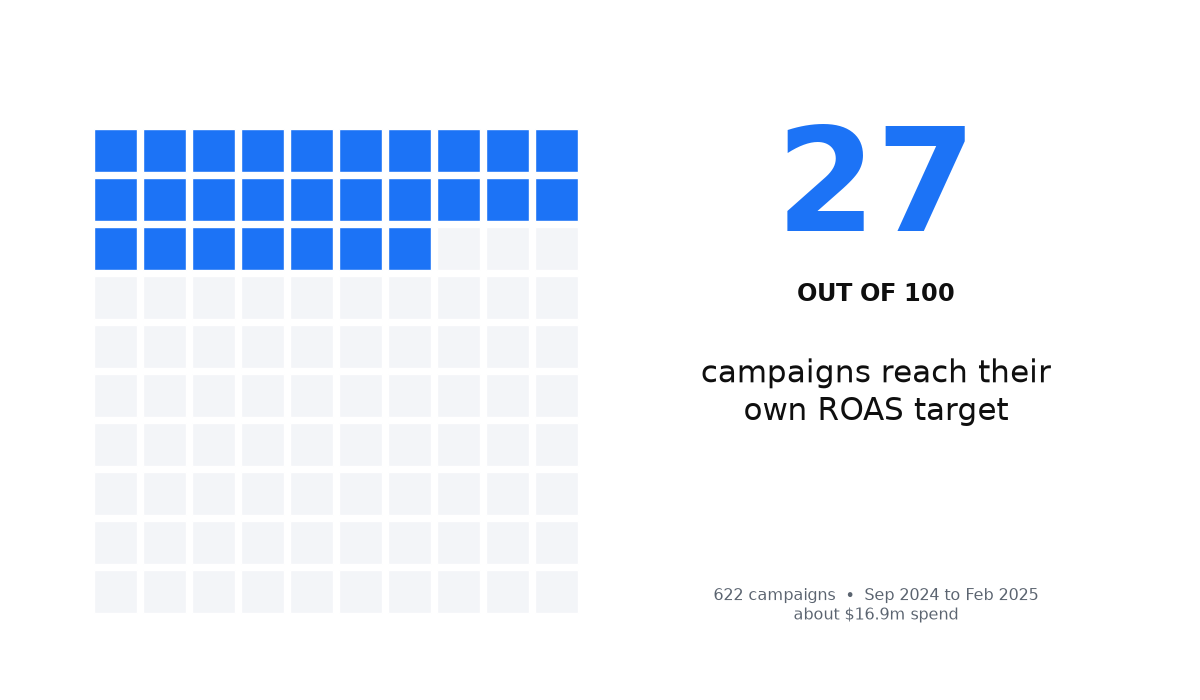
In my review of 622 campaigns with a target ROAS, from September 2024 to February 2025, on about $16.9 million in spend, only 27% of campaigns actually hit their own target. The median of actual to target is 0.86. That is a miss against the campaign’s own goal, not a verdict on an absolute ROAS level. The dataset does not measure the bank feed, duplicates, returns, or incremental sales. It only says that a correctly set target in the account is not a guarantee of the result.
When this does not apply
This walkthrough does not rescue an account with no conversion tracking at all. Then there is nothing in the report to catch in a lie. You first need an event that stands for money.
It also does not prove that a high ROAS is always fake. If you knowingly run only brand and want to intercept demand that already exists, the number can be honest and still show no incremental sales. This checklist does not measure brand incrementality.
If sales close offline and you do not import those deals back into Google Ads, the five places above describe the account, not the till. Then reported ROAS is not about your money at all.
Once a transaction ID is in place, only payment sits in value, returns are adjusted, and the window matches the time from click to payment, a gap can still remain. Help and the discrepancy overview also name currency, value semantics including tax, modeled conversions, cross-device and view-through, invalid traffic, different models, and processing delay. The residual cannot be assigned, without an incrementality test, to sales that would have happened without ads. That is an experiment question, not a one-evening tag check.
An evening with the checklist closes the gaps that sit in help and that you can check by hand. It does not close every gap between the account and the till, and it does not replace the skill of reading what value the strategy is learning on. If the number still will not sit on your money after those checks, the next step is not another column. It is to take apart what the account treats as a result.
My e-book “19 Google Ads Secrets”: how to get the most out of Google Ads without draining your budget, drawn from real campaigns and tests.
See the book →FAQ
Why does the account show a profit when the bank does not?
Because ROAS divides the value you assigned by cost, not profit by cost. Duplicates, leads treated as payments, unadjusted returns and modeled backfills can inflate that value. Separately, the report books the conversion on the click date, so a calendar week in the bank is not obliged to match one for one.
Does Google inflate ROAS on purpose?
No. Each of the five places is described in Google’s own help. The product warns about duplicates, leftover Primary actions, the need to adjust returns, the effect of attribution on Target ROAS, and the fact that primary columns are counted on click time. The problem is that those pages are rarely opened before the number has already gone into an owner report.
Is a high ROAS good or bad?
On its own, neither. A pretty number often sits on brand and on repeat buyers, and therefore looks higher than ROAS on new demand. A low number on a long cycle sometimes means only the default 30-day window from the click. Clean the five places first, then read ROAS separately on brand and on new demand, and only then compare it with your own break-even threshold.
How do I check ROAS in one evening?
Walk the checklist: campaign goals, the unique transaction ID, conversions versus payments, return adjustments, window and attribution, reporting delay, currency and tax, and a brand breakdown. If a step looks suspicious, fix it before you move budget or the Target ROAS goal.
What should I ask a contractor who reports a 400% ROAS?
Which actions are Primary and at what value, and which of them are assigned to the specific campaign. Whether a unique transaction ID is in place and whether it changes between purchases. Whether returns are retracted. What conversion window and attribution model are used. What ROAS is without brand campaigns. What currency is used and whether tax sits in value. And how that figure lines up with CRM payments for the same period, not only with the column in the account.