
To stop advertising in Google Ads, pause the relevant campaign. Every ad inside a paused campaign stops showing, while the campaign and its history remain in the account. You can resume it later.
But a pause is not always the right response to fast spending. First decide whether you need zero impressions or simply a slower rate of spend. Use the why clicks bring no leads to diagnose the wider problem, and the guide to why Google Ads spends a daily budget too quickly for that specific situation.
How to stop impressions without deleting the campaign
Pause at campaign level when your goal is literal: this campaign must produce no impressions now. The official Google Ads guide to campaign status confirms that all ads within a paused campaign stop showing and that you can resume the campaign whenever you want to run them again.
Deleting the campaign is unnecessary for a temporary stop. A pause preserves the campaign and its history. Still, the ability to restore delivery does not mean an automated bid strategy will continue without another calibration period. That is the cost of pausing that is easy to miss during a rushed decision.
When to pause and when to reduce the budget
These actions solve different problems. A pause stops impressions. A budget reduction is worth considering when ads may continue but the current pace of spending does not suit the business. In the latter case, you avoid pausing the campaign and resuming it later.
| Situation | Suitable decision | What to check |
|---|---|---|
| Impressions must stop completely | Pause the campaign | Every ad inside it will stop showing |
| You only need to limit spending | Consider reducing the budget first | You avoid the pause and resume event itself |
| You need to adjust the automated strategy target | Change the target value | That target change alone does not trigger Learning or erase what Smart Bidding learned |
| The reason for spending is unknown | Diagnose the cause first | A pause stops the symptom but gives you no condition for a safe return |
Before pausing, write down why you made the decision and what must become true before ads can return. The condition could be that the business can handle new inquiries again, the offer has been corrected, or the review is complete. This note does not affect the algorithm. It prevents an automatic restart before anyone checks the original problem.
Separate the roles as well. The owner decides whether the business can serve new demand. The specialist checks the campaign and the implications for the bid strategy. With those questions separated, a pause becomes a management decision with a known cost of return, not an emotional button.
The practical rule is simple. Pause when delivery must stop completely. When you only need to control the pace of spending, consider reducing the budget first. This keeps an emergency stop distinct from adjusting advertising intensity.
An audit finds the leaks; steady leads come from the system around your ads. My e-book “19 Google Ads Secrets” shows how to get the most out of Google Ads without draining your budget, drawn from real campaigns and tests.
See the book →What happens after you resume the campaign
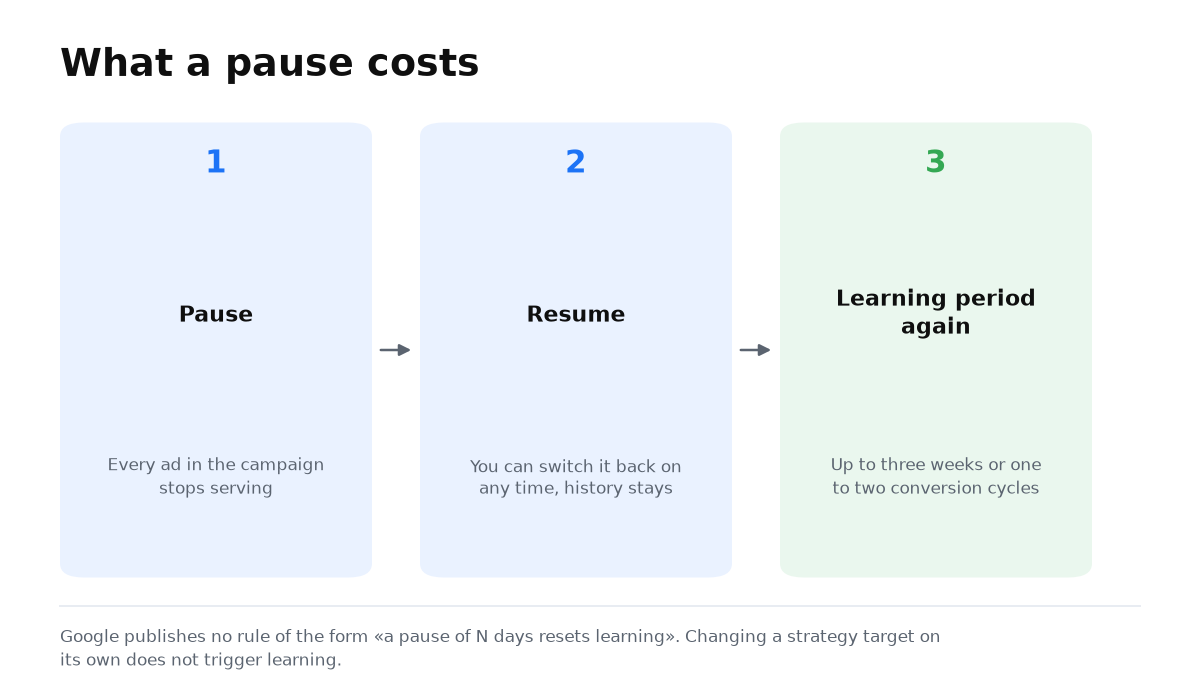
Google has no rule saying that a pause lasting a particular number of days resets learning. There is no supported formula for promising a safe short pause or claiming that the algorithm must start learning again after a specific date.
What Google does confirm is narrower. Its list of significant campaign changes explicitly includes an existing campaign being paused and resumed, followed by another learning phase. The relevant event is the pause and resume sequence, not an invented threshold measured in days.
During learning, an automated bid strategy needs time to calibrate toward its goal. According to Google’s guidance on Learning status, this can take up to three weeks or one to two conversion cycles. A larger amount of conversion data can make the process faster.
This does not support a claim that the campaign loses its history or that the algorithm starts from nothing. The evidence supports another learning period after pausing and resuming, but not the complete erasure of everything previously learned. That distinction matters when setting expectations for the restart.
When this does not apply
The advice to consider a lower budget first does not apply when impressions must stop completely. The business may be unable to accept inquiries, the offer may be unavailable, or an ad may contain a critical error. Lower spending would leave ads running, so the campaign needs to be paused.
The opposite boundary matters too. If the campaign is running and only the pace of spend is causing concern, a pause may be too blunt. It stops delivery now and can add a learning period after the return. Define the result before acting: no impressions or slower spending.
Questions and answers
Can I resume a paused campaign?
Yes. Google lets you resume it whenever you want to run the ads again. After pausing and resuming, the campaign enters another learning period.
How many days can a campaign remain paused without affecting learning?
Google publishes no number of safe days. It describes the pause and resume sequence as a significant change rather than defining a safe duration.
How long can the new learning period take?
Up to three weeks or one to two conversion cycles. A larger amount of conversion data can shorten the process.
Is reducing the budget always better?
No. It is an option when impressions may continue. If they must stop completely, pause the campaign and account for another learning period after it returns.