
The pattern is familiar: Google Ads spends the budget, the report shows hundreds of clicks, and the phone stays silent. A business owner may conclude that the ads do not work. In reality, a click is only the first step, and the problem often begins after the visitor reaches the website.
How much of a Google Ads budget goes to search terms that never bring a lead?
In our real ad accounts, mostly in Eastern Europe, the typical advertiser spends about 39.4% of the spend visible in the Search terms report on terms without a single recorded conversion (median, i.e. the typical value, 2023 to 2025); for half of the accounts it is 28.0% to 67.0%. WordStream's grader reports (2025) put the typical account's waste at about $1,127.54 a month out of about $3,127.38 spent, by WordStream's own definition. Where the figures come from ↓
Real accounts = ad accounts managed by Igor Ivitskiy's team, mostly in Eastern Europe.
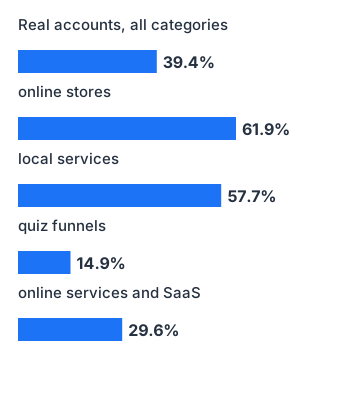
Figures in this block are for 2023 to 2025; the article below may cite figures from other samples and periods.
Try it on your own spend
| Category | Median | Half of accounts | Note |
|---|---|---|---|
| all categories (general benchmark) | 39.4% | 28.0%–67.0% | |
| online stores | 61.9% | no data | small sample |
| local services | 57.7% | no data | small sample |
| quiz funnels | 14.9% | no data | small sample |
| online services and SaaS | 29.6% | 18.7%–34.6% | |
| WordStream grader 2025: about $1,127.54 wasted out of about $3,127.38 spent a month (its own definition of waste; shares not compared) |
- Calculated from search terms visible in the report: Google hides rare queries, which account for about a third of search spend.
- According to WordStream, one account in four has not added a single negative keyword (2025).
Where the figures come from
Panel: the open “Ivitskiy Ads Lab Google Ads Panel & Benchmark Compilation 2026” dataset (version 1.0, CC BY 4.0) on Hugging Face and GitHub; real managed ad accounts, mostly Eastern Europe (business country is not recorded in the primary data); a convenience sample, not a market norm; dollar amounts at a fixed mid-2026 exchange rate.
Unit of observation: advertiser; share of spend on search terms without a single recorded conversion among terms visible in the report, windows 2023 to 2025, managed accounts and audits pooled; quartiles only where the sample allows; small-sample categories are marked. The calculator multiplies the typical share by the spend you enter: a scenario. WordStream: "Google Ads performance" (updated 11 June 2026), WordStream free grader reports for 1 January to 17 November 2025, account country not stated; WordStream defines "waste" itself, and the report text calls the figures averages.
Updated: 2026-09-24 · release r1
Hugging FaceGitHubDownload the values (CSV)Work through these six causes in order. Start with the quickest checks, then move to the deeper ones. For a complete account diagnostic tree, see this guide to a Google Ads audit and wasted budget.
Cause 1. The clicks are wrong: you pay for unrelated searches
Open the search terms report and sort it by cost. Searches containing words such as “free,” “download,” “do it yourself,” or “what is” rarely become leads because the person wants information, not a service. In commercial accounts I analysed, some of these words individually consumed hundreds of thousands of dollars without producing a single result.
Five-minute check: Review the top 20 search terms by cost. Count how many relate to your product and service area. If fewer than 15 do, fix traffic quality before changing the website.
Cause 2. The mobile page is slow: leads disappear during loading
A median 72% of advertising budget is spent on mobile traffic, so your landing page lives on a phone, not on a designer’s laptop. Mobile page speed was one of the few Google metrics in my data that genuinely matched lead volume. Fast mobile pages converted 3.65% of visitors, while slow pages converted 1.28%. The traffic and spend were the same, but the faster pages generated almost three times as many leads.
Five-minute check: Open the landing page on your phone using mobile data instead of office Wi-Fi. Count the seconds until the main button becomes usable. If it takes more than three seconds, you are paying every month for visitors who leave before the page is ready.
Cause 3. The page does not answer the search
Someone searches for “dental implant price” but lands on a clinic homepage that opens with its mission and a photo of the building. Every extra click needed to reach the answer loses some visitors. The ad created an expectation, so the first screen should fulfil it with the same service, a price or price range, and a clear booking or enquiry button.
Five-minute check: Take the three most expensive search terms and follow each visitor journey. Can the visitor see the answer without scrolling?
Cause 4. The contact form creates too much friction
The form has eight fields, email is mandatory, CAPTCHA adds another step, and there is no messaging option. Many prospects prefer to send a message or call directly. If the only contact method is a long form followed by “we will call you later today,” some ready-to-buy customers will choose a competitor who responds immediately.
Five-minute check: Try submitting an enquiry from your own phone. Count the fields and the seconds required. Can a visitor start a message with one tap?
Cause 5. Leads exist, but broken tracking hides them
This is the most deceptive scenario. Ads generate enquiries, but the report shows zero because conversion tracking was never configured or broke after a website update. You then “optimise” a working campaign and switch it off yourself. Before judging the ads, confirm that a test enquiry submitted from a phone appears in the conversion report. Here is the step-by-step guide to setting up Google Ads conversions.
Five-minute check: Submit a test enquiry and check whether it appears in Google Ads within 24 hours. Compare the number of enquiries in your CRM with the advertising report for the previous week. A gap above 20% means the tracking is inaccurate.
Cause 6. The conclusion came too early: the sample is small
“We bought 30 clicks, received no leads, and the ads failed.” At a 3% conversion rate, 30 clicks produce an expected value of 0.9 leads, while the probability of receiving none is about 40%. That is normal mathematics, not a verdict. Judge the campaign when its expected lead count is large enough for a reliable comparison, not after an arbitrary number of clicks.
Five-minute check: Count the clicks in the campaign you want to stop. With fewer than 100, you do not yet have enough data for that decision.
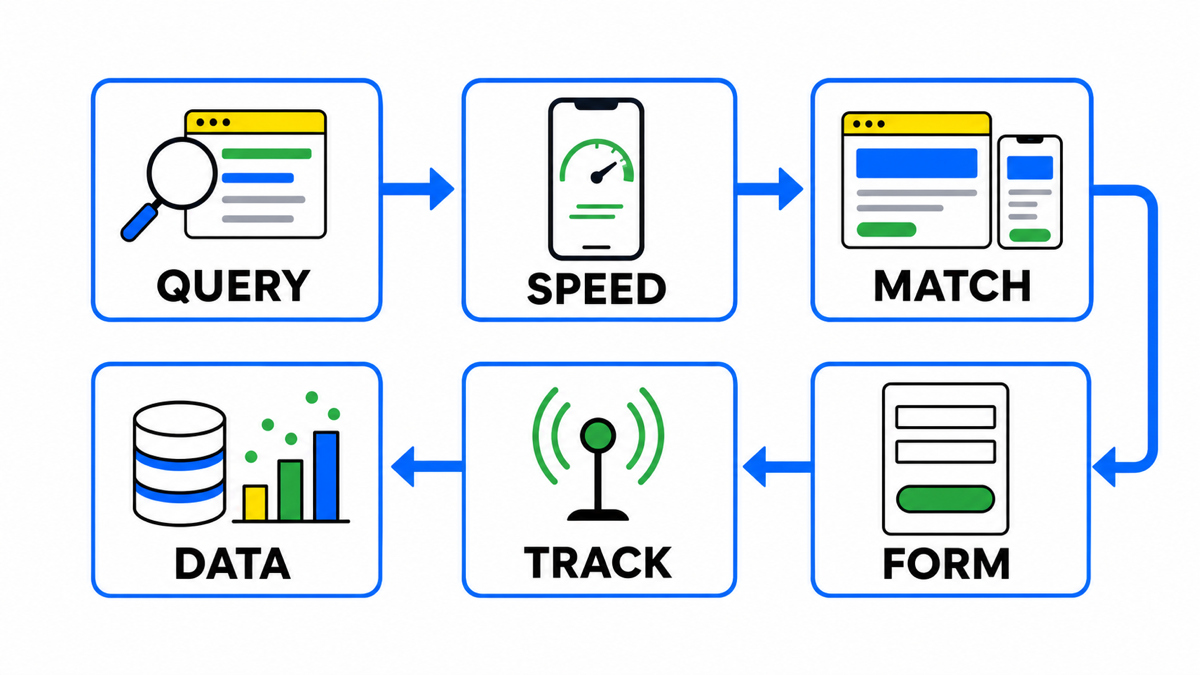
Fast diagnosis: all six checks together
| Cause | Check | Warning sign |
|---|---|---|
| Irrelevant searches | Top 20 search terms by cost | Fewer than 15 relate to your product |
| Slow mobile page | Open the website on a phone using 4G | More than 3 seconds until the button works |
| Page does not match the query | Follow the 3 most expensive search terms | No answer on the first screen |
| Form friction | Submit an enquiry yourself | Too many fields and no messaging option |
| Broken tracking | Send a test enquiry and compare with the CRM | Missing lead or a gap above 20% |
| Small sample | Count campaign clicks | Fewer than 100 clicks |
Once you have completed this sequence, you will know whether the immediate problem sits in traffic, the landing page, tracking, or simply insufficient data.

My e-book “19 Google Ads Secrets”: how to get the most out of Google Ads without draining your budget, drawn from real campaigns and tests.
See the book →If all six checks pass and the cause is still unclear, widen the diagnosis. The issue may involve bids, campaign structure, or the offer itself. You can learn a systematic account review process in my free Google Ads masterclass. If you need an expert to inspect the campaigns directly, see the advertising campaign audit.
Frequently asked questions
Clicks are expensive and there are no leads. Is that the same problem?
No. Expensive clicks relate to bids, competition, and ad quality. A lack of leads after genuine clicks usually points to search terms, the landing page, or tracking. Fix the lead problem first because cheap clicks with no enquiries still lose money.
Could competitors be clicking the ads?
It happens, but less often than many advertisers assume. Click fraud has recognisable warning signs, including click spikes without leads, unusual locations, and suspicious IP addresses. See this separate guide to Google Ads click fraud.
The ads used to work, but leads disappeared. Where should I look?
Start with cause 5. Tracking or the contact form often breaks after a website update or phone number change. Then open the account change history and identify what changed immediately before the decline.
My conclusion
“We get clicks but no leads” is the complaint I hear most often from business owners, yet the advertising itself is rarely the main cause. A click buys attention only. The landing page then wins or loses the enquiry through its speed, relevance, and contact options. My order of work stays the same: complete these six checks before discussing budget, bids, or a new agency.
Breakdowns by niche
Each breakdown below follows one owner who set up the account themselves, and the mechanics you can repeat.