
When campaign labels are incomplete or inconsistent, one source can split across separate report rows, leaving the owner unsure where visits came from. This guide shows how to prevent that split and choose the appropriate tagging method for each link.
Adding manual UTM parameters to every Google Ads link does not give a business owner more control over the main traffic source in GA4. The real risk appears when a click identifier cannot be used and the manual tags are incomplete. In that situation, Analytics builds all channel dimensions only from the UTM values you supplied.
Traffic labels are only one part of measurement. For the wider owner-level view, read ad analytics for business owners. This guide focuses on where a visit came from, which tagging method to use, and how to keep campaign names consistent enough to audit later.
What is a UTM tag in plain English?
A UTM tag is a set of parameters added to a page address to describe a visit. You choose labels for source, channel, campaign, and any useful detail. Their practical purpose is to leave a readable trail in your data, so a visit from an email does not merge with a visit from a partner placement or another campaign.
A useful tag should answer a business question. It might separate two campaign waves or distinguish one placement from another. Agree on names before launch and keep them stable. Analytics cannot infer that two spellings, two capitalisation styles, or two internal nicknames refer to the same source.
Which parameters does Google Analytics recognise?
Google Analytics officially recognises nine UTM parameters. Two are not currently reported in Analytics properties. A business owner does not need to memorise the full list, but the team does need a shared rule for the parameters it uses.
| Parameter | What it should record | Practical naming rule |
|---|---|---|
utm_source | The specific traffic source | Use one stable name for each source |
utm_medium | The channel type | Do not mix a source name with the channel type |
utm_campaign | The campaign name | Use the same template across every campaign link |
utm_id | An internal campaign identifier | Add it when the team reconciles data by identifier |
utm_source_platform | The platform that directed the traffic | Do not use it as a substitute for source |
utm_term | A term for manual tagging | Use it only for an agreed purpose |
utm_content | A creative or link variation | Name variations consistently across the team |
utm_creative_format | The creative format | Do not expect it in current reports |
utm_marketing_tactic | The marketing tactic | Do not expect it in current reports |
Google recommends always setting utm_source, utm_medium, and utm_campaign. Treat these as the core of a manual traffic label. Without them, a report can show a campaign name without making its source or channel clear.
How auto-tagging and gclid work
After someone clicks an ad, auto-tagging adds a parameter called gclid, short for Google Click Identifier, to the destination address. When Google Ads and Analytics are linked, that identifier carries detailed advertising dimensions without requiring your team to encode every campaign manually.
Without auto-tagging, Analytics does not receive the full set of Google Ads details for campaigns, ad groups, keywords, queries, and costs. Auto-tagging is also required to import key events from Analytics into Google Ads and Google Ads cost data into Analytics. Manual UTM tags provide a smaller descriptive layer, not a replacement for that exchange.
Why manual UTM tags do not override auto-tagging
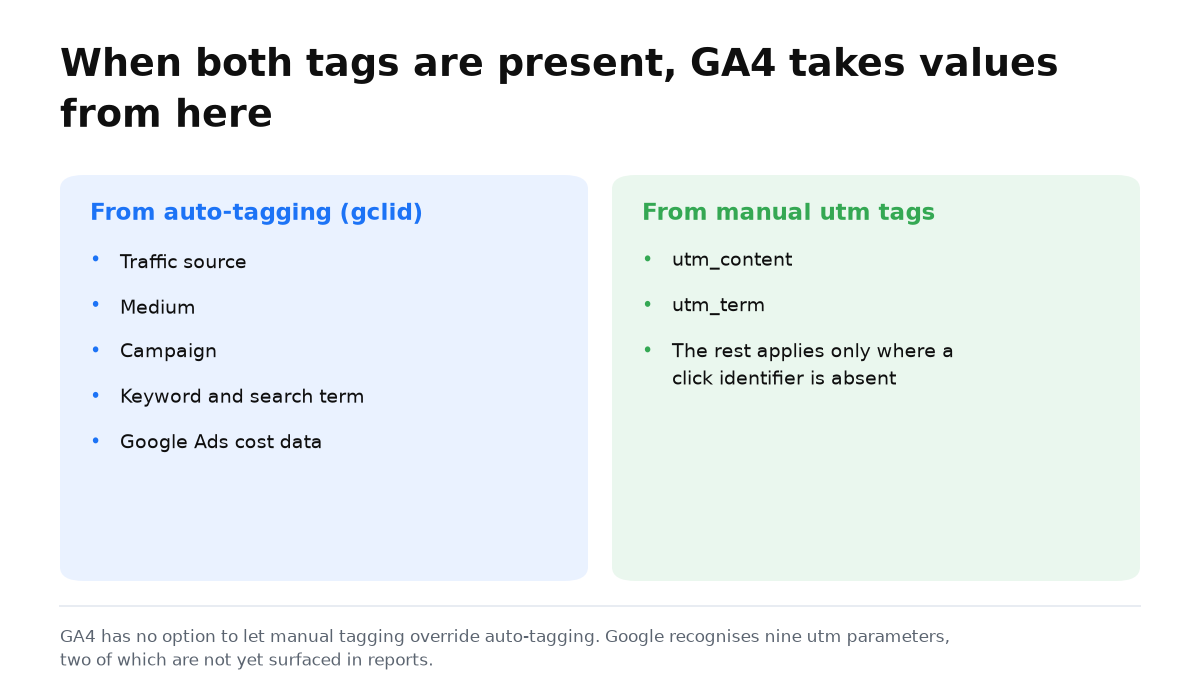
GA4 has no setting that allows manual tagging to override automatic tagging. Google explicitly states that auto-tagging has priority. When both methods appear together, Analytics uses the automatic values for source, medium, and the other traffic classification dimensions.
Manual utm_content and utm_term values can still populate separate manual-tagging dimensions. That does not make UTM values the controller of the main traffic source. Duplicating the entire automatic setup by hand therefore creates extra work and a second naming system without overriding the first one.
When an incomplete set really distorts the data
The risky case starts where gclid cannot be used. If the address contains at least one UTM parameter, Analytics derives all cross-channel dimensions only from the UTM values. Partial tagging is no longer a harmless addition. It becomes the sole basis for classification.
The rule is simple: outside auto-tagging, do not add one random parameter. Send every relevant value, especially source, medium, and campaign. If old data is already fragmented, do not pretend a historical rename will make the original links consistent. Record the new naming dictionary and apply it from the next launch so the change has a visible boundary.
How to build a tagged URL without a builder
- Write a source value. Choose one short name and keep the spelling and capitalisation consistent across links.
- Name the channel. Keep the type of placement separate from the specific source so the report can group it sensibly.
- Name the campaign. Use a label that will still make sense to the person reviewing the report later.
- Add useful detail. Use the remaining parameters only when the team knows which decision that detail will support.
- Test the finished address. Open it yourself and confirm that the page loads and the parameters remain after the visit.
A builder can assemble an address, but it cannot fix inconsistent names. The valuable asset is a short team dictionary that says how sources, channels, campaigns, and creative variations are named.
Where to view the result and troubleshoot problems
Start with a question, not every available column. To verify where visits came from, compare source, medium, and campaign. If one campaign appears on several rows, inspect the spelling in the links. If Google Ads detail disappears, check auto-tagging and the product link before inventing another manual convention.
In one crypto project, consistent source labels made it possible to trace a wave of chargebacks back to a single Performance Max campaign three months later. The campaign had looked successful in aggregate. This is one case, not a frequency estimate, but it shows why a durable label matters: the business consequence can emerge long after the click.
Common UTM tagging mistakes
- Manually duplicating Google Ads auto-tagging and expecting UTM values to control the main GA4 source.
- Passing one isolated parameter where gclid does not apply.
- Naming the same source differently, which splits one channel across several report rows.
- Mixing source, channel, and campaign names in one field.
- Adding parameters without knowing which report question they should answer.
When this does not apply
A UTM tag labels a visit. It does not repair an incorrectly defined key event, a sale lost by the sales team, or a misleading value assigned to a lead. Better source labels make a report easier to audit, but they cannot make the underlying business outcome more accurate.
Manual tagging does not replace Google Ads auto-tagging when you need costs, keywords, queries, and the exchange of key events. Conversely, gclid does not create naming discipline for channels that require manual labels. These are different jobs.
You can now separate channels that rely on auto-tagging from those that need a complete manual set. That removes redundant work and gives your reports consistent labels that can still be audited when a customer outcome appears later.
My e-book “19 Google Ads Secrets”: how to get the most out of Google Ads without draining your budget, drawn from real campaigns and tests.
See the book →Questions and answers
Should I add UTM tags to Google Ads links?
They are not required for the main traffic classification in GA4. Auto-tagging has priority, and manual values cannot override it. Separate utm_content and utm_term values can still be used in manual-tagging dimensions.
Which UTM parameters should always be set?
Google recommends always setting source, medium, and campaign. Where gclid does not apply, pass every relevant parameter because Analytics will derive the channel dimensions only from your UTM values.
What if the old data is already fragmented?
Record the launch from which the new naming dictionary applies, and do not mix the old and new schemes in one conclusion. Check auto-tagging, the Ads and Analytics connection, and the completeness of manual tags in channels without gclid.