
UTM tags vs auto-tagging answers a plain question: who writes the label that says where a customer came from. Auto-tagging appends a Google Click Identifier, called gclid, to the destination URL when someone clicks a Google Ads ad. A UTM tag is a set of tracking parameters you add to a web address, such as the source, the channel, and the campaign name. When both are on one Google Ads address, GA4 keeps the auto-tagged source, channel, and campaign.
The split rows usually come from the other links. People compare gclid vs UTM as if one switch covered every visit. It does not. If gclid cannot be used and the address has any UTM parameter at all, Analytics builds every cross-channel label from those UTM values alone. A missing source or channel shows as (not set). Two spellings of one newsletter become two rows. The wider map of the property is in the guide on how to use Google Analytics 4.
I have spent 19 years in advertising, and I still see an owner tag every Google Ads final URL by hand and leave the email half finished. For a plumber, an HVAC company, or a dentist, I want that cost column in dollars beside the visit. The column arrives when auto-tagging is on and the products are linked. How the cost sits next to leads is covered in advertising analytics for business owners. This page is only about the label on the visit.
What is a UTM tag in plain English?
A UTM tag is a set of tracking parameters on the address so the visit names itself. A plumber’s email should not share a row with a partner directory. Analytics will not merge two spellings.
Google’s help on custom campaign URLs says the values are case sensitive. utm_source=google is a different source from utm_source=Google. SpringSale and Spring_Sale are two campaigns. Google’s own example of capitalization is Meta and meta.
Which parameters does Google Analytics recognize?
Google lists nine parameters. Two of them, creative format and marketing tactic, are not shown in current Analytics reports, so I do not ask a team to fill them. The three parameters you should always set on a manual link are source, medium, and campaign. Campaign id and source platform are parameters you can add. If you set any one UTM parameter, Google strongly recommends the other relevant ones, especially campaign id and source platform, because a missing parameter shows as (not set).
| Parameter | What it should record | Practical naming rule |
|---|---|---|
utm_source | The specific source | One lowercase spelling |
utm_medium | The channel type | Not the source name |
utm_campaign | The campaign name | One spelling only |
utm_id | Campaign id | Same id as any upload |
utm_source_platform | The sending platform | Not a substitute for source |
utm_term | Paid keyword | Only if you will read it |
utm_content | Creative or link | One name per creative |
utm_creative_format | Creative type | Not in current reports |
utm_marketing_tactic | Tactic | Not in current reports |
A dentist email and a partner page can share a campaign name and still need two sources. Newsletter and email in the medium field will split one list.
How auto-tagging and gclid work
After someone clicks an ad, auto-tagging adds gclid to the address. Google’s page on auto-tagging gives the shape www.example.com/?gclid=123xyz and calls the parameter a Google Click Identifier. New accounts have the feature on already. In Google Ads, I still open Admin, then Account settings, then Auto-tagging, and I check the box “Tag the URL that people click through from my ad”.
That click id is what lets Analytics receive Google Ads campaign and cost data, and what lets Google Ads receive key events and engagement metrics such as bounce rate and average session duration. Some browsers need auto-tagging before they will track a conversion. A sale in the shop that started with an ad needs it too. The actions worth importing are covered in GA4 key events for ads.
With the products linked, auto-tagging fills detail a manual tag does not. Google’s page on traffic-source dimensions includes account name, ad group, network, campaign, keyword text, and query. Manual tags are the label for links with no gclid.
Why manual UTM tags do not override auto-tagging
GA4 has no switch that lets your UTM parameters replace the auto-tagged source. Google says auto-tagging is prioritized because that override does not exist. When both methods are on the link, source, medium, and the other traffic-classification dimensions come from auto-tagging. Your utm_content and utm_term can still fill Manual Ad Content and Manual Term. They do not take over the main source.
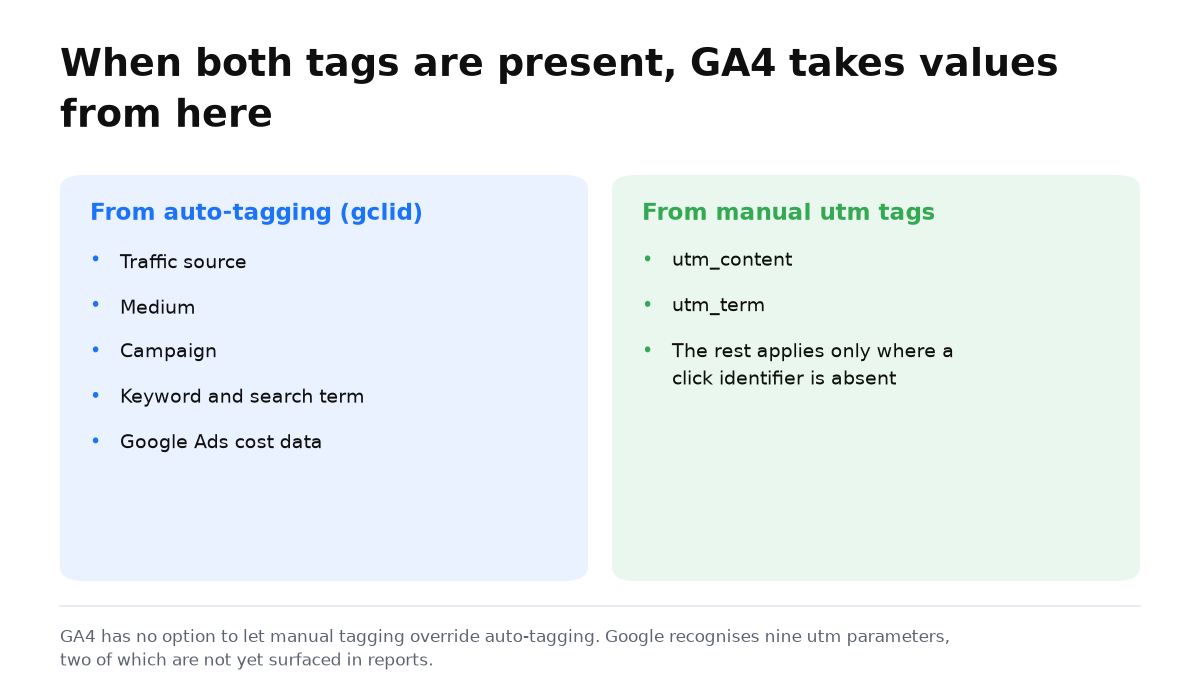
Copying Google Ads into UTM fields does not rename the Ads row. A stray utm_source does nothing while gclid works, and it becomes the only label on the day gclid cannot be read.
When an incomplete set really distorts the data
An incomplete set of UTM parameters distorts the data when gclid cannot be used as intended and any UTM parameter is already on the address. Analytics then derives every cross-channel dimension from those UTM values alone. One lonely utm_campaign is no longer a harmless extra. Source, medium, campaign, campaign id, and source platform that you left off show as (not set).
Outside Google Ads, always set source, medium, and campaign. If you add any UTM parameter, Google strongly recommends the other relevant ones too, especially campaign id and source platform, so a gap does not show as (not set). Add content or term only for a decision you will make. For a plumber, newsletter and Newsletter are two rows.
A new spelling does not repair old links. I write the date the dictionary starts, and I do not add the two periods into one total. In one crypto project, a stable source name let me trace a wave of chargebacks, three months later, to one Performance Max campaign that had looked fine in the weekly sum. One case is not a rate.
How to build a tagged URL without a builder
To build a tagged URL without a builder, append the UTM parameters to the final web address by hand. Put a question mark before the first parameter and an ampersand between the rest. A builder only joins the pieces. It does not fix two spellings of one source.
- Copy the real page address. Use the page the customer should land on, not a hop that adds the tags later.
- Add the source. If the address has no question mark, start with ?utm_source= and one lowercase spelling. If a question mark is already there, start with &utm_source= instead.
- Add the channel. Append &utm_medium= with the type of placement, such as email. Do not repeat the source name here.
- Add the campaign. Append &utm_campaign= with a name you will still recognize next quarter.
- Add campaign id and source platform when you have them. Google strongly recommends every relevant parameter once any UTM value is present, because a missing one shows as (not set). Add utm_content or utm_term only for a question you will read. Skip creative format and marketing tactic.
- Open the finished address. The page must load, and every parameter must still be in the address bar.
Where to view the result and troubleshoot problems
To view the tagging result and troubleshoot a problem, open Acquisition, then Traffic acquisition, and read Session source, Session medium, and Session campaign. If one campaign is several rows, compare the spelling in the links before you touch the budget. If the Google Ads detail is missing, check the auto-tagging box and the link between the products before you invent another manual scheme.
Do not hunt for the tags on the landing page report. Google omits UTM parameters from Landing page + query string and from Page path + query string. The values sit on Page location.
Google’s check for auto-tagging says gclid sits before any # fragment, and it uses & when the address already has a question mark. Redirects have to keep gclid in the final address. If a rewrite changes the capital letters inside the value, the hit can still show as source google and medium cpc, while campaign, ad group, and keyword show as (not set). The value can be up to 100 characters. A tag inside a frame cannot read the parent address, so it cannot see gclid.
Google’s page on final URLs covers the site that errors when any extra parameter is added. Copy the landing page, add a test parameter, and load it. The page must open and the parameter must remain. If it does not, allow parameters and turn auto-tagging back on. Manual tags are the fallback, and they show only a subset of Google Ads data. Tag the real final URL. A redirect from that URL to a second address that carries the tags does not pass the Ads data.
Common UTM tagging mistakes
Common UTM tagging mistakes split a visit across two rows or hide the Ads detail.
- Hand-copying Google Ads labels and expecting them to replace gclid on the main source.
- Putting one UTM parameter on a link that has no usable gclid.
- Spelling one source two ways, or mixing the source name into the channel field.
- Letting a redirect drop gclid, or changing the capital letters inside the value.
When this does not apply
Tagging rules and the auto-tagging comparison do not apply to broken conversion tracking on the site, to an app install campaign, or to a visit that never had a web address. A label does not repair a key event that fires on the wrong thank-you page, or a call the front desk never booked. The source can be perfect and the outcome still wrong. Cleaner rows make the report easier to audit. They do not make a lead real.
Auto-tagging does not name an email, a partner page, or a QR code on a van. Those visits have no gclid. gclid also does not create a naming habit for them. The two jobs stay separate. App campaigns do not follow the auto-tagging setting, so this page is not the setup note for an app install campaign.
If the site errors on an extra parameter, leave auto-tagging off only until the site accepts it. Manual tags then show a subset of Ads data. On a healthy site, turning auto-tagging off to keep control with UTM parameters throws away the click id.
You can now tell a Google Ads click, which should carry gclid, from an email or a partner link, which needs a full UTM set. The step-by-step version is in my book on Google Ads for business owners.
My e-book “19 Google Ads Secrets”: how to get the most out of Google Ads without draining your budget, drawn from real campaigns and tests.
See the book →Questions and answers
Should I add UTM tags to Google Ads links?
Not for the main source. Auto-tagging wins, and GA4 has no override. utm_content and utm_term can still fill the manual dimensions. A stray utm_source does not rename the click while gclid works.
Which UTM parameters should always be set?
Source, medium, and campaign are the three parameters Google says to always set on a manual link. Campaign id and source platform are parameters you can add. If any UTM parameter is already present, Google strongly recommends the other relevant ones, because a missing parameter shows as (not set).
Where do I see where the customer came from?
Open Acquisition, then Traffic acquisition, and read Session source, Session medium, and Session campaign. Do not look for the tags on Landing page + query string. That dimension omits them. Page location is where the parameters are kept.
What if the old names are already split?
Pick one spelling from the next launch. Old rows stay split. Write down the date, and do not add the two periods into one total.