

A negative keyword in Google Ads prevents an ad from showing when a search matches the exclusion according to its negative match type. This lets a business remove irrelevant impressions from people who want something it does not sell and are unlikely to become customers.
A quick guide to keywords, search terms, and negative keywords
Keep three concepts separate when you manage search traffic:
- A keyword is a targeting setting that helps Google decide which searches may trigger your ad. For example, the keyword “buy a laptop” may lead to impressions for searches such as “laptop purchase,” “order a laptop,” “laptop price,” or “gaming laptops.”
- A search term is the actual combination of words a person types into Google. The distinction is covered in more detail in the guide to keywords and search terms.
- A negative keyword is a setting that excludes impressions for unwanted searches.
Suppose the keyword “buy a laptop” triggered an impression for “gaming laptops,” but the store does not sell gaming models. A negative keyword can remove that unwanted search.
How to choose negative keywords correctly
A few obvious exclusions such as “free,” “download,” or “essay” are often not enough. Good negative keyword selection requires three separate decisions.
Why I check negative keyword morphology. I do not assume that one negative keyword will automatically cover every form and close variation. For each unwanted meaning, I review the language people actually use, changes in number, and possible misspellings. I then choose the level and negative match type. I am especially careful with short words that may form part of a valuable query in another context.
Google explains the behavior in its negative keyword troubleshooting guide.
- Understand broad, phrase, and exact negative match. Do not confuse these with the match types used for regular keywords.
- Review the search terms that actually triggered your ads. Extra words and prepositions can completely change a person’s intent.
- Account for variations. A negative keyword does not automatically block every grammatical form, number, or close variation. A concept such as “free” may require several separate forms in languages where the word changes.
The harder cases occur when each word looks useful on its own but the full combination expresses the wrong intent. Base the decision on real search terms rather than a generic list.
How to add negative keywords in Google Ads
Consider a company that builds panel homes and uses the keyword “panel homes.”
How to add keywords
- In Campaigns, open Audiences, keywords, and content, then Search keywords, and select the plus button.
- Choose the required campaign and ad group.
- Enter the keyword with the desired match type and save the change.
- Broad match: panel homes.
- Phrase match: “panel homes.”
- Exact match: [panel homes].
How to add negative keywords
- Open the negative keyword section and select the add option.
- Choose the campaign or ad group level. A campaign level exclusion applies across that campaign, while an ad group level exclusion applies only to the selected group.
- Select the specific campaign or ad group.
- Add the negative keyword with the required match type.
- Broad negative match: free.
- Phrase negative match: “do it yourself.”
- Exact negative match: [how to build a panel home yourself for free].
How to review search terms
Before deciding what to exclude, find the actual searches that caused your ad to appear.
- In Campaigns, open Insights and reports, then Search terms.
- Set the date range you want to analyze at the top of the account.
- Review search terms, campaigns, ad groups, clicks, impressions, cost, conversions, and cost per conversion. Customize the columns when necessary.
- For each unwanted search, choose the negative keyword, application level, and match type that fit the case.
An example of negative keyword use
Suppose “panel homes” was added as a broad or phrase match keyword. The search terms report then shows “how to build a panel home yourself for free.” The company sells a construction service, so this informational intent is not a fit.
- Broad option: free.
- Phrase option: “do it yourself.”
- Exact option: [how to build a panel home yourself for free].
Each option can stop the ad from appearing for the example, but its reach and risk of blocking other searches will differ.
If you want to reduce irrelevant spend, start with the search terms report and add only exclusions whose meaning you have checked.
My e-book “19 Google Ads Secrets”: how to get the most out of Google Ads without draining your budget, drawn from real campaigns and tests.
See the book →The logic of choosing negatives in a real example
Continue with the panel home company and consider two irrelevant searches.
- “Buy panels for a home.” Every individual word may look useful, but the phrase means the person wants panels rather than a home construction service. The business could add the phrase negative “buy panels,” which captures the unwanted intent without blocking every query that contains “for a home.”
- “Free panel home plans.” This is an informational search rather than an order for construction. If the word “free” could occur in valuable searches, a safer option is the full query as an exact negative: [free panel home plans].
Negative keyword match types
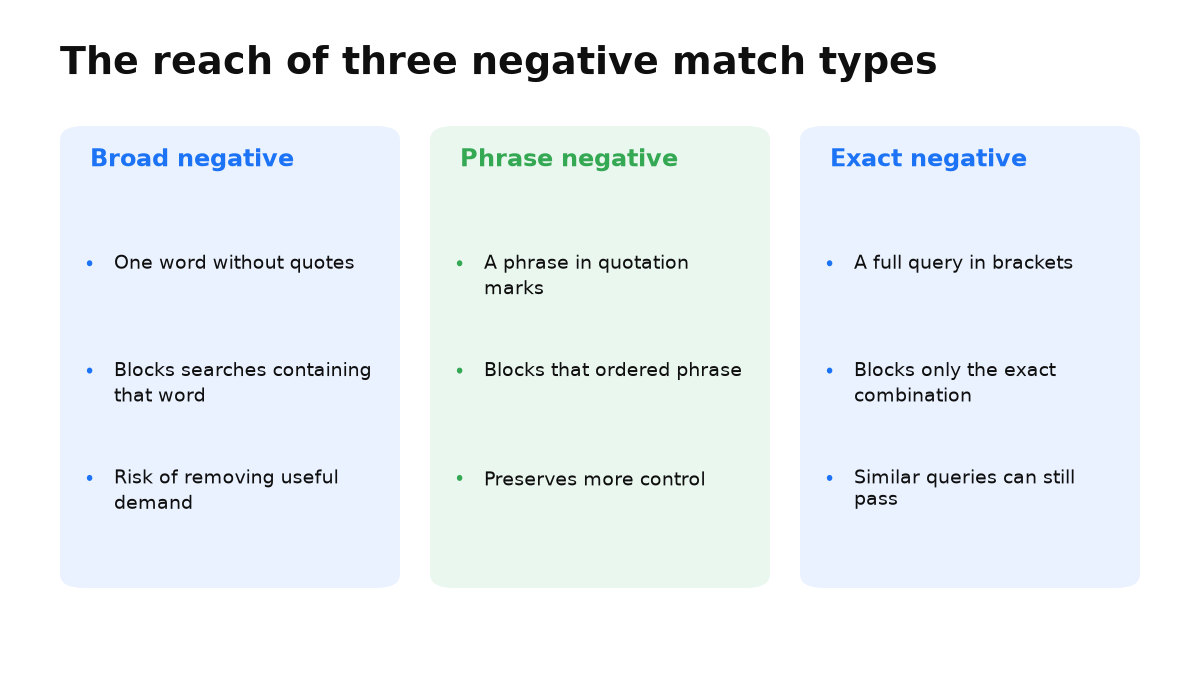
Broad, phrase, and exact negative match differ in how much unwanted demand they block and how much useful traffic they may remove by mistake.
Broad negative match
- Enter it without quotation marks or square brackets.
- It excludes searches that contain every word in the negative keyword, in any order.
- In this one-word example, any search containing that word can be excluded.
- Benefit: one word can remove many unwanted searches.
- Risk: a poor choice can block many relevant impressions.
For example, the negative keyword how can remove informational searches such as “how to choose a laptop,” “how to build a home,” and “how to create a business.” Before using it, confirm that informational demand does not contribute to your customer journey.
Phrase negative match
- Put the word combination in quotation marks, such as “buy panels.”
- It excludes searches containing that combination in the specified order.
- Benefit: you can block an unwanted meaning without excluding each useful word separately.
- Risk: a phrase that is too general may also remove relevant searches.
The phrase negative “buy panels” can exclude “buy panels for a home” when the business sells completed construction rather than panels.
Exact negative match
- Put the complete search in square brackets, such as [buy panels for a home].
- It excludes a search that exactly matches the specified combination without reordered or changed words.
- Benefit: you have more control over the specific search being blocked.
- Risk: its reach is narrow, so similar searches may continue to trigger ads.
The negative keyword [buy panels for a home] removes one specific version. Other word orders or forms may require separate exclusions.
Conclusion: using negative keywords safely
Negative keywords reduce irrelevant impressions and help protect the budget, but an exclusion that is too broad can block valuable demand. Some campaigns may require a list of a thousand negatives, so structure, match types, and regular review of actual searches all matter.
Regular keywords and negative keywords behave differently. Do not expect a negative phrase to cover every word form and order automatically. Check the results after every substantial change.
Student question: Demand Gen or Performance Max
Which should a business choose: display banners, Demand Gen, or Performance Max?
These tools serve different jobs. Performance Max reaches across Google channels and focuses on generating sales and conversions. Demand Gen is designed to create demand, which can also lead to conversions, but the campaign goal and operating logic are different.
There is no universal “better” or “worse” option. The right choice depends on the campaign goal, approach, and business. A need for a particular full screen banner format is a separate use case, not proof that one campaign type is superior to another.