
Every month you pay for Google Ads management and receive a report with convincing charts. The harder question is what work those charts represent. The account’s change history helps you see who changed the campaigns, when they did it and which tools they used.
One account I reviewed showed a revealing pattern: 33.8 changes a week before a new team arrived, 815.8 during its first three months and 8.0 afterwards. That sharp drop was a reason to investigate what work the team was doing and how it affected results. The owner discovered the pattern through an audit, rather than the monthly report.
This is a reason to check what you are paying for before reaching a verdict on the provider. For a full account diagnosis, use the Google Ads audit diagnostic tree. The checks below focus on the person or agency managing your campaigns.
Seven practical checks for your Google Ads provider
1. Your business should control the account
The advertising account should be registered under an email address you control, with the provider given access to manage it. If the account remains entirely under the agency’s control, ending the relationship can mean losing access to its history, statistics and accumulated learning. Establish account control before relying on any of the other checks.
2. Review 90 days of change history
Open Change history in Google Ads and select a three-month period. Look at the pattern as well as the count: is there regular weekly work, or only a couple of changes each month? A month with no changes while the account continues spending should prompt a question about what the management fee covers.
Read the content of the changes before judging the workload. A high count does not establish that the decisions were useful, and a low count needs to be considered alongside the account’s maturity and results.
3. Read the search terms report
Sort search terms by cost and read the top 20. Look for phrases such as “free”, “download” and “what is”, or searches relating to regions you do not serve. If those searches are irrelevant to your offer, ask why they are receiving budget. You can make this first relevance check in five minutes without specialist experience.
4. Compare financial results with scores
Count how many report items concern money and enquiries: cost per lead, lead volume and spend. Then count those about scores and engagement, such as optimisation score, Ad Strength and click-through rate, or CTR. Improving the second group does not necessarily improve your business.
In my analysis of advertising accounts, ads rated Excellent outperformed Average in only 55% of comparisons, little better than a coin toss. If a report celebrates scores while avoiding enquiries and their cost, it gives you activity to admire without establishing commercial value.
5. “We added 500 negative keywords” is not a result
The number of negative keywords added is a familiar reporting item. In the accounts I analysed, the correlation between negative keyword list size and the share of wasted spend was approximately zero. Ask a more useful question: what share of last month’s spend went to search terms with no recorded conversions, and how did that share change?
6. Find out what counts as a conversion
Ask exactly which actions are recorded as conversions. A common trap is counting contact page views or clicks on a phone number alongside genuine enquiries. A report can then show “120 conversions” when there were 14 actual enquiries. Primary actions should represent real enquiries, calls or sales, rather than every interaction someone can complete.
7. Ask what they deliberately chose not to do
Ask: “What have you deliberately decided not to do in this account, and why?” A professional should be able to explain two or three decisions: why they have not expanded the campaigns, for example, or why they are leaving bidding alone until there is more data. A list of things they could try gives you less insight than a clear explanation of the choices made for your business.
These seven checks give you a concrete agenda for a conversation about the work you are paying for. If you want to understand the account well enough to assess the answers yourself, start by learning how its search terms, conversion data and change history connect.
My e-book “19 Google Ads Secrets”: how to get the most out of Google Ads without draining your budget, drawn from real campaigns and tests.
See the book →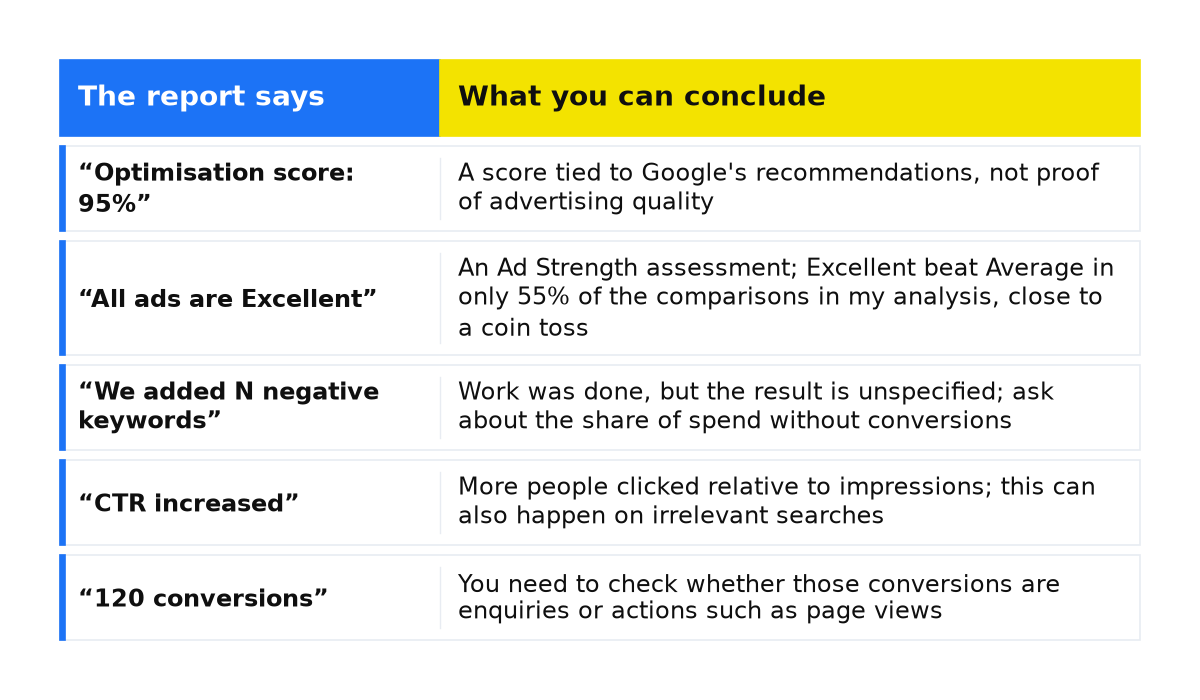
What the report’s claims actually tell you
| The report says | What you can conclude |
|---|---|
| “Optimisation score: 95%” | A score tied to Google’s recommendations, not proof of advertising quality |
| “All ads are Excellent” | An Ad Strength assessment; Excellent beat Average in only 55% of the comparisons in my analysis, close to a coin toss |
| “We added N negative keywords” | Work was done, but the result is unspecified; ask about the share of spend without conversions |
| “CTR increased” | More people clicked relative to impressions; this can also happen on irrelevant searches |
| “120 conversions” | You need to check whether those conversions are enquiries or actions such as page views |
Also check automatically applied recommendations. These apply only to the recommendation types previously enabled for the account. Some reported activity may therefore have been carried out automatically. Review the enabled types and disable any that do not fit the agreed strategy.
Act on the findings
If five to seven checks look sound, acknowledge what is working, but address any failed checks. Even with five checks passed, two failures call for corrections: discuss the specific findings and allow a month to resolve them. Apply the same approach if three checks fail. A concrete issue is easier to address than a general complaint that advertising is not working. If most checks fail, seek a second opinion before making a decision.
You can build your own understanding; I demonstrate the process in my free masterclass. Alternatively, commission an independent advertising campaign audit. My team does not take on ongoing account management work from the open market, so we have no incentive to discredit your provider to win that management contract.
Common questions about checking a provider
Is it reasonable to ask for account access?
Yes. It is your account, data and advertising budget. Refusing to provide even read-only access is a serious warning sign because it prevents you from verifying the work and results.
How many changes per week is normal?
There is no universal target. A mature account may need fewer interventions than a new one. The pattern worth investigating is hundreds of changes during the first few months followed by almost none, while the monthly fee remains the same. Assess that pattern alongside the reasons for the decisions and the account’s performance.
Is blaming the website just an excuse?
Not always. A landing page can lose enquiries, particularly if its mobile version loads slowly. Separate the questions: are the searches relevant, and does the page help those visitors enquire? The Google Ads diagnostic tree includes checks for both traffic and landing pages.
My conclusion
Many conflicts between a business and its agency begin with a lack of transparency. The owner sees a report but does not know which questions to ask. These seven checks give that conversation a practical structure. A good provider can explain the work and the decisions behind it. A defensive response is an additional signal to consider alongside access, data and results, rather than a verdict by itself.
The same habit of checking what changed and what result followed also helps when reviewing website conversion work or email campaigns. Ask for evidence that connects the activity to the outcome.
What to do next
- For a structured audit, work through tracking, search terms, settings, bids and landing pages.
- If you have clicks but no enquiries, check tracking before deciding whether traffic or the website is responsible.
- If you need an independent assessment, an advertising campaign audit from my team can provide a second view of the account.