
“Under review” in the Status column means the ad or asset is still being checked and will be allowed to serve if Google finds no policy issues. You see it on the Ads, ad groups, or Assets table, not on the keywords table.
Until that label changes, this ad does not yet have permission to show. If nothing in the campaign is serving, start with the broader diagnosis of why a Google Ads ad is not showing, then come back to this status.
What it means
This is a policy check before the ad can run, not Quality Score and not your bid. Open Campaigns, then Ads or Assets, and read the Status column. While the row says “Under review”, Google has not approved or refused the ad yet.
Google Ads Help on ad and asset review status gives these windows: most reviews finish within one business day; standard reviews for Demand Gen and Discovery campaigns can take 3 to 5 business days; some complex formats may take up to 7 business days. There is no tighter promise in hours.
After review, an ad can serve with “Eligible”, “Eligible (limited)”, “Eligible (limited all locations)”, or, for video, “Serving”. “Disapproved” means no impressions. “Not eligible” is different: the campaign or ad group is paused, removed, ended, pending, or incomplete, which is not a policy review.
What is at stake
An ad that is “Under review” cannot serve yet. You are not spending budget on it, and you are not getting leads from it either. If it is the only ad in the group, that ad group stays silent until the review finishes.
The main trap is not the wait, but resetting the clock. Any change to budget, bid strategy, or ad text starts the review again. In my practice this label often appears after someone else’s edits: a contractor moved bids, rewrote a headline, or swapped the landing page. The owner sees “Under review” and edits again. A day becomes a week.
What to do
- Do not edit. Leave budget, bid strategy, and ad text alone while “Under review” is active. Any change resets the review clock.
- Check the account. It should be enabled, with a positive balance, and with no pending financial or identity checks.
- Open change history for the past week. In my practice this is the first step when the label “appeared on its own”. See who changed copy, budget, an asset, or the landing page.
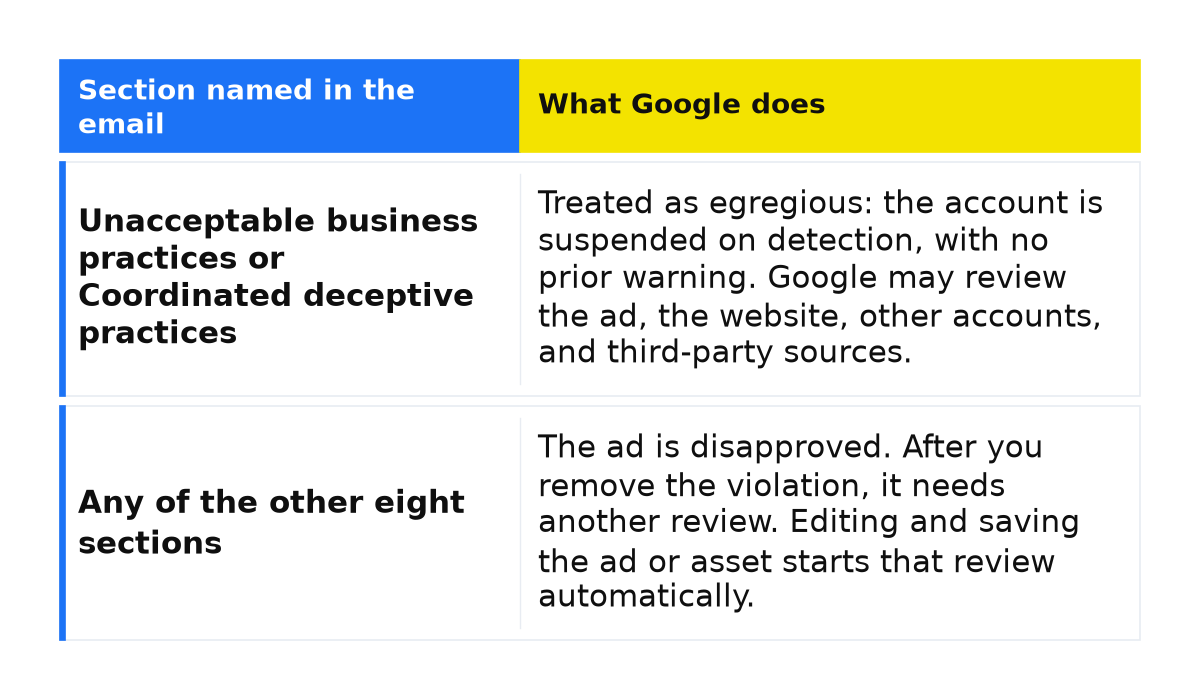
- Open Policy Manager. Individual assets can be disapproved for punctuation, spacing, or image quality. Fix those so a new review starts on that asset, instead of rewriting the whole ad at random.
- If it has been under review for fewer than 7 business days, wait. A typical Search ad is one business day, Demand Gen and Discovery 3 to 5, complex formats up to 7. Do not count weekends as business days.
- If the status has not updated after 7 full business days, make one small edit to the ad or asset to put it back in the queue. One edit, not a batch.
What not to do
- Do not rewrite the ad every hour to “speed it up”. Each edit starts the review again.
- Do not create a new ad to clear “Under review”. The new ad goes into review as well, and the old one stays put.
- Do not nudge budget or bid strategy while the label is up: for the timer that is the same as a new headline.
- Do not pause the campaign in a panic. A pause produces “Not eligible”, and you will mix two different reasons the ads are dark.
When this does not apply
These steps do not fix “Disapproved”: repair the content or landing page rather than wait. Do not confuse “Under review” with “Not eligible” (paused, removed, ended, pending, or incomplete). The label is not a keyword status and not Ad Strength. In Demand Gen and Discovery, editing copy after one business day is too soon.
If the status still has not moved after seven business days and one small edit, we can go through the account together: change history, Policy Manager, and any pending identity or financial check.
My e-book “19 Google Ads Secrets”: how to get the most out of Google Ads without draining your budget, drawn from real campaigns and tests.
See the book →Questions and answers
Does the ad show while it is “Under review”?
No. It does not yet have the right to serve. Impressions start after review if there is no policy issue and the status becomes “Eligible” or a limited variant.
How long do Demand Gen and Discovery take?
Standard reviews for those campaigns can take 3 to 5 business days, some complex formats up to 7. That is not a reason to rewrite the ad on day two. If it has been under review for fewer than 7 business days, wait.
What if 7 business days have already passed?
Confirm the account is enabled, the balance is positive, and no identity or financial check is pending. Then make one small edit to the ad or asset. Do not delete it or clone it “just in case”.