
A target audience is the group of people you want to show your ads to. The definition is simple, and that is exactly what makes it misleading. Because the idea of a “group of people” suggests that you describe a customer portrait, and Google finds them.
The wider context of the system is covered in Google Ads: The Complete 2026 Guide. It is also worth seeing what PPC advertising really costs. See also how account structure works.
In reality, it is the other way around. In search advertising, the core audience is defined neither by demographics nor by your description of an ideal buyer. It is defined by the search term a person has already entered into the search engine. Who exactly is searching is something you figure out after the fact. This is the main mechanic that causes budget waste when misunderstood, and we will break it down in detail below. If you want to see this topic in the context of the entire system, it is one of the chapters in our complete guide to Google Ads 2026.
Search, Display Network, and YouTube: three different meanings of the word “audience”
The exact same word in Google Ads works differently depending on the campaign type. This is not a subtle detail, it is the foundation.
| Parameter | Search | Display Network | YouTube |
|---|---|---|---|
| What defines the audience | User search term | Your lists and segments | Your lists and segments |
| Role of audience lists | “Observation” for data and bid adjustments or “Targeting” to narrow impressions | Primary targeting | Primary targeting |
| User intent | Active, searching now | Passive, reading content | Passive, watching videos |
| Control over who sees it | Depends on the search term, filters, and audience mode | Strong | Strong |
Conclusion from the table: in search, the core audience is set by search terms. A person comes to you at the moment of need, and lists are layered on top of this demand. In “Observation” mode, they do not restrict impressions but provide data and the ability to adjust bids. In “Targeting” mode, impressions are narrowed down to the selected list. In the Display Network and on YouTube, lists and segments act as the targeting itself because there is no active search term.
What you actually control
An audience in search is assembled from six layers of settings. Here they are in order of importance:
- Search term (keywords). 90% of the answer to the question of who to show ads to. Wrong keywords result in the wrong audience, and no demographics will save it.
- Geo. Country, city, radius. Plus an important option: targeting presence in a location, not “interest in a location”. By default, Google sets a broader option, and your ads catch people from other cities who were simply interested in yours.
- User interface language. Not the language of the search term, but the language of the user’s Google interface. A subtle but real difference.
- Device. Mobile, desktop, tablet. Bid adjustments by device, and in some campaign types, complete exclusion.
- Ad schedule. Days of the week and hours. A schedule technically always works, but restricting impressions by time is only worthwhile when accumulated statistics show a difference in performance, not when you think that customers call in the morning.
- Audience lists. Remarketing, Customer Match, and combined segments. In “Observation” mode, they do not restrict impressions but provide data and the option to raise or lower a bid for a specific group. In “Targeting” mode, they narrow impressions to the chosen list.
The first point decides everything. The remaining five act as filters and adjustments on top of it. If your keywords are poorly chosen, analyzing how search terms diverge from your keywords will yield better results than any expansion of audience lists.
A mistake that costs money: the “customer portrait”
A typical scenario. A business owner sits down with a marketer and describes the client: men aged 30-45, average income and above, New York, car owners. This description is entered into the campaign through demographic filters, and they expect Google to now show ads to the right people.
Google does not see this portrait in search. It sees the search term “buy car part new york” and shows the ad to everyone who entered it and matches the campaign settings. Demographic exclusions only work for users whom the system has identified by age or gender. About half of the users have an “Unknown” demographic status and continue seeing ads unless this category is explicitly excluded. Therefore, excluding women only cuts off users identified as women, but it does not give complete control over reach. Such a filter often creates an illusion of control rather than actual control.
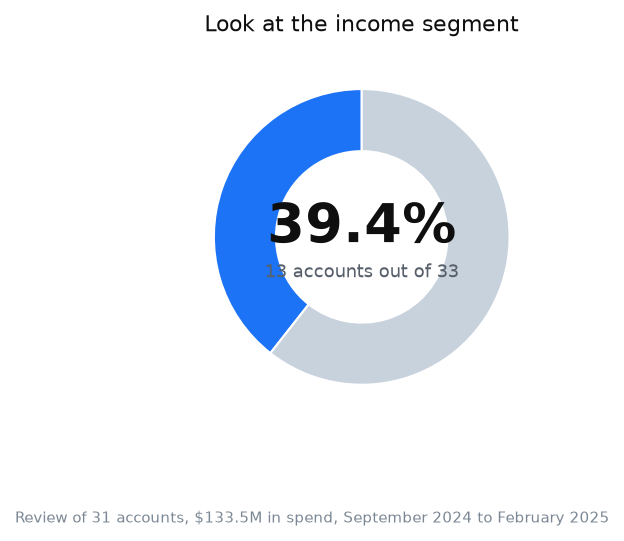
The overall scope of our analysis covers $133.5 million in spend. To analyze demographic settings, we used a separate sample of accounts. Only some of them even look at the breakdown by household income, although the data appears there automatically. And only one account ever applied bid adjustments based on income. One out of thirty-three. Yet, the income breakdown is available in search campaigns for the US, and in our premium niche accounts, we saw a difference in conversion rates between the top and bottom income deciles.
What this implies is that the vast majority of advertisers pay the same price per click for a person who can afford the product and for a person who cannot. This happens not because they are unaware of the option, but because they are used to treating the search audience as Google magic. There is no magic. There are layers of settings that nobody touches.
Google determines demographics based on account settings and user activity across Google services, as explicitly stated in Google Ads Help. It is a model, not a passport. Treat it as a probability.
Keywords and negatives are half the job; the other half is what happens after the click. My e-book “19 Google Ads Secrets” shows how to get the most out of Google Ads without draining your budget, drawn from real campaigns and tests.
See the book →Practical setup procedure
- Check your search terms report for the last 30 days. If there are more than 20% irrelevant queries, the audience problem is solved with negative keywords, not demographics.
- Geo: set targeting to “Presence: people in or regularly in your targeted locations”.
- Add remarketing lists in “Observation” mode if you want to maintain a broader reach than just your past visitor base. Use “Targeting” mode only when you deliberately want to narrow impressions to a list.
- Review demographic breakdowns: age, gender, income. The data populates there automatically. Do not exclude anything until you have statistics.
- After 4-6 weeks, make bid adjustments where the difference in cost per conversion exceeds 30%. Not earlier.
When this does not apply
This mechanic will not work if there is little search demand in your niche. When a product is new and nobody searches for it by name, a search campaign based on keywords will only gather crumbs. In that case, the audience is indeed defined by segments, and your foundation is the Display Network or YouTube, not search.
It will also not work on a very small budget. Demographic bid adjustments require sufficient statistics in each group. With a budget of a few hundred dollars a month, this data may not accumulate, and it is better to keep all adjustments at zero.
A third case: if your business model means you should not be on Google Ads at all, such as products with prohibited or restricted advertising according to platform policies. No audience work will solve a policy issue.
FAQ
What is a target audience in simple words?
It is the group of people who are shown your ads. In search advertising, this group is formed not by your customer description, but by the search terms people type into Google. Your task is to correctly define the keywords and filter out the excess through geo, language, time, and audience settings.
How to set a target audience in Google Ads?
In search: through keywords, geo with the location presence option, language, ad schedule, and audience lists. “Observation” mode provides data and bid adjustments without narrowing impressions, while “Targeting” mode restricts impressions to the selected list. In the Display Network and on YouTube, the audience is set directly through segments, remarketing, interests, and custom segments.
Does demographic targeting work in search ads?
It works, but only for users whose demographics Google has been able to identify. The “Unknown” category requires a separate exclusion. Demographic data is a model built on account settings and activity, so it should be used as a probabilistic signal. In our sample, only one advertiser applied bid adjustments based on income.
How does remarketing differ from a target audience?
Remarketing is one type of audience list: people who have already visited your website. A target audience is a broader concept that also includes those who have never interacted with you. In search, “Observation” mode allows you to analyze warm users and adjust bids for them without narrowing the overall reach. “Targeting” mode limits impressions to a list.
Sources
- Google Ads Help. “About audience segments”. https://support.google.com/google-ads/answer/2497941 (accessed: August 2026).
- Google Ads Help. “About your data segments”: https://support.google.com/google-ads/answer/10569356 (accessed: August 2026).
- Google Ads Help. “About bid adjustments”. https://support.google.com/google-ads/answer/2732132 (accessed: August 2026).
- Google Ads Help. “About location targeting”. https://support.google.com/google-ads/answer/2453995 (accessed: August 2026).
Data period: September 2024 to February 2025. The mechanics of the described settings have not changed since then. As of August 2026, they are available in search campaigns for the US, including the household income breakdown.