
Keywords for advertising are the bridge between demand and your business. Below is how to find the phrases that bring buyers to the site, not window shoppers. Without a usable keyword set, a Search campaign starts blind.

Start with the business problem and commercial meaning.
Choose the advertiser input and its match type.
After launch, add useful terms and exclude irrelevant intent.
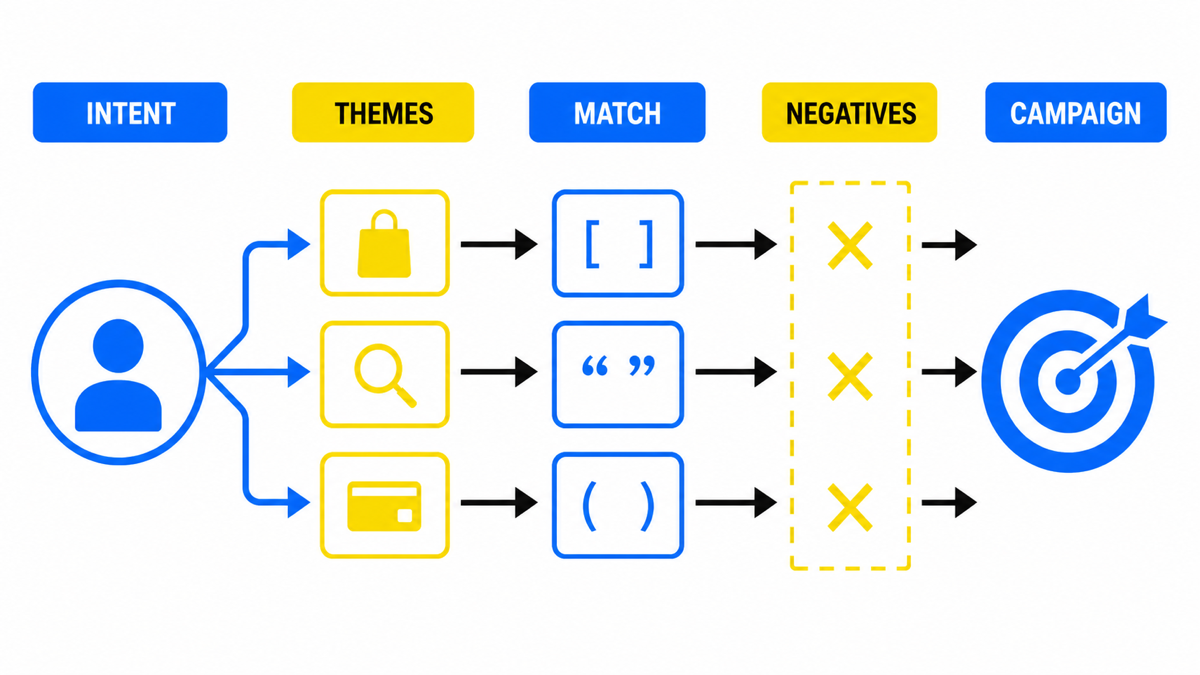
What a keyword is
Start with the product or service you will promote first. I recommend the most in-demand line, not the entire catalogue on day one.
A keyword in Google Ads is a command to the ad system: when to show your ad. Keywords decide which user searches in Google may trigger the ad. A search reflects a need right now, and people express the same need in many different wordings.
If you try to understand what the person is thinking while typing, selection gets easier. If you only grab the obvious niche nouns, you risk:
- missing a large share of real demand;
- walking into the densest competition, where head terms already have many advertisers and a higher cost per click in $.
Tip 1. Non-obvious variants are easy to find in Keyword Planner. If you sell “building toys for kids”, enter that seed and look at related searches people actually use.
Tip 2 (not for a tiny starter budget). If you can afford data collection, you can temporarily use broad match: the keyword with no quotes or brackets. Google will expand to related wording. A seed like building toys for kids may surface “kids construction set”, “lego sets”, “magnetic building tiles”. You then promote the search terms that produced sales or qualified leads into your keyword list. With that method, a conversions-focused bid strategy with a target cost per conversion is usually saner than maximising clicks.
Keyword versus search query
A keyword is the phrase you add in campaign settings. It controls which search queries are eligible to show the ad.
A search query is what the person actually typed into Google.
Example: the phrase-match keyword “building toys for kids” can still trigger on queries such as “buy building set”, “wooden construction toys”, “building toys for boys”. One keyword, many queries.
How to read the person’s intent
Keyword work is intent work. Imagine the searcher wears a sign on their chest and you decide whether you can help.
Say you rent apartments. From the crowd you need people likely to book:
- Queries like real estate or apartment say almost nothing. They might mean buy, sell, renovate, refinance, or paperwork. Dangerous as paid keywords.
- Queries like apartment for rent or rental apartments are much closer to a transaction.
- A query like 3 bedroom apartment for rent in Austin is a strong fit for a local operator.
Takeaway: the more specific the query, the fewer people type it, and the clearer the intent. Showing ads on defined queries means fewer clicks and a higher share of real prospects. Clicks are cost. The goal is not maximum clicks. It is maximum qualified visits. Tight queries often mean lower waste and better payback in $.
Vague queries create lots of impressions while only a thin slice of people want your service. Many accidental clicks, few enquiries, and the ads often fail to pay for themselves.
Types of search queries
A search query is whatever people type into Google. A useful split:
- Informational: they want to learn. Often “what is”, “how to”. You can also spot this from the results page: if it is full of articles, intent is likely informational.
- Navigational: they want a specific site or brand (typing the brand name to get there faster).
- Commercial: they want to buy or book. “Buy”, “near me”, “price”, “cost”, “best”, “hire”. Sometimes those words are missing, but store and service pages dominate the results.
- Location-dependent: city, neighbourhood, “near me”. A plumber in Manchester and a plumber in Toronto are not the same market. Google often applies location even when the query has no city word.
By volume, keywords are roughly high, mid or low frequency. There is no universal threshold. A few hundred monthly searches can be huge in one niche and tiny in another.
Long-tail queries. A query can include a core (pizza, laptop, plumbing), an intent marker (order, fix, hire) and a tail of detail (brand, city, specs). Long tails usually mean lower volume, softer competition on CPC and higher conversion, because the person is closer to a decision.
One long-tail phrase is quiet on its own, but as a set those detailed queries can add meaningful demand. Expanding structure into tight, specialised phrases often improves both efficiency in $ and the number of qualified visits.
Two start tactics:
- Start broader, collect a few days of search-term data, clean fast. Saves planning time, needs budget headroom for noisy clicks.
- Start tight on a small budget: longer, specific phrases. Fewer people search them, intent is clearer. Learning is slower, waste on day one is lower.
Keyword match types
Match type controls how freely Google may interpret your keyword. Three core options:
- Broad match (no operators). Google may show the ad on queries it considers related. Volume is high; informational and off-topic terms sneak in. Budget burns fast without aggressive negatives and conversion tracking.
- Phrase match (quotes). Closer to your wording; Google may reorder, add words, use close variants. For most service accounts this is the default workhorse.
- Exact match (square brackets). The narrowest lane. Best for proven converters, often after the campaign has real data.
For most service launches, start with phrase match and only widen where conversions and search-term control are proven.
Once the difference between keyword, query and match type is clear, the next step is building a list for your offer without pouring the first budget into neighbouring wording.
My e-book “19 Google Ads Secrets”: how to get the most out of Google Ads without draining your budget, drawn from real campaigns and tests.
See the book →Research inputs and outputs
Before you build the campaign, collect three kinds of evidence:
- the wording customers use for the need;
- Planner signals about demand, competition and CPC;
- post-launch evidence from the search terms report.
Sources for the language customers actually use
You need the names customers use for the product or service. Ads should speak that language, not internal company jargon.
Example: “residential mortgage origination support” usually loses to “help getting a home loan”. People search the second way more often, so more of the right people reach the site.
Sources for the list:
- Google autocomplete while you type.
- Related searches at the bottom of the results page.
- Google Trends for seasonality and regional interest (US, Canada, UK each have their own pattern).
- Keyword Planner inside Google Ads.
- Paid SEO tools (Semrush, Ahrefs) when you need depth. Most small accounts can start without them.
What to take from Keyword Planner
Keyword Planner helps you see how competitive a phrase looks and the order of magnitude of CPC. Forecasts refresh often from recent data and adjust for seasonality. You typically look at:
- approximate monthly searches;
- competition level;
- indicative bid ranges;
- a rough budget sketch.
The tool is free. Path: Google Ads → Tools → Planning → Keyword Planner.
To discover new keywords:
- Enter the product or service.
- Choose language and location (for example English + United States, Canada or United Kingdom).
- Optionally add your site URL.
Download the results and then:
- remove duplicates;
- group by theme;
- move high-intent winners into tighter ad groups;
- send junk straight into negatives.
What the search terms report adds after launch
After launch, the search terms report provides evidence that pre-launch tools cannot. Use it for three jobs:
- Cut irrelevant traffic with negative keywords. They block queries that will not sell. Lists differ by niche and city. Common starters for many selling businesses: free, DIY, jobs, download, salary, how to.
- Scale the winners: separate ad group, higher bid, tighter ad and landing page.
- Tune bids for the middle band that is too early to kill and too early to scale hard.
The cleaner your search terms report, the less money you spend on accidental clicks. Negatives accumulate and transfer into new campaigns.
Why keyword stats still matter after launch
Keyword work is not only for ads. Once Google Ads shows which phrases produce enquiries, those phrases also guide SEO: reinforce pages around proven wording instead of guesses.
SEO then gets cheaper and faster. You are not optimising “everything”. You prioritise what already paid for itself in clicks.
Paid blocks take a large share of the results page, especially on mobile. Many people see ads before organic links. That is why keyword quality and ad relevance affect not only CPC, but whether you appear at the moment of demand at all.
A practical keyword research algorithm
1. Define what potential customers search for
You need business context and a customer lens. How does a normal person describe the need: which words, which qualifiers, which fears.
Inside your niche, split terms into high, mid and low volume. Thresholds differ for a dental clinic in Toronto and a niche B2B tool. Higher-volume phrases usually mean more traffic and a higher CPC.
2. Find the keywords
Bring together the customer-language sources and Planner output from the research section above. Group the working list by need and intent before you build ad groups.
3. Check whether you covered real wording
People misspell, use slang, abbreviations and local phrasing. Include how customers actually speak, not only the polished wording from your brochure.
4. Build the negative keyword list
Put the obvious exclusions into the campaign before launch. Then expand them from the search terms report as real wording appears. Even similar niches need different lists because the unwanted intent differs by offer and location.
5. Tighten with match types
Use match types so ads do not wander into irrelevant queries: broad, phrase, exact. For most new service ad groups, the starting norm is phrase match plus active negatives, with exact match for proven winners.
6. Check relevance and cost per click
The auction is not won by bid alone. Ad relevance, expected CTR and landing page experience matter. Keyword research without checking whether the page keeps the promise ends in expensive clicks in $ and weak conversion.
Keyword selection is one of the highest-leverage launch steps. Saving time on the list almost always costs more in wasted media.
Takeaways on keyword research
The useful output is not the longest possible list. It is a map from customer wording to intent, ad group, landing page and exclusion:
- Use customer language, not internal product jargon.
- Separate intent so each ad group can make one clear promise.
- Control reach with match types and negative keywords.
- Validate after launch with search terms, conversions and CPC rather than search volume alone.
A precise list cannot rescue a weak offer or landing page, but it prevents the campaign from testing unrelated demand first.
Keyword research for Google Ads is analytical work, not a 20-word brainstorm after dinner. Building a stream of qualified customers is craft plus verification. Cutting corners on preparation usually costs more than the preparation itself.