
A law firm, clinic, home service company, or consultancy may receive an online enquiry but close the work later by phone or in its CRM. Google Ads sees the form submission, not the signed agreement or payment. Offline conversion import connects those stages by reporting what happened after an ad produced a click or call.
Store the ad click identifier with the website lead.
Attach the later lead or deal outcome to the same record.
Send the action name and event time back to Google Ads.
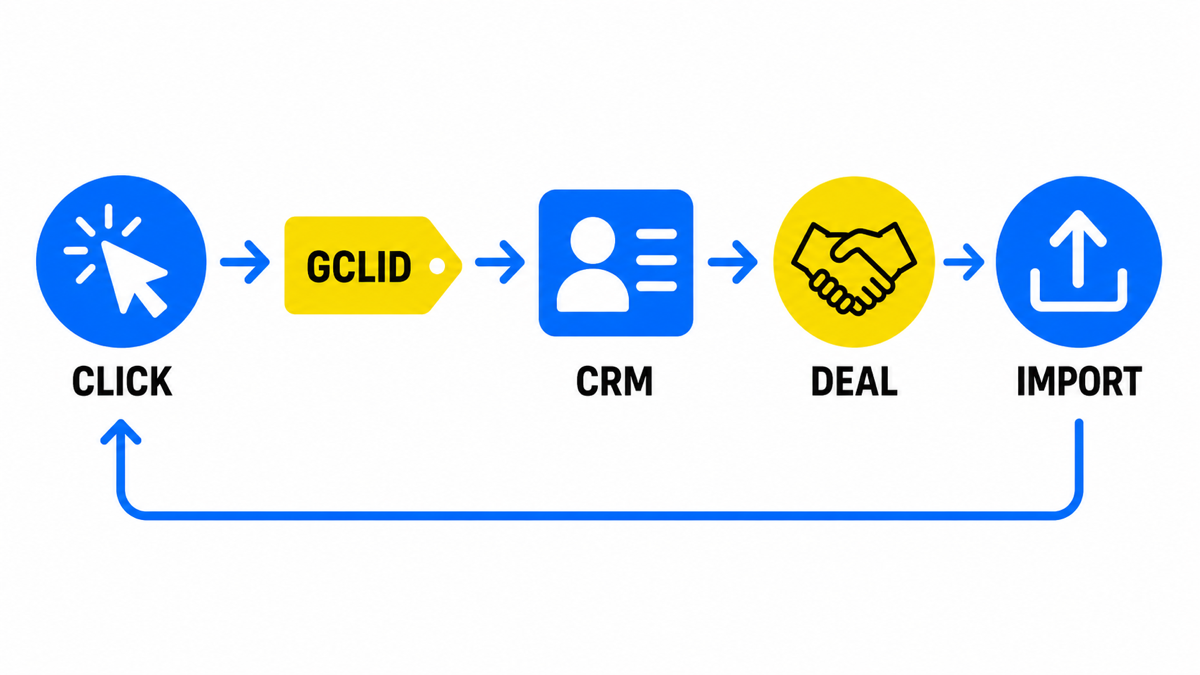
Choose the CRM outcome that should return to Google Ads
Before an import, the ad platform can measure website events such as a submitted form or a click on a phone number. An import can add the event that your business treats as meaningful, such as a qualified opportunity, signed contract, or payment. The classic process uses the Google Click ID, or GCLID. Google assigns it to an ad click, the business stores it with the prospect, and the identifier later returns to Ads with the conversion type and time.
You must also decide whether the offline action is primary or secondary. A primary action can be used for bidding. A secondary action remains available for observation. Google’s setup guidance warns that an incorrect primary or secondary configuration can prevent Smart Bidding from optimizing effectively. Select the business outcome first, verify the data flow, and only then use it as a bidding objective.
Build the path from ad click to imported sale
GCLID is a URL parameter passed with an ad click. It identifies the campaign along with other attributes of that click. Auto-tagging must be enabled for the parameter to appear. If the site and CRM fail to store it when the enquiry arrives, the classic import cannot reconstruct that connection after the sale.
- Enable auto-tagging. Google lists this as a prerequisite for GCLID-based offline conversion import.
- Capture the GCLID on the site. The setup requires page changes and a hidden form field. A small business may use GTM or its form platform where supported. GCLID is case sensitive, so the value must not be reformatted.
- Store it in the CRM. Add a GCLID text field to the lead or opportunity record and confirm that the form or connector passes the value with the contact details.
- Create the offline conversion action. Give it a clear name and set its initial role deliberately. After creating a new conversion action, wait 4-6 hours before the first upload. Uploading sooner can mean a delay of 2 days before conversions appear in reports. These conditions come from Google’s GCLID setup guide.
- Create an import row when the CRM status changes. Include GCLID, the exact and case-matched Conversion Name, and Conversion Time. Order ID, transaction value in $, and currency are optional fields.
- Upload a file or schedule a source. Google Ads supports a manual upload and scheduled data sources. Repeating the same identifier, conversion name, date, and time does not import the same conversion twice.
- Review processing. Imported conversion statistics take about 3 hours to appear in the account, while a file can take 24-48 hours to process fully. Check upload status and row errors instead of relying only on the conversion column.
The upload window matters for businesses with long sales cycles. A classic offline conversion uploaded more than 90 days after the associated last click is not imported. For enhanced conversions for leads, the window is 63 days. Google documents both limits in its offline conversion import guidelines. If your sale routinely closes later, choose an earlier meaningful milestone that occurs within the applicable window.
Assign ownership across the website, CRM, and ad account
| Stage | What must be ready | Typical owner |
|---|---|---|
| Auto-tagging | Access to Google Ads account settings | Business owner or paid search partner with the required permissions |
| GCLID capture | Site script, GTM, or a supported form feature, a hidden field, and consent appropriate to the market | Website owner, freelancer, or agency managing the site |
| CRM field | A GCLID text field and a reliable transfer from the enquiry form | CRM administrator or integration specialist |
| Conversion action | Exact name, category, primary or secondary role, and value where needed | Owner together with the Google Ads specialist |
| Business rule | A specific CRM status that represents a qualified opportunity or sale | Business owner, because this defines commercial success |
| Import | GCLID, Conversion Name, Conversion Time, and optional value in $ and currency | CRM owner prepares the data, Ads owner uploads or schedules it |
| Quality control | Upload status, exact action name, and GCLID coverage among closed opportunities | Owner reviews the process regularly until it is stable |
A direct CRM integration can replace the manual file. Google provides separate instructions for Salesforce, HubSpot, and Zapier, but there is no universal promise that every website and CRM connect without configuration. The underlying requirement remains the same: preserve a matching key and send the selected outcome to the correctly named Google Ads action.
A practical review is to place the website capture, CRM field, imported action, and upload errors on one screen, then identify the first point where the identifier or status goes missing.
My e-book “19 Google Ads Secrets”: how to get the most out of Google Ads without draining your budget, drawn from real campaigns and tests.
See the book →Make the offline action primary only after validation
One accepted upload is not enough to prove that the process is reliable. Run the cycle again, inspect accepted rows, check GCLID coverage in closed opportunities, and confirm the conversion name matches exactly. Then set the roles intentionally:
- Website enquiries can remain secondary when they are too far from revenue to guide bidding.
- Qualified opportunities or CRM sales can become primary after the import is stable and the event provides a repeatable signal.
- Transaction value can be passed when deal sizes differ, so a high-value contract and a low-value booking do not appear identical to the system.
Google recommends that advertisers new to offline conversion import start with enhanced conversions for leads. This approach adds hashed first-party data such as email addresses and phone numbers. In the About offline conversion imports help article, Google also reports a median 10% increase in conversions for advertisers using first-party data alongside imported GCLIDs compared with standard offline conversion import. That is Google’s comparison, not a promised lift for your business.
Frequently asked questions
Can a small business set this up without an in-house developer?
Often, GTM, a hidden form field, a CRM field, and a supported connector are enough. If the site or CRM cannot preserve and transfer GCLID, focused development work will be required.
Why was the upload successful but the conversion is missing?
Statistics take about 3 hours to appear and full processing can take 24-48 hours. Also verify the exact conversion name, report period, upload status, and whether the action is primary or secondary.
Should we import every lead or only completed sales?
Import the CRM stage that your business defines as success, using a distinct action. If bidding should learn from completed sales, make that action primary and keep earlier website leads available for observation.
What happens when a closed sale has no GCLID?
Classic GCLID import cannot connect that sale to the ad click. Repair capture and CRM transfer first, and do not make the offline action primary while most new records remain unmatched.
What to do next
Define the CRM stage that represents commercial value, test the GCLID path through the site and CRM, and complete several clean uploads. Only then should you change the action used by bidding. The import does not create better performance by itself: it gives Google Ads a signal closer to revenue.