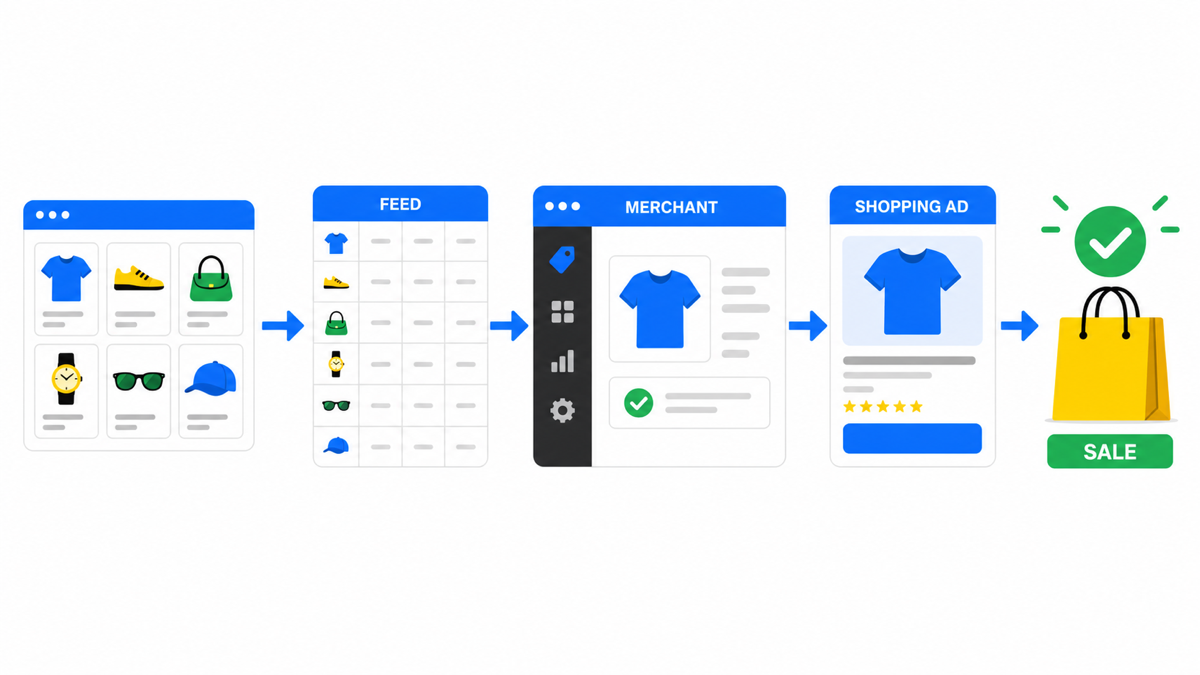
Google Shopping ads are the strongest source of customers for online stores. Shoppers reach a seller’s site through other channels too: search ads, Performance Max, video ads. But Shopping campaigns consistently outperform the rest for straight product sales.
What Shopping Ads Are and Where They Show Up
A product listing is built from:
- the product name;
- its description;
- an image;
- the price.
Clicking the product takes the shopper straight to the store’s product page, where they see the full details and can buy.
Your product ad shows up when someone searches Google for a matching product. Say your product is a “Samsung TV.” Google will show it to people searching “buy a tv,” “buy a samsung tv,” or anything close to that.
These product listings can appear above or beside the organic results. Sometimes Google also surfaces a “Shopping” tab with comparable products from different stores.
How to Set Up a Google Shopping Campaign
Before the campaign can run, your catalogue has to clear that console, and that is where stores lose the most time. The order of operations and the three usual traps are covered separately: Google Merchant Center: setup without disapprovals.
The first job is your product feed. The system that holds all your product data is Google Merchant Center. You can upload each product by hand if your catalog is small, but that’s rare in practice. There’s a faster route.
Why Shopping Starts With the Feed
I always start a Shopping build in Merchant Center: disapprovals, titles, IDs, prices, availability, and whether each listing actually matches its landing page. Then I split brand and generic demand in the analysis, so a strong brand name doesn’t mask weak performance on generic searches.
Google’s own guidance on getting your product data complete and accurate is in the Google Merchant Center help center.
What a Product Feed Is and How to Prepare One
Your feed is essentially a structured price list, and a developer can usually get it built quickly. The major platforms, Shopify, WooCommerce, and BigCommerce, all support fast export of product data straight into Google Merchant Center, either through a built-in feature or an app you add.
Once every product is loaded into Merchant Center, you can check for each one:
- price;
- stock status;
- which country it’s targeted at;
- whether it has any policy violations.
Setting Up the Campaign in Google Ads
The next step is building the Shopping campaign in Google Ads. The workflow looks like setting up any other campaign. You’ll choose:
- Campaign type “Shopping.” This ties your campaign to the data sitting in Google Merchant Center.
- Budget.
- Language and location targeting.
My e-book “19 Google Ads Secrets”: how to get the most out of Google Ads without draining your budget, drawn from real campaigns and tests.
See the book →Once the campaign is live, you can track impressions across every product in the feed. As the person running the account, you’ll see:
- how many people clicked on a given product;
- how many times it sold;
- the resulting cost per click and cost per conversion.
You can set your own cost-per-click bid for every individual product.
How to Manage a Shopping Campaign
There are 4 levers for optimizing a Shopping campaign:
- Changing product attributes in the feed.
- Adjusting bids and cost per click for each product based on how it performs.
- Managing search terms and excluding the ones that don’t belong.
- Managing audiences.
Unlike search campaigns, you don’t set keywords when building a Shopping campaign. That job is done by the ad text itself, meaning the product’s title and description. Google decides on its own when your product is a plausible match for what someone typed in.
Monitoring Search Terms
Your job is to check which search terms are triggering your ads. Wasteful impressions (low performers and irrelevant matches) can be blocked by adding them as negative keywords. Check the box next to the term you want to exclude, then choose “Add as negative keyword.” After that, the term stops triggering your Shopping ads.
Working With Audiences
Audiences are segmented by age, gender, intent, and interests. Raise bids on the audiences that convert well, lower them on the ones that don’t. Trimming the weak audiences lifts conversions and brings down cost per click and cost per conversion. It keeps you from spending on the segments of the population that were never going to buy from you.
Key Takeaways on Google Shopping Campaigns
Google Shopping campaigns work extremely well. Getting the optimization right at every stage can multiply your results several times over.
No business can afford to ignore its ads; they’re the main engine driving sales. Skip steady management and you can lose your flow of customers fast, and it takes a long time to rebuild. It’s far cheaper to spend an hour a day keeping an eye on performance than to fix that later.