
Broad match in Google Ads is the match type auditors and paid-search specialists love for one practical reason: when a Search campaign is full of broad keywords, you can often show an owner a faster before-and-after. Changing match type alone can cut wasted $ and lift efficiency without rebuilding the whole account.
Better still: do not start with the mistake. A keyword entered without quotation marks and without square brackets is broad match by default. Why that can hurt, and how to use broad on purpose, is below.

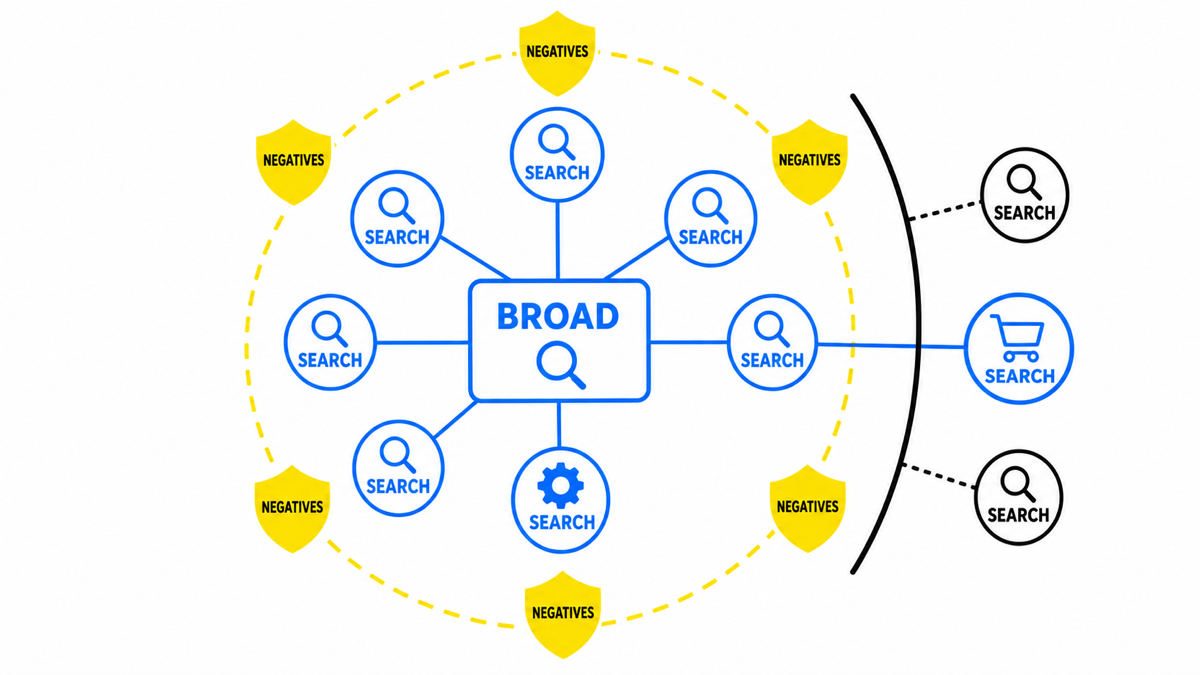
Broad match expands eligible queries when Smart Bidding has a useful goal.
Search-term review and negative keywords keep irrelevant intent out.
Short takeaways first
- Broad match is on when the keyword is added without “” quotes and without [] brackets. No special symbols means broad.
- Broad can deliver many impressions on off-intent queries that are far from the keyword’s meaning. That often means higher spend without sales.
- If you do not yet know how to run broad, use a simple rule: put keywords in “quotes” (phrase match).
Example:
Phrase: “keyword”
Broad: keyword
The best way to use broad match well
One proven pairing is broad match with Maximize conversions and a target CPA. Broad gives the system room to explore, while the bidding strategy tries to suppress weak queries so conversion cost stays near the $ target you set.
Example: you sell rugs online in the US or Canada.
- Use the keyword buy rug with no quotes (broad).
- Set the campaign to Maximize conversions with a target CPA you can afford, for example a $ amount per sold rug.
- You get wide reach, and Google’s automation tries to buy sales under that cost constraint by dropping weak paths and keeping stronger ones.
How I test broad match
I never flip every keyword to broad in one bulk edit. I ring-fence a clean experiment, keep goals and bid settings stable, and compare not only volume but new query categories and conversion value. I pair broad with Smart Bidding and use negatives as meaning boundaries the algorithm should not explore.
Google’s documentation explains why broad match is recommended with Smart Bidding.
Why broad match can be a problem
In Google’s definition, broad can show ads on relevant queries even when the query does not contain your keyword words. If Google judges the meaning close enough, the ad can serve without a literal overlap.
English semantics are usually handled more reliably than many other languages, but owners still see mismatches: gender swaps, product category jumps, and “close enough” guesses that are not close for the business. For a US, Canadian or UK store, that still means $ on the wrong job-to-be-done.
If search terms already show spend on the wrong product, gender, city or research intent, the next move is tighter match types, stronger negatives, or broad only under a conversion-value bidding constraint.
Tags and reports matter when they show payback. My e-book “19 Google Ads Secrets” shows how to get the most out of Google Ads without draining your budget, drawn from real campaigns and tests.
See the book →How broad match behaves: real-world examples
How far a query can drift from the keyword under broad:
- buy bicycle ≈ buy scooter (both treated as personal transport).
- women’s heels ≈ men’s dress shoes (gender treated as a soft swap).
- corner shelf NYC ≈ urologist NYC style near-misses when the system “corrects” a word. A medical seeker sees a hardware product.
- warehouse space for rent ≈ rent gazebo for BBQ. Leisure booking is not industrial space.
- kitchen showroom ≈ shawarma recipe kitchen. Someone cooking at home is not shopping cabinets.
The pattern is the same: the keyword theme and the query theme diverge hard. Ads reach the wrong audience, so orders do not follow.
What broad match does to the campaign
What the user sees often fails their intent. Two outcomes hurt:
- They click. You pay the CPC in $, and they bounce because the page sells something else.
- They do not click. CTR falls, quality signals weaken, and bad experience accumulates. Downstream you usually see:
- higher CPC and higher total spend;
- harder auction wins for top positions.
How to fix it
Practical options to cut off-intent traffic and raise conversions:
- Change match type while setting up or editing the campaign:
- phrase match: put the keyword in quotes;
- exact match: put it in square brackets.
Both produce fewer irrelevant impressions than broad.
- Use negative keywords. If women’s heels is broad, negatives can block paths such as:
- men’s;
- repair;
- used / second hand;
- custom made (if you only sell ready-to-wear);
- care / polish / cleaner;
- running shoes and other sports footwear.
Closing every broad leak with negatives alone can demand a huge list. The simpler path is often phrase or exact match.
After launch, keep doing three things:
- watch which search terms get impressions;
- improve the keyword list (Keyword Planner helps);
- grow the negative list.
Broad match takeaway
In my audits of messy accounts, uncontrolled broad match has sometimes left only about 5-10% of traffic clearly on-intent. Removing the off-target traffic in those cases cut spend by roughly 80-90%. These are first-hand orientations, not a Google benchmark or a promise for every account. So either use phrase match, or run broad only with Maximize conversions and a target CPA in $ that the business can actually sustain.