
“Misconfigured” is one of five conversion-action statuses: recording has stopped entirely because of a setup error or a broken tag. Open Summary within the Goals menu and read the Status column. A click on the status opens the alerts, then View details or View all issues.
How to build the action itself is covered in Google Ads conversion tracking setup. The five statuses are set out in the Google help page on conversion tracking status. You might not see every one of them in the account yet. Some of the detail is rolling out gradually.
What it means
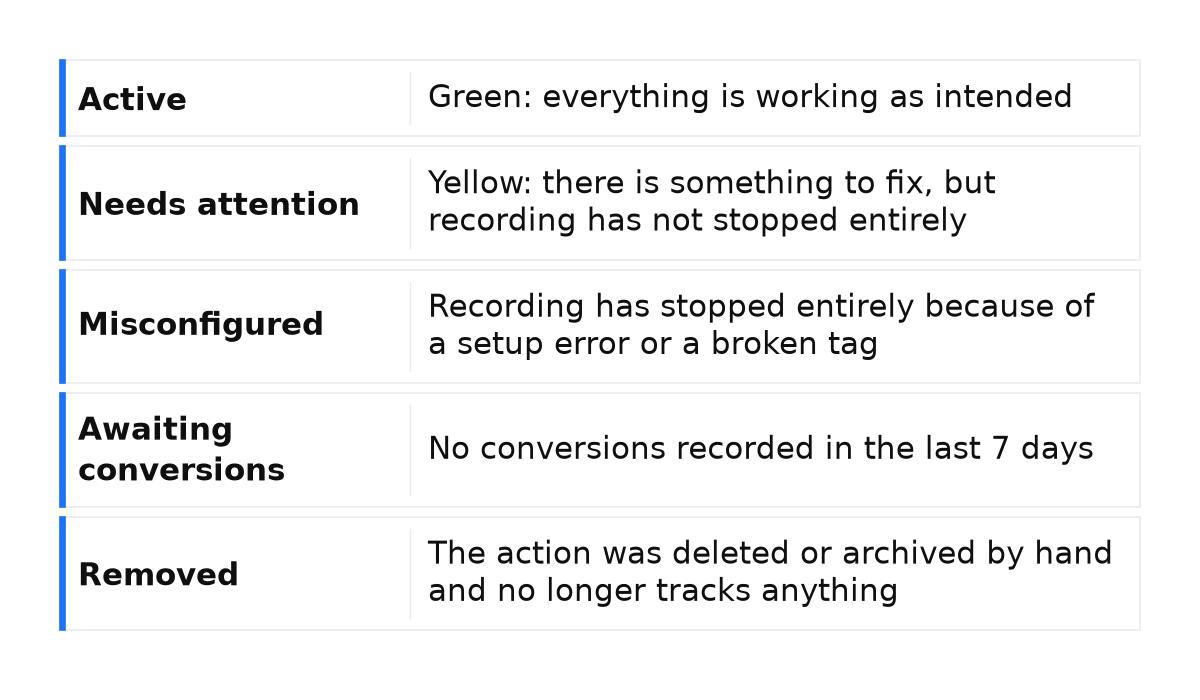
| Status | What it means |
|---|---|
| Active | Green: everything is working as intended |
| Needs attention | Yellow: there is something to fix, but recording has not stopped entirely |
| Misconfigured | Recording has stopped entirely because of a setup error or a broken tag |
| Awaiting conversions | No conversions recorded in the last 7 days |
| Removed | The action was deleted or archived by hand and no longer tracks anything |
Hover over the status for the steps that restore measurement. Tag statuses are a different list: Inactive, Unverified, and Needs Attention. The tag list writes the words as Needs Attention. The action status writes them as Needs attention. Same words, different rows.
What is at stake
While the action is Misconfigured, new conversions do not enter the reports at all. The yellow status “Needs attention” is different: recording stays on, and there is something to fix, but it has not stopped entirely. Active means counting is working. Removed means you deleted or archived the action by hand, and it no longer counts.
The status people mix up with this one is awaiting conversions: no conversions in the last 7 days. Usually the action is under 48 hours old, campaigns are paused, or traffic is too low. That is not a broken tag. A quiet week with no leads is how I read Awaiting conversions, not Misconfigured. When recording has stopped entirely, I go to the tag.
What to do
- On Summary in the Goals menu, hover over the Status column and follow the steps in the tooltip to restore measurement. Then click the status itself. That opens the alerts, then View details or View all issues.
- If the action is Misconfigured and Google Tag Manager has no Conversion Label, check whether Google created the action on its own. That is the case when the label is missing. Auto-created goals cannot be mapped to Google Tag Manager conversion tags. Create a conversion action in Google Ads by hand so you get a Conversion ID and a Conversion Label. I do not force an automatic goal onto the tag.
- Then check the tag. Run a test conversion in Google Tag Assistant. To confirm the action is Primary, open Goals, then Conversions, then Summary. That screen is one step deeper than the Summary page where the status itself sits. The action should be Primary, and you need to accept the Enhanced Conversions terms. For calls, turn on call reporting and keep the minimum length from cutting out short calls. Set up the Conversion Linker tag. Tags should be in place and firing. If the code will not cooperate, ask a web developer. The checks are in the help page on conversion tracking status.
- After the fix, read the Status column again. Reports can take 3-24 hours to update. That window is about reports, not about the status disappearing.
What not to do
- Do not read this status as a week without leads. An empty week is the status Awaiting conversions.
- Do not raise bids to fix this status. Raising bids or budgets belongs to low volume, when you simply are not seeing conversions.
- Do not expect the status to clear within 3-24 hours: that is how long reports take to update, not a deadline for the status. Do not confuse tag statuses with action statuses, and do not map an auto-created goal to a Tag Manager conversion tag.
When this does not apply
The broken-tag steps do not fix Awaiting conversions. That status means no conversions in the last 7 days, usually an action younger than 48 hours, paused campaigns, or traffic too low to trigger a conversion.
The yellow status “Needs attention” leaves recording on. Tag statuses Inactive, Unverified, and Needs Attention are other rows, even when the words look the same.
If you are not seeing conversions, the help page names two possibilities: a bad tag setup, or low volume. For low volume it says to raise bids or budgets, or to wait. That does not fix a status where recording has already stopped entirely. Even after recording is running, the figures can still disagree with another platform: Google Ads ties a conversion to the click date. Fractional conversions are normal for data-driven attribution, and they are not a broken tag.
I put the whole system behind these checks into a short e-book.
My e-book “19 Google Ads Secrets”: how to get the most out of Google Ads without draining your budget, drawn from real campaigns and tests.
See the book →Questions and answers
Is this a week without leads?
No. An empty week is Awaiting conversions. Misconfigured means recording has stopped entirely.
Tag Manager has no label. Map the automatic goal?
No. An auto-created goal cannot be mapped to a conversion tag. Create the action in Google Ads by hand and take the Conversion ID and Conversion Label from it.
Will the status clear in 3-24 hours?
No. The help page does not promise that. Reports can take 3-24 hours to update. Read the Status column again after you fix the tag.