

A responsive search ad can show many combinations of headlines and descriptions. For a small or midsize business, those combinations need a clear structure so the algorithm does not spend budget on repetition or conflicting messages.
What responsive Google ads are and how they differ
Traditional text ads used three headlines and two descriptions, and Google displayed the copy in the arrangement prepared by the advertiser. Responsive ads work differently because the system combines the supplied assets for each impression.
- Responsive search ads are designed for Google Search and contain text assets.
- Responsive display ads are created for Display campaigns. Google combines headlines, descriptions, a logo, images, and a call to action button. Image size and shape adapt automatically to the available placement on a site, in an app, on YouTube, or in Gmail. Demand Gen and Performance Max use their own asset-based formats.
How responsive search ads are created in Google Ads
When you create a responsive search ad, Google Ads allows 15 headlines and 4 descriptions. The system selects and combines different assets. Use the preview on the right to move through the available examples and check how those combinations read.
How Google tests search ad variations
Google tests combinations of headlines and descriptions so that it can favor versions with better results later. This process requires performance data, but Google does not specify a universal impression threshold. Before enough data accumulates, individual assets may remain in the learning stage.
Even after an ad has accumulated many impressions, some headlines and descriptions may still show a learning status in the asset report. Small and midsize businesses may not collect enough data to test all possible combinations effectively.
How to improve impression performance
Open the combinations report to see which arrangements users have actually viewed. Some combinations may repeat the same point or sound unnatural. This report reveals where the algorithm needs clearer constraints.
How I use Ad Strength
I treat Ad Strength as a diagnostic hint about RSA structure, not a promise of results. I make changes using real conversion and unit economics data, not the color of a score in the interface.
Google’s Ad Strength documentation describes the metric as an estimate of potential effectiveness with recommendations. It is not an eligibility requirement for serving the ad.
There are two practical ways to proceed:
- With sufficient performance data and budget, you can let Google run a longer test and wait for combinations with better actual results to emerge.
- With a smaller budget and fewer impressions, control the positions of critical copy so users receive the intended message.
How to control the headlines and descriptions Google shows
Each headline and description has a pin control that assigns the copy to a particular position. Pinning can lower Ad Strength because it restricts automation, but with limited impression volume it can protect the meaning of the ad.
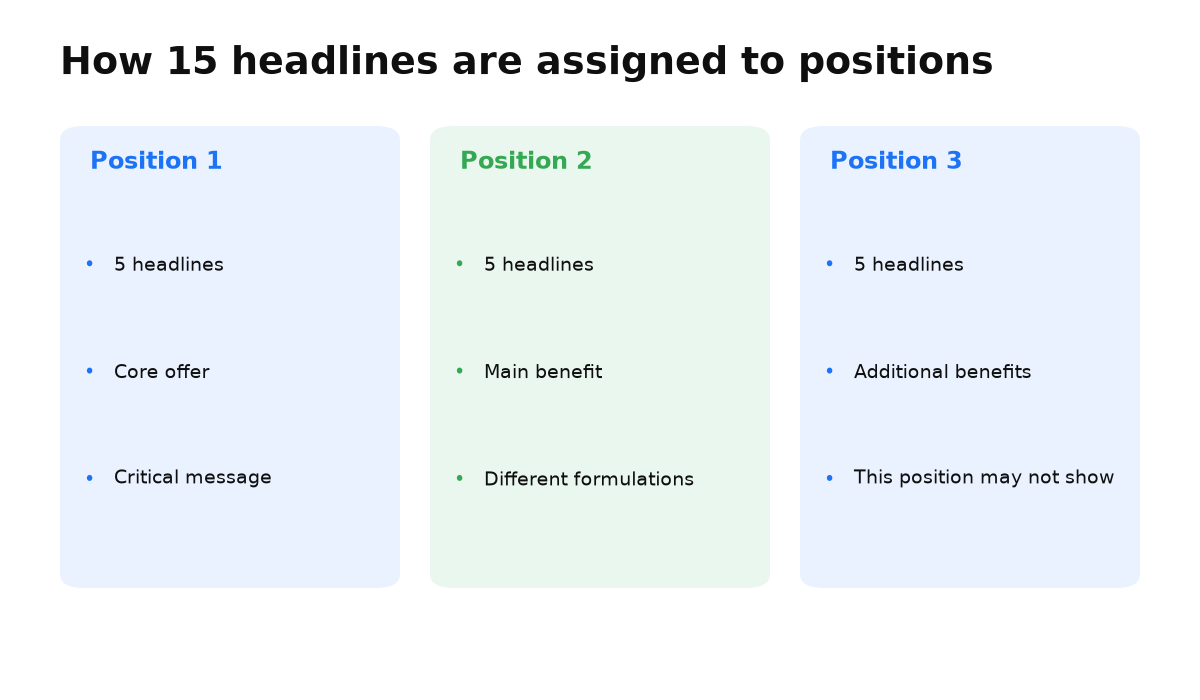
I use the following structure for 15 headlines:
- Use the first 5 as primary headlines. Each version should communicate the core offer in different words. Pin several unique options to position one only when that message must always appear there.
- Use the next 5 for the main benefits. Let them rotate freely unless a benefit must appear in position two.
- Use the remaining 5 for additional details. Leave them unpinned so the system can test more combinations. Do not place essential information only in a headline intended for position three because that position does not always appear.
Descriptions follow a similar pattern, and each description has a 90 character limit:
- Use the first 2 as primary descriptions. Keep the benefits concise. Pin them to position one only when the wording must always appear there. For a law firm, an example is: “Experienced lawyers. Former judges. Free first consultation.” Every word should contribute useful information.
- Use the other 2 for additional details. Leave them unpinned unless exact placement is required because the second description does not always appear.
If you want to build an RSA around your actual data volume without losing the offer’s meaning, the next step is to define a role for every headline and description in the campaign.
A campaign built by the manual still does not guarantee leads. My e-book “19 Google Ads Secrets” shows how to get the most out of Google Ads without draining your budget, drawn from real campaigns and tests.
See the book →Pinning creates three practical outcomes:
- Users do not see awkward repetition.
- Google has fewer possibilities to test when assets are pinned. This reduces the number of combinations but does not guarantee that testing will finish in a fixed proportion of the time.
- The campaign does not spend budget serving weak combinations during learning.
Other elements of a responsive search ad
- Final URL. On a multipage site, an ad for a specific product or service should lead to that product page, not the home page.
- Display path. This is the address users see at the top of the ad. Relevant keywords can reassure them that the landing page matches their search.
- Ad assets. Fill in the available assets so the ad can occupy more space and communicate more about the product and company.
- URL options. Leave them unchanged unless the campaign has a specific reason to use them.
- Dynamic keyword insertion. Entering the “{” character in a headline field opens the tool. Google can insert a relevant keyword and personalize the ad around the user’s query.
Frequently asked questions about responsive search ads
Conclusion on responsive ads in Google Ads
An algorithm can outperform a person, but it needs a large volume of data paid for by the advertiser. Small and midsize businesses often lack enough impressions for a complete test of every combination.
During setup, predict how the audience will respond, assign roles to headlines and descriptions, and pin critical positions. Then test that judgment against actual performance.
What a “Poor” Ad Strength rating means and whether you should chase a better one is covered separately: