
The ROAS formula is simple: divide conversion value by advertising cost. Multiply the quotient by 100% to express the result as a percentage.
Correct arithmetic does not guarantee an honest metric. The main error sits in the numerator: businesses enter revenue when they need gross profit. The numerator is then overstated by exactly the cost of delivering the product or service.
If you first need to understand what the metric means and which result your margin can support, start with our guide to ROAS in Google Ads. Here, we will focus on the calculation itself and the places where it fails.
The ROAS formula
The basic formula is:
ROAS = conversion value / advertising cost × 100%.
Google gives the same instruction for turning the Conv. value / cost column into a percentage: multiply the value to cost ratio by 100. You need only two inputs, but they must cover the same period and the same set of sales.
How to calculate ROAS from your data
- Find your advertising cost. Use the actual interaction cost for the period you are reviewing.
- Define conversion value. Decide whether it means revenue, gross profit, or the expected value of closed deals.
- Divide value by advertising cost. The result is ROAS expressed as a multiple.
- Convert the multiple to a percentage. Multiply the quotient by 100%.
For example, a business with a 25% gross margin only breaks even on advertising at 400% ROAS. Revenue of 400 monetary units contains gross profit of 100, with the rest required to cover cost of delivery. If advertising also cost 100, a revenue based report shows 400%, even though advertising has already consumed all gross profit.
ROAS as a percentage and a multiple
| Gross margin | Break even ROAS | The same result as a multiple |
|---|---|---|
| 25% | 400% | four times |
| 40% | 250% | two and a half times |
| 60% | 167% | about one and two thirds times |
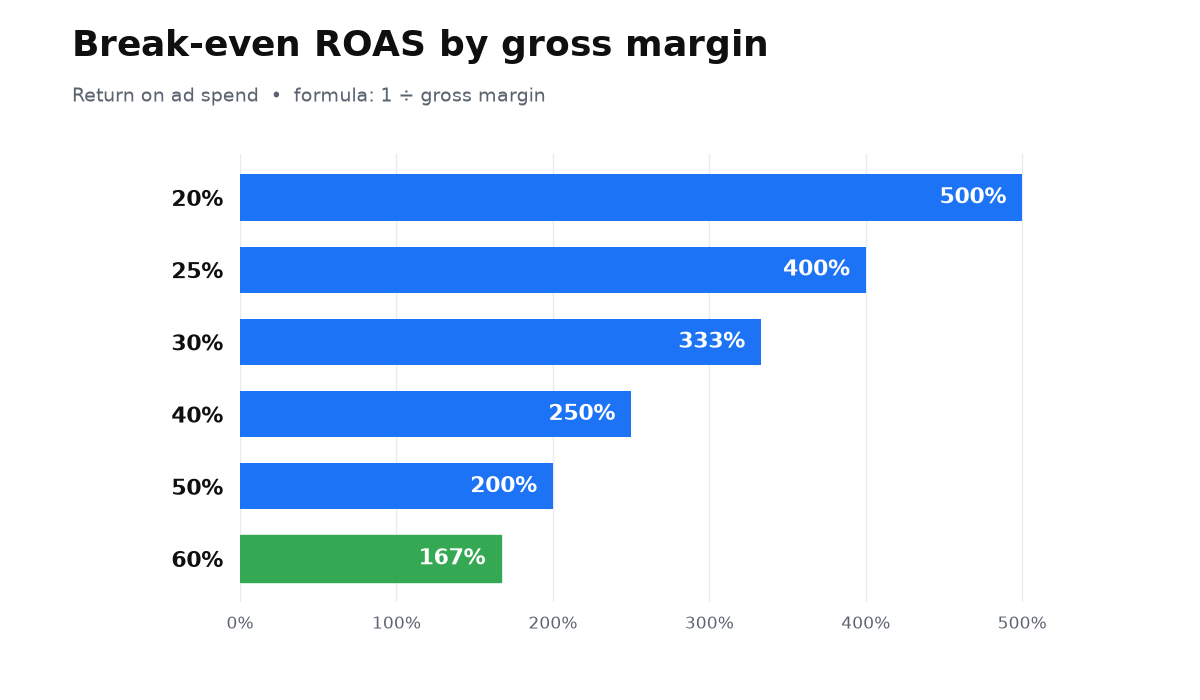
Percentages and multiples describe the same ratio. Trouble starts when one report calculates ROAS from revenue and another uses margin. Those numbers are not comparable, even if both carry the same label.
What belongs in the numerator
The numerator is not some abstract idea of income from ads. It is the conversion value the advertiser sends to Google Ads. Google’s official guidance explicitly offers sales revenue and profit margins as possible values. Your choice changes what the result means.
- Revenue tells you how much selling activity was associated with advertising cost.
- Gross profit shows how much remains after cost of delivery to cover advertising and other expenses.
- An assigned lead value is a model, not a completed sale. It must be checked regularly against closed deals.
A service business can estimate lead value from its average deal size and close rate. The final report should replace that forecast with the actual value of closed business. Otherwise, the sales process can lose prospects while the advertising ROAS remains untouched.
Where the formula breaks
Revenue replaces gross profit
This is the most dangerous substitution. Revenue looks impressive, but some of that money belongs to suppliers, contractors, or production. Leave cost of delivery in the numerator and it is overstated by exactly that cost. A handsome ROAS can then coexist with no profit.
A lead replaces a payment
Service sales often happen well after the initial enquiry. If every lead receives a fixed value and closed deal data never returns to the advertising platform, ROAS evaluates lead generation rather than cash. With a long sales cycle, compare advertising cost with deals from the same lead cohort, not merely with payments received during the calendar month.
The tag sends the wrong value
Purchases with different amounts require the tag to send transaction specific value and currency parameters. Google documents dynamic conversion values separately. Without them, the platform uses the same default value, turning ROAS into a disguised conversion count.
We left this terminology error on an older page in our own blog: under the label of return, it gives the formula “(income minus cost) / cost.” That is ROI, not ROAS. The page needs an update, and the useful correction here is straightforward: ROAS does not subtract cost from its numerator.
When this does not apply
- The business knows neither the value of a closed deal nor the share of leads that become payments. The numerator then has no reliable foundation.
- Cost of delivery varies sharply across products or services while only total revenue reaches the platform. Average ROAS can hide loss making sales.
- Cost and value come from different periods or currencies. The formula will produce a ratio, but that ratio will not describe the economics of the business.
You now have the formula, the order of inputs, and a check for the numerator. The useful next step is not to chase a prettier percentage but to connect advertising value with real margins and payments.
My e-book “19 Google Ads Secrets”: how to get the most out of Google Ads without draining your budget, drawn from real campaigns and tests.
See the book →Questions and answers
How do you calculate ROAS quickly?
Divide conversion value by advertising cost. Multiply the quotient by 100% to express the result as a percentage.
Should all revenue go into the numerator?
Not necessarily. Revenue measures sales but ignores cost of delivery. Gross profit is more useful for managing profitability, or you can at least test revenue based ROAS against the gross margin.
How should a business calculate ROAS with a long sales cycle?
Begin with expected lead value based on average deal size and close rate. After payment, replace the forecast with actual deal value and compare it with the acquisition cost of the matching lead cohort.