
Google Ads offers a broad range of advertising options. This guide explains the main campaign types, the kinds of advertising available in Google, and their ad formats. It will help you understand:
- what each kind of Google advertising can achieve;
- how to plan a Google Ads campaign for your market;
- when to use each Google advertising format.
When you decide to advertise through Google Ads, you create a campaign and select its objective. The right campaign type follows from that marketing objective. Think in advance about your brand strategy, the time available, and the budget you can commit. In this article, I explain how to match a campaign type to your advertising goals.
I have selected the main Google Ads campaign types:
- Search advertising;
- Display advertising;
- Shopping campaigns;
- Video campaigns and YouTube advertising;
- App advertising;
- Performance Max.

The fundamental difference between Search and Display advertising
Search advertising focuses on people with an expressed intention. Other contextual and display formats more often reach people who are simply spending time online.
A simple example makes the difference clear:
- Someone with severe tooth pain searches for an emergency dentist because they need an appointment now.
- Someone looking for a dinner recipe sees an emergency dentist banner beside the page, although the service is not relevant to them at that moment.
The first type of Google Ads campaign can sell quickly to interested people. The second introduces a product, explains its advantages, and presents the benefits of choosing your business. It gradually develops a colder audience and gently encourages the next action.
The path to purchase is indirect and usually longer:
- A person signs up for a free event and completes a form.
- They become involved in a topic that interests them.
- They may eventually buy something.
For physical products, downloading a catalog can serve as an intermediate step.
The call to action should reflect the temperature of the demand:
- Search calls to action: Visit site, Buy, or Order.
- Display calls to action: Sign up, Learn more, or Get a quote.
Search advertising (Search campaigns)

Read the separate guide to Google Search advertising.
How I assign roles to campaign types
I do not look for one universally best campaign type. Search captures expressed demand, Demand Gen and video help develop it, Shopping presents products at the point of choice, and Performance Max connects several Google properties around an objective. I separate budgets and evaluation criteria by role so that upper funnel activity does not compete in the same report with a campaign that closes an immediate query.
Google’s official documentation lists the available campaign types and their characteristic formats.
Google Ads began with Search advertising. It was the first Google advertising format and remains one of the most effective. Search targets the hottest audience because people already have a clear intention and are looking for a particular product or service on Google.
Consider a real world analogy. Two people enter an electronics store. One is browsing, while the other has a firm intention to buy a specific item. The second person approaches an adviser, explains what they need, and is very likely to buy the recommended product.
Search works well for businesses that sell in response to a mature need. The website receives visitors who already need what the business offers. If someone searches for pizza delivery near me, they intend to order now.
Search is less suitable when you offer a product people do not know about or do not yet realize they need. For example, many businesses never consider purchasing a financial analytics service. Before attracting that user through intent, you first have to demonstrate which problems the service can solve.
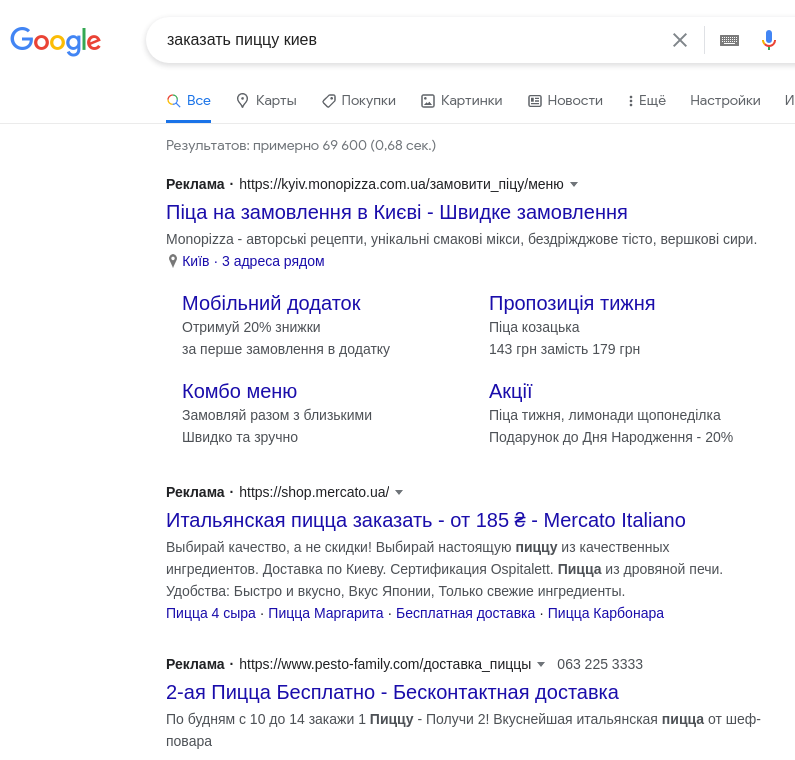
Search ads appear in response to a user’s query. Their main advantage is that the person is already interested and actively seeking a solution. Keywords provide the primary targeting, while location, gender, age, and other audience settings can refine who sees the ad.
What Search advertising looks like
Most Search ads are text based. Headlines and descriptions tell the user what they can buy. A link takes them to a relevant website page where the interaction continues and the purchase can be completed.
In addition to copy, an ad can include assets such as:
- up to 4 sitelinks leading to other website pages or an app;
- a business address and phone number;
- an image;
- additional descriptive details;
- a display path;
- ratings, review stars, and callouts;
- promotions.
These additions make an ad more prominent, communicate more information, and can bring more relevant visitors to the website.
Special kinds of text based Search ads include:
- Responsive search ads. Google can combine up to 15 headlines and 5 descriptions, allowing the ad to fit more searches. You can pin required copy while other elements continue to rotate.
- Dynamic Search Ads. The description remains fixed while Google selects URLs and headlines that correspond with the user’s query. The relevant website pages must be indexed by Google.
- Calls are now better collected through responsive search ads with call assets. Do not make the separate call-only format part of a new structure. New call-only ads can no longer be created, and existing ones are being phased out.
Where Search advertising appears
Search ads can appear in these places:
- Primary placement: Google Search results in response to a specific query.
- Additional placement: the Google Search Network, including sites with embedded Google search.
- Additional placement: sites and apps operated by Google search partners.
On broader partner inventory, a text ad may reach people who are simply reading weather information or news rather than responding to a specific commercial query. They lack immediate intent, so performance can be lower.
This example explains why it is usually useful to evaluate partner networks separately and disable them when they do not perform:
- A user enters JS in the search box on a web development school’s site. They are probably looking for that school’s JavaScript course.
- The user sees an ad offering JavaScript website installation. It does not match what they need.
- The advertiser pays for the visit but receives no useful result.
Ads limited to Google Search can therefore be more effective than the same campaign expanded across millions of unrelated sites.
How to set up Search advertising

Search campaign setup covers three levels:
- Targeting. Specify keywords and match types. An ad can appear when the user’s query exactly matches or is similar to a keyword, depending on the match type. You can also set a maximum cost per click for each keyword.
- Ads. Provide 3 to 15 distinct headlines, 1 to 4 descriptions, the landing page URL, and optional business names, logos, and other assets. These are the elements a user sees in the search results.
- Campaign settings. At this level, select the conversions to optimize, daily budget, bidding strategy, target cost per acquisition, and other parameters.
Characteristics of Search advertising
- Ads appear only in response to a query.
- You pay for ad clicks rather than impressions.
- You can define the bid and maximum amount you are willing to pay for each click.
Who Search advertising suits
- Businesses with a website where a prospective customer can complete a meaningful action.
- Advertisers offering a popular product or service that people frequently search for online.
- Businesses with a clear and familiar product or service. A new ecommerce site selling expensive Persian rugs, for example, may still create doubt. Until it earns customer trust, interested shoppers may prefer established suppliers.
Performance Max campaigns (PMax)

Read the separate guide to Performance Max campaigns.
Campaign types other than Search more often reach people without an immediate intention to buy. Direct sales through Performance Max can therefore struggle when the campaign lacks sufficient data and strong conversion signals.
These formats can look more engaging because they combine copy with images, video, and prominent interactive calls to action.
One major use of PMax is lead generation, where people submit their details on a website for later contact. Machine learning looks for people who are relatively likely to register or complete another selected conversion.
Where Performance Max appears and what it looks like
Performance Max can reach people while they read an article, watch a video, check email, or complete another online task. Its placement range is extensive:
- Google Search;
- YouTube beside videos or between them;
- Google partner sites and apps;
- Google Maps;
- Gmail, including Promotions and Social tabs. The ad resembles an email marked Ad or Sponsored. Opening it reveals the full message. About 80% of the world’s population uses Gmail. These placements may feel less intrusive because recipients can perceive them as useful information rather than a conventional banner.
A PMax ad can resemble a banner assembled from images, a logo, video, and text. Not every component must appear. A placement might contain copy with a logo, an image with copy, or video with copy.
When you add a product feed, the user can see product images, prices, descriptions, and the store name. Google assembles the ad automatically to fit the available space, so its dimensions and shape vary. The system chooses products from the feed based on what the user is looking for.
Performance Max settings
Campaign setup can use:
- Ad assets: 20 images, 5 logos, 5 videos, 15 headlines, 5 long headlines, 5 descriptions, a call to action, detailed information, sitelinks, and the business name.
- Targeting guidance: audience signals.
- Bidding objectives: conversions or conversion value.
My e-book “19 Google Ads Secrets”: how to get the most out of Google Ads without draining your budget, drawn from real campaigns and tests.
See the book →Discovery advertising (Demand Gen campaigns)

Read the separate guide to Discovery advertising.
This campaign resembles other visual formats such as Display, although it does not extend across partner sites in the same way as the Google Display Network. It can generate leads effectively and is strongly oriented toward mobile experiences.
What Discovery advertising looks like and where it appears
A carousel format can present up to 10 cards featuring products or services. The cards can emphasize benefits and provide more information about the company, delivery, promotions, brands, and other relevant details.
Delivery uses eligible Google properties, including YouTube and the other surfaces available to Demand Gen.
Discovery advertising settings
You can control:
- Objectives such as conversions, value, or clicks.
- Devices.
- The ad schedule.
- Ad groups for individual audiences. Targeting can consider demographics, interests, and life events, while also using remarketing lists and exclusions.
Google Display Network advertising (Display campaigns)

Read the separate guide to Google Display Network advertising.
AdSense connects websites that partner with Google. Google pays publishers for carrying ads on their sites and receives money from advertisers through Google Ads.
The Google Display Network includes millions of sites, creating extremely broad potential reach.
Display works with emerging needs. A person may not have decided what they need yet and may still be collecting, analyzing, and comparing information. Display increases awareness, while repeated exposure can encourage people to learn more about the product.
Display also supports remarketing audiences. These people visited your site but did not complete a purchase. Showing the product they viewed in other places can significantly increase the chance that they return and finish buying.
Ads can appear on Google partner sites and YouTube. The network reaches more than 90% of internet users worldwide. Targeting can use keywords, topics, and placements. You can also define audiences, such as people interested in saloon cars in the UK or sedans in the US.

Where Display ads appear and what they look like
A banner can include an image, copy, and a button leading to the website. Some placements may use only text, a logo, and a button. Main Display ad formats include:
- A responsive ad assembled by Google.
- An uploaded ad that presents the finished creative you supplied.
- A lightbox ad that initially occupies little space and expands to fill the screen after a click.
Ads can be delivered across:
- YouTube;
- the Google Display Network;
- Gmail.
Display advertising settings
Setup options include:
- Devices.
- A product feed for dynamic ads.
- Targeting by demographics, audience segments, keywords, specific websites, and topics. Combining targeting types can work well, for example connecting the user’s interests with the context of the page where the ad appears.
- Ad assets including 15 images, 5 logos, video, 5 headlines, a long headline, and 5 descriptions.
- Advanced options that allow Google to process assets further.
- Improve images through smart cropping and by adding copy or logos.
- Create video from text and images.
- Use native formats that adapt the ad to a site’s visual style.
Characteristics of Display advertising
Ad creation is automated. You provide copy, images, and a logo, while Google creates versions that fit naturally into each publisher’s layout.
- Engagement oriented ads. Interactive image and video ads can appear on YouTube and the Display Network.
- Gmail advertising. These ads appear as teasers in the Promotions tab and open like ordinary emails.
Types of Display advertising
- Text ads. Conventional Google Ads text creative.
- Image ads. Upload your own visual or use a free Google image in JPG, PNG, GIF, or HTML5 format.
- Text and image ads. Advertising that combines copy with illustrations.
- Video ads. Video can improve brand recognition and present a product with more detail.
- Rich media ads. Creative that combines text, video, and animation.
Who Display advertising does not suit
1. Advertisers with fixed brand colors and finished banners who do not want any elements to change, because algorithms can automatically adjust the creative characteristics.
2. An automated campaign may not suit a business whose only objective is to bring entirely new users to the site, because automation relies heavily on interested buyers and remarketing signals.
Shopping campaigns (Google Shopping advertising)
Shopping ads are assembled from a table of your product data rather than written by hand, so the feed decides what can be shown at all. Exact field limits and a ten-minute audit of your own file: the product feed and how not to break it.

Read the separate guide to Shopping campaigns.
Google Shopping is designed for ecommerce stores and websites where customers can complete a purchase. The site must therefore meet criteria such as:
- having a shopping cart or basket;
- offering delivery;
- supporting different payment methods;
- providing a returns process.
A Merchant Center account is another mandatory requirement.
Shopping helps generate more ecommerce sales through Google advertising and suits online stores in many product categories.
The more specific the product in a user’s query, the better a product ad can perform.
Where Shopping ads appear and what they look like
Shopping ads appear beside or above Google Search results and in the Shopping section. A product card contains an image, product title, price, and store name. It can also show ratings, reviews, additional links, promotions, and delivery options. The shopper can choose the item that fits their visual and price expectations before visiting the site.
Characteristics of Shopping advertising
Shopping can expand coverage. A prospective customer may see several product ads together with a relevant text ad for the same query. This can double the advertiser’s coverage of potential buyers.
- Simpler management. Instead of relying on advertiser selected keywords, Google determines which queries trigger an ad from the product attributes supplied through Merchant Center.
- Higher purchase probability. When a user searches for a particular product and can immediately see its image and price, they may be more likely to click that ad.
Who Shopping advertising suits
- Businesses whose products have images and prices.
- Advertisers selling clear and familiar products.
- Businesses that need visibility at the top of the search results.
- Stores with a broad product range.
Video campaigns (YouTube video advertising)

Read the separate guide to YouTube advertising.
Video campaigns can reach large audiences on YouTube and Google partner video properties. You can choose the objective and subtype, then select ad formats that explain your product and encourage viewers to act.
The principle resembles targeted video advertising on Facebook and Instagram. A video creative appears on YouTube for people with relevant interests.
This traffic can show strong engagement. People who visit a website from YouTube advertising may:
- show more interest;
- spend longer on the site;
- interact with more of its content.
Video can advertise almost any kind of business. A short video might feature:
- the product manufacturing process;
- the team and business owner;
- product benefits and characteristics;
- the consultation process.
Watching a video can have a strong effect, convey atmosphere, and help a viewer decide that they need the product. Video can therefore sell better than other display formats and sometimes approach Search performance.
Where YouTube advertising appears and what it looks like
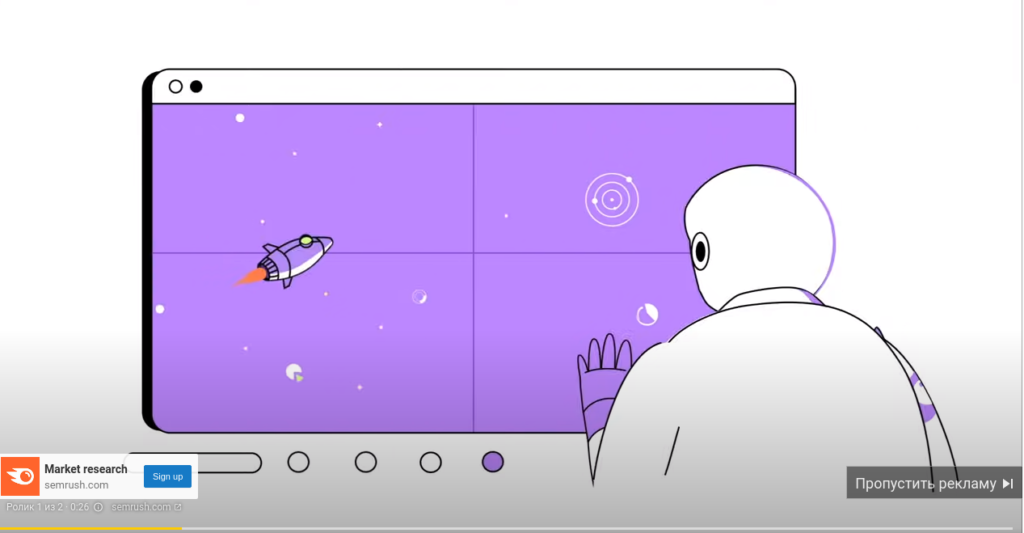
These ads appear on YouTube, except during ad free viewing by Premium subscribers:
- In-stream ads appear at the beginning, middle, or end of another video:
- Skippable in-stream. The user can skip the ad after 5 seconds.
- Non-skippable in-stream. The viewer cannot stop the ad and must watch the complete 15 second message.
- In-feed video ads, previously called Video Discovery, look like video cards. They can appear on the YouTube home page, in search, and among recommendations. A person watches after clicking. The creative should look like a normal YouTube video, which is also how users tend to perceive it.
Compare 2 in-stream scenarios:
- Skippable: the ad is served 10000 times, 9000 users skip it, 1000 watch and create a charge for the advertiser, and 100 buy.
- Non-skippable: the complete ad is served 10000 times and the advertiser pays for every view, 1000 people visit the website, and 100 buy.
The final result is the same, with 1000 visitors and 100 purchases, but the advertising budget differs by a factor of 10 in favor of the skippable option. The second format may make sense for an election campaign that needs very broad exposure and has an enormous budget. Targeting remains essential, whether you choose a specific YouTube channel or define audiences by interest.
Types of YouTube advertising
- Outstream ads appear on partner sites. They were designed for mobile devices so that a user can start the video with one tap. Their broad inventory can improve brand awareness.
- Non-skippable in-stream ads prevent the viewer from skipping the message. Their duration must not exceed 15 seconds.
- Bumper ads increase reach and brand awareness. They last no more than 6 seconds and cannot be skipped.
Who YouTube advertising suits
- Businesses that need to improve brand awareness.
- Advertisers able to present their product effectively through video.
Advertising for mobile apps

App campaigns can advertise across major Google properties such as Search, Google Play, YouTube, Google Search recommendations, and the Display Network. Management is relatively simple because the advertiser supplies text and selects the bid.
If your business has an app, you can promote it by linking the Google Play and Google Ads accounts, then creating an App campaign in Google Ads.
Where app advertising appears and what it looks like
Ads can appear across Google services including Search, YouTube, Gmail, Google Play, Discover, and the Display Network, but only on mobile devices.
An ad contains information about the app, including its name, icon, image, copy, video, and rating. Google takes some information directly from the app store. The user can choose Install or Close. Selecting Install sends them to Google Play.
How to set up advertising for mobile apps
Setup allows you to choose:
- The campaign subtype.
- App installs.
- A particular action within the app.
- Pre-registration before the app launches.
- The platform, Android or iOS.
- The app you want to advertise.
Characteristics of advertising for mobile apps
- Users cannot always configure a free ad blocker inside a mobile app, so they may not be able to disable the advertising easily.
- Many users buy products and services through apps.
Who advertising for mobile apps suits
- Businesses that have already tested other advertising formats and want to reach an additional target audience.
- Ecommerce businesses with convenient navigation in their own app.
Local objectives in Performance Max
Separate Local campaigns can no longer be created because this scenario has moved to Performance Max. It suits a salon, restaurant, or other physical location that needs directions, calls, and visits. Launch requires accurate addresses in Google Business Profile and a connection between that profile and Google Ads.
During setup, choose the Store visits and promotions objective with Performance Max as the campaign type. Provide:
- the business name;
- branch addresses and the radius around them;
- opening hours;
- a phone number.
Google can serve these ads in Google Maps, YouTube, Display, and Search based on a user’s queries and location.
Smart campaigns and automated formats

Read the separate guide to Smart campaigns.
Google manages these campaigns through automation. The advertiser describes the business, while Google configures other functions including targeting, cost per conversion, and the ad.
Main historical and current automated formats include:
- Google Ad Grants: ads for nonprofits, eligibility and the catch as a historical format. New ecommerce campaigns now generally use Shopping or Performance Max.
- Google Ads Targeting for the US and Europe on the Google Display Network.
- Demand Gen as the current name replacing Discovery.
Frequently asked questions about Google Ads campaign types
Conclusions about Google Ads campaign types
Use the range of options available in Google Ads. Testing and combining different formats can help you build the most effective system for the business.
Search is usually the first campaign type to configure because it is closest to a sale. It delivers 80-90% of sales in a business. You can then expand into other forms of Google advertising. The same video can support Display, Video, and PMax campaigns. The same image can be reused in Demand Gen, PMax, and Display.
| Article or topic | Description |
|---|---|
| Google Ads campaign types | All campaign types and advertising formats available in Google Ads |
| Search advertising | Setup and characteristics of Search advertising and Google Ads Search campaigns |
| Shopping campaigns | Setup and characteristics of Shopping advertising, Shopping campaigns, and Google Shopping |
| Performance Max | Setup and characteristics of Performance Max advertising and PMax campaigns |
| YouTube advertising | Setup and characteristics of video advertising and YouTube video campaigns |
| Discovery advertising | Setup and characteristics of Discovery advertising and Demand Gen campaigns |
| Display advertising | Setup and characteristics of campaigns on the Google Display Network |