

Store owners usually come to Google Ads for shopping ads and hit something they did not plan for: first you have to set up a different console, hand your catalogue to it and wait for Google to approve it. This is where weeks disappear, and not because it is difficult. It is because the steps look identical while doing entirely different things.
One more word you will need below: feed. It is simply a table of your product data in a format Google can read. Not a program, not code. A table.
What Merchant Center is, and why Google Ads does not replace it
Google Ads answers the question “who do we show this to, and at what price”. Merchant Center answers a different one: “what exactly are we showing”. It is a store of product data: title, price, availability, image, link. A shopping ad is assembled from that data automatically, which is why you never write its copy by hand the way you do in search.
The practical consequence: if the price in your catalogue is wrong, the ad carries the wrong price too, and Google disapproves the product for it. Advertising here is not a layer on top of your store. It is a direct reflection of your store.
The same catalogue feeds free product listings, paid shopping campaigns and Performance Max alike. So work spent on Merchant Center is not a cost for one channel. It is the foundation under every product placement you will ever run.
Why your interface looks nothing like the screenshots
For several years Google moved everyone to a new version of the console and called it Merchant Center Next. In July 2026 the company announced the name was going away: “You’ll begin to notice the ‘Next’ branding removed from our Help Center articles, email communications, and the Merchant Center interface. The platform you use today will simply be referred to as Google Merchant Center”. The same note says it plainly: “No action is required. This name change doesn’t affect your account”.
In practice this means one thing, and it matters: nearly every step-by-step guide out there, including ones published in the summer of 2026, is written against the old name. If you are reading a guide about “Merchant Center Next” and cannot find those labels in your account, nothing is wrong. There is nothing to do.
Verifying and claiming are two separate steps
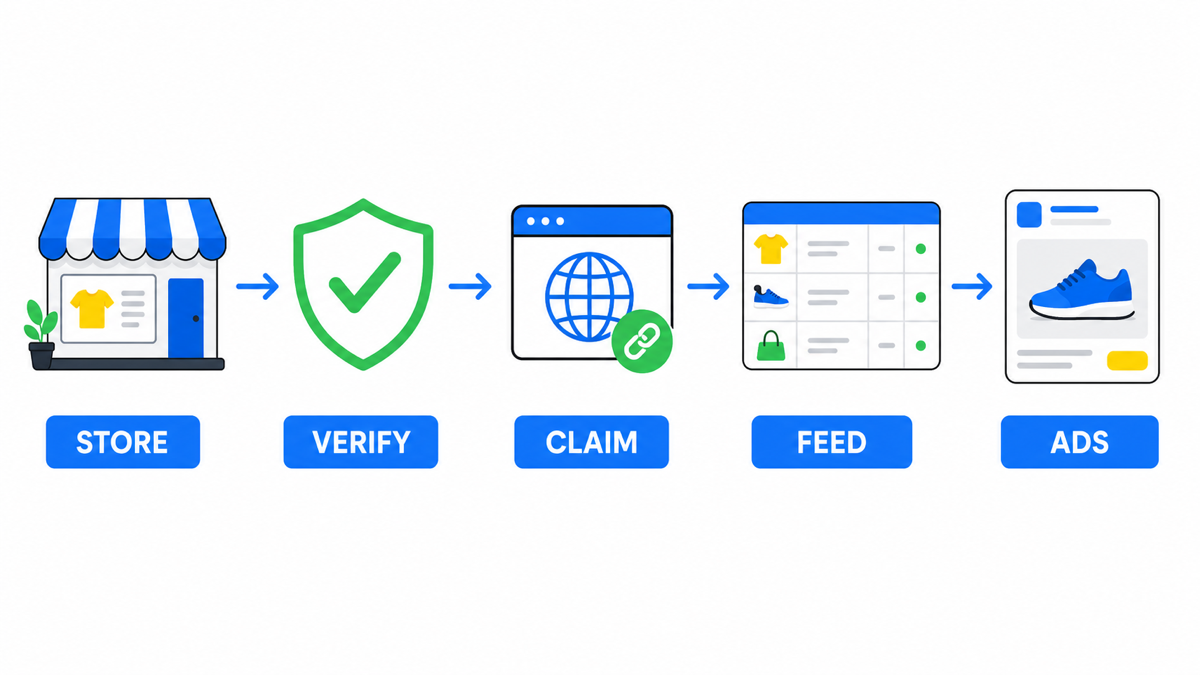
This is the single most common beginner mix-up. Google’s own documentation treats them as two distinct definitions: verify means “you let Google know that you’re the website owner”, while claim means “you create a link between your website address and Merchant Center account”.
| Action | What it proves | What happens if you skip it |
|---|---|---|
| Verify | That the site is yours | Google will not accept the address at all, so there is nowhere to go next |
| Claim | That this address is tied to this particular Merchant Center account | The site is verified, yet products still do not show: there is no link to the account |
There are five ways to verify: email, an integration with your e-commerce platform, an HTML tag or file on the site, Google Tag Manager, or Google Analytics if you hold administrator rights there. The method does not change the outcome, so take whichever one you already have access to right now.
One address, one account
The rule sounds harmless until you run into it: one address can be claimed by one account. Verbatim from the documentation, “A single URL can only be claimed by one account”. There is exactly one exception: where a parent account sits above several child accounts, the children inherit the claim from the parent. So the only parties who can share an address are those sitting under one parent.
Where this bites in real life:
- You changed agencies. The previous one claimed your address into their account, and until they release it, your new account cannot have it.
- You started a second account “from scratch” because the first one got tangled. The address stayed with the first one, and the clean slate will not launch.
- Several storefronts on one domain. These are separated through sub-accounts, not through several independent accounts.
Hence the practical rule: register the Merchant Center account under the business owner and grant your contractor access to it. Five minutes at the start, weeks saved when the contractor changes.
And if a former agency already holds the address and will not respond? Unpleasant, but not a dead end, and the order matters. Start with a written request to release the claim, by email rather than a messenger: you need a trail. In parallel, check whether you still hold rights in that account yourself, because access was often granted to the owner’s email and then forgotten, in which case the whole thing closes in a minute. If the silence continues, what remains is a support request with evidence that the domain is yours, and this is where rights over the site itself matter: verifying site ownership is done independently of whoever holds the claim. Which is why the first move in any dispute is to verify the site under your own name.
Half of all rejections are about the store, not the feed
The unwelcome part for anyone polishing their catalogue: Google inspects the storefront itself, not just the product data. The requirements are stated plainly in the documentation, and every one of them can be checked in ten minutes by opening your own site as a customer.
- Contacts in plain sight. Verbatim: “Make your contact information clearly available on your website”, with a contact form, a link to your social business profile, an email address or a phone number given as examples.
- At least one conventional payment method must be available at checkout: credit card, debit card, invoicing or payment on delivery.
- A cart that works end to end. The wording leaves no wiggle room: a user must be able to add products to the cart and fully complete the checkout process. What is being tested is the whole path, not the presence of a button.
- Honestly disclosed terms. The site must “clearly and conspicuously” disclose all related conditions before and after purchase, including the payment model and the full expense the user will bear.
- A readable returns policy: what the user is required to do, under what circumstances you offer returns and refunds, the timeframe in which you accept returns and when a refund can be expected. And the clause almost everyone skips: “Even if you don’t offer returns or refunds, still state your policy explicitly”. “We do not accept returns” is a policy too, and it has to be written down rather than left silent.
Pay particular attention to the full-expense clause. Stores rarely get into trouble here because they are deceiving anyone. They get into trouble because shipping or a fee only appears on the final checkout step. The amount is technically disclosed, and the customer still learns it too late.
A campaign built by the manual still does not guarantee leads. My e-book “19 Google Ads Secrets” shows how to get the most out of Google Ads without draining your budget, drawn from real campaigns and tests.
See the book →The order of operations that saves weeks
- Walk your own site as a customer, all the way to payment. Skipping nothing. This filters out most future rejections and costs nothing.
- Register the Merchant Center account under the business owner, not the contractor.
- Verify the site by any available method, then claim the address separately. Make sure both statuses are green, not one.
- Upload the feed and wait for the initial review. Per the documentation that is “up to 3-5 business days for Shopping ads”, and possibly longer for other programs.
- Clear the disapprovals before you switch the budget on. A campaign running against a catalogue where half the products are disapproved competes on the surviving half: you pay the normal price per click with a truncated assortment, and you judge the channel on incomplete data.
- Only then link Merchant Center to Google Ads and launch the campaign.
Step 1 comes first for a reason, even though it looks the least technical. Catalogue errors are fixed in bulk, in one exported spreadsheet over an evening. A broken cart is fixed by a developer, in a queue and for money, and that is what takes weeks. Which makes it far cheaper to hit that wall before you submit rather than after.
Where this is available
Shopping ads and free product listings share one country list: if your country is on it, both are open to you, and if it is not, neither is. Ukraine is on that list, alongside the United States, the United Kingdom, Germany and Poland. For a store selling into several markets this closes the availability question entirely: what you actually have to plan is the language of your data and the currency, not whether the channel exists.
Frequently asked
Do I need Merchant Center if I am not running paid ads
You do, if you want free product listings. They draw on the same catalogue and the data requirements are identical. The only difference is whether you pay for the impression.
Do I have to pay for Merchant Center itself
No. The console and the storage of your product data are free; you pay for advertising in Google Ads if you choose to run it. Which is exactly why a store benefits from setting up Merchant Center before its first advertising budget: free product listings draw on the same catalogue.
My products are only on a marketplace, I have no site of my own
Then this route is closed to you for now, and the reason is technical rather than bureaucratic. Both mandatory steps, verifying and claiming, are performed against your own address: the first proves the site is yours, the second ties that address to your account. You cannot verify somebody else’s storefront. Product placements become available together with your own site, not before.