
To reduce clicks from places your business does not serve, define the real service area, switch from “presence or interest” to “presence,” set a radius around the operating point, and exclude nearby regions that overlap the target.
Selecting a city is not enough if the campaign also reaches people who merely showed interest in it. Location targeting for a local business should match where customers can visit or where staff can travel. If the campaign supports a physical location, compare it with the guide to advertising on Google Maps.
Presence versus presence or interest
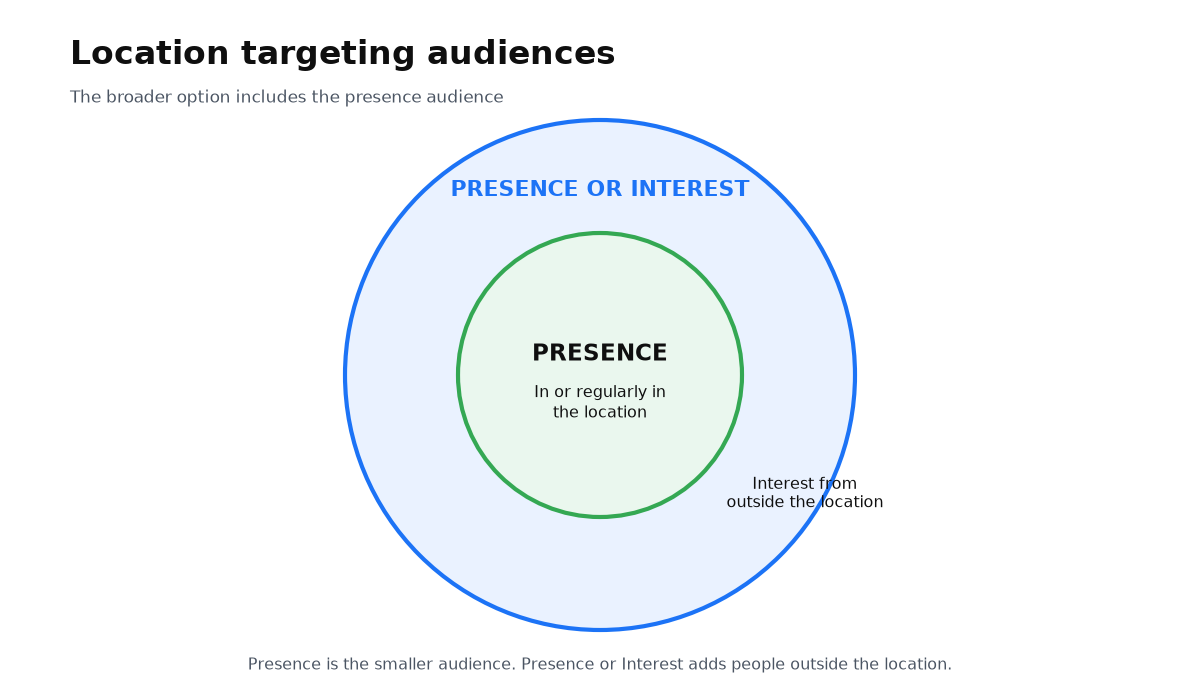
Presence reaches people likely to be physically present or regularly in the selected location. Presence or Interest reaches those same people plus people outside the area who have shown interest in it. Google’s advanced location options guidance defines the distinction this way.
| Setting | Who it can reach | When it fits |
|---|---|---|
| Presence or interest | The same people as Presence, plus people outside the location who have shown interest in it | The business sells remotely or deliberately serves demand from outside the area |
| Presence | People likely to be physically present or regularly in the location | The customer must visit or the provider travels only within a fixed service zone |
Google describes the broader option as the default and general recommendation. The same guidance says advertisers should consider Presence when they want users only in specific locations. That often matches a clinic, salon, repair shop, or local delivery service more closely.
When to use a radius or a list of locations
A radius works when the service area starts from an address such as a clinic, salon, warehouse, or technician base. Google can target a defined distance from that point. Under its location targeting rules, the minimum radius is 1 km.
A city or district list works better when the business follows administrative boundaries. A technician may cover named towns without serving every point in a circle around the office. You can also combine the methods by choosing a broad base area and excluding unwanted sections.
How to configure a local campaign
- Write down the real service zone: where customers will travel or where your team actually goes.
- Add cities, districts, or a radius around the operating point rather than an arbitrary regional center.
- Use Presence for a strict local service. Keep the broader option only when outside interest has commercial value.
- Exclude places inside a broad target where you do not take orders.
- After launch, inspect actual geographic reports and refine the map because location signals are not perfectly accurate.
How location exclusions work
An exclusion is useful when an unwanted city or district sits inside a broader selected area. If the same location is both included and excluded, the exclusion takes priority. Google states this rule in its location exclusion guidance.
There is no need to exclude every neighboring region that was never targeted. Start with real overlaps such as suburbs inside a radius, districts within a selected region, or places beyond the team’s practical travel boundary.
When this does not apply
- The business sells remotely across the country. Strict Presence can remove relevant customers who are interested from another location.
- The area is too small to meet privacy or audience thresholds. Delivery can become intermittent or disappear.
- You expect absolute geographic precision. Google uses IP, device signals, and behavior and describes location targeting as a best effort.
The campaign area now matches the real service: an appropriate presence setting, a radius or location list, and targeted exclusions. The answers below explain why ads may appear outside the area, the minimum allowed radius, and how exclusions take priority.
My e-book “19 Google Ads Secrets”: how to get the most out of Google Ads without draining your budget, drawn from real campaigns and tests.
See the book →Questions and answers
Why does someone outside my area see the ad?
Check the broad Presence or Interest option first. The person may have shown interest in your location while being elsewhere. Google’s geographic signals are also probabilistic.
What is the smallest radius I can set?
Google requires at least 1 km around a point. Even an allowed small area may deliver inconsistently if it does not meet audience and privacy thresholds.
Which wins, inclusion or exclusion?
Exclusion takes priority. When the same area appears in both lists, the ad should not serve there under Google’s rule.