
The wider context of the system is covered in Google Ads: The Complete 2026 Guide. See also the conversion calculator.
Google Ads conversions show which business results your advertising actually produced. Clicks and impressions matter, but revenue comes from people who purchase, submit a lead form, register, or call your business.
In short, a conversion is a valuable action completed after someone interacts with an ad. You can measure website actions by installing the Google tag directly or through Google Tag Manager. In most cases, Google Tag Manager is easier to maintain and test.
Google Ads supports 4 main conversion sources: websites, apps, phone calls, and imported data. One common mistake is leaving conversion value unconfigured even when the business already has enough data to estimate it. Without values, Target CPA treats every primary conversion equally, while Target ROAS cannot distinguish a 50$ customer from a 5000$ customer.
The 2026 version of this guide also covers Enhanced Conversions and the current Target CPA and Target ROAS labels.
What conversion tracking can tell you in Google Ads
If the campaign, ad group, or keyword table does not include conversion data, add the relevant columns:
- Open the campaign table.
- Select Columns.
- Select Modify columns.
- Open the Conversions category.
- Select Conversions and apply the changes.
Once tracking is active, you can answer practical questions such as:
- Which keywords generate the most conversions?
- Which search terms were used by people who later converted?
- Which audiences convert most often by age, gender, interests, or remarketing segment?
- Which locations produce the most conversions?
- What does each conversion cost in different cities, states, regions, or countries?
- How does conversion performance differ between markets such as New York, Austin, London, and Manchester?
This information lets you improve campaigns step by step. You can increase conversion volume, reduce cost per conversion, and stop paying for traffic that produces clicks without customers.
How to create a conversion action in Google Ads
Conversions can be created directly in Google Ads or imported from Google Analytics 4. To create a website conversion directly in Google Ads:
- Open Goals.
- Select Conversions, then Summary.
- Select Create conversion action.
- Choose Conversions on a website.
- Enter your website domain, such as
ivitskiy.com/blog. - Select Scan.
Google will check whether the site already has a Google tag or a linked Google Analytics property. If neither is detected, it will offer instructions for installing a Google tag.
You can define a conversion from a page URL when the action ends on a unique confirmation page. For button clicks, dynamic purchase values, transaction IDs, or custom parameters, choose the manual code setup instead. Google documents both options in its website conversion setup guide.
How to create a conversion action manually
For each conversion action, configure the following settings.
Category
Choose the category that most closely matches the action, such as Purchase, Submit lead form, Sign-up, Contact, or Book appointment. Create separate conversion actions when you need to measure several outcomes.
Conversion name
Use a name that anyone working in the account will understand. Good examples include Lead form submitted, Phone consultation booked, and Online purchase.
Conversion value
Conversion value is the monetary value of the action. For ecommerce, send the actual transaction value dynamically whenever possible.
For lead generation, you can estimate the average value of a lead from sales data. Suppose 10 leads produce 2 sales worth 5000 $ each. The average value per lead is:
2* 5000$ / 10= 1000$
Use profit rather than revenue if profitability is the metric that should guide bidding. If there is not enough reliable data, select the option that does not assign a value and revisit the setting after collecting sales results.
Count and conversion windows
Purchases are normally counted as Every, while lead submissions are often counted as One per ad interaction to avoid treating repeated form submissions as separate customers.
The default conversion windows are 30 days after a click, 3 days after an engaged view, and 1 day after a view-through impression. These defaults are documented in Google’s conversion windows guide. Keep them unless the buying cycle gives you a clear reason to change them.
How Enhanced Conversions improve measurement
Enhanced Conversions supplement regular tracking with securely hashed first-party customer data, such as an email address or phone number collected through a form or checkout.
This can recover some conversions that would otherwise be difficult to attribute because of browser privacy restrictions, cookie limitations, or movement between devices. It also provides better input for automated bidding.
Enable Enhanced Conversions when the site legitimately collects email addresses or phone numbers and the implementation complies with the applicable consent and privacy requirements. Google now supports an account-level setting and unified data inputs, as explained in its Enhanced Conversions documentation.
After reviewing the conversion settings, select Done, then Save and continue. Repeat the process for every distinct action you need to measure.
Creating the action inside Google Ads is only the first half of the setup. The website must still send the corresponding event when a visitor completes the action. There are 3 common implementation methods:
- Install the Google tag and event code yourself.
- Send the instructions to a developer.
- Configure the event through Google Tag Manager.
Google Tag Manager is the preferred route in 98% of routine implementations because it separates tracking changes from the website release cycle and provides a preview mode for testing.
How to set up the conversion with Google Tag Manager
First, obtain the conversion ID and conversion label:
- Open Goals, then Conversions, then Summary.
- Select the conversion action by name.
- Open its tag setup instructions.
- Choose the Google Tag Manager option.
- Copy the Conversion ID and Conversion label.
Then configure 2 components in Google Tag Manager: a trigger and a tag.
Create the trigger
- Open Triggers.
- Create a new trigger.
- Give it a clear name, such as
Thank-you page viewed. - Select Page View as the trigger type.
- Choose Some Page Views.
- Set the condition to Page URL contains and enter a unique part of the confirmation URL, such as
thank-you. - Save the trigger.
Do not use Click URL for a page-view trigger. Click URL describes the destination of a clicked link, while Page URL describes the page the visitor actually reached.
A thank-you page trigger is suitable only when that URL cannot be opened or refreshed repeatedly without completing the action. For embedded forms, single-page applications, or purchases with dynamic values, use a form event, data layer event, or purchase event instead.
Create the conversion tag
- Open Tags.
- Create a new tag.
- Give it a descriptive name.
- Select Google Ads Conversion Tracking as the tag type.
- Enter the conversion ID and conversion label.
- Add the value, currency, and transaction ID variables if the conversion requires dynamic data.
- Attach the trigger created in the previous step.
- Save the tag.
Add a Conversion Linker tag that fires on all page views if the container does not already have one. Then use Google Tag Manager Preview mode to complete a test conversion and confirm that the correct tag fires once.
Publish the container only after the test succeeds. Return to the conversion summary in Google Ads and check the Status column. Reporting may take several hours to update after the first valid event.
My e-book “19 Google Ads Secrets”: how to get the most out of Google Ads without draining your budget, drawn from real campaigns and tests.
See the book →What conversion tracking changes in campaign management
Once several conversion actions are recording correctly, you can optimize campaigns around business outcomes instead of click volume.
You can compare keywords, search terms, audiences, locations, devices, and campaigns by:
- Conversion volume
- Cost per conversion
- Conversion rate
- Conversion value
- Return on ad spend
- Qualified lead or completed sale volume
Primary conversions influence automated bidding and appear in the main Conversions column. Secondary conversions remain available for analysis but do not directly guide Target CPA or Target ROAS.
Starting in June 2026, Google changed the labels used for 2 Smart Bidding configurations. Maximize conversions with a Target CPA is now shown as Target CPA, while Maximize conversion value with a Target ROAS is now shown as Target ROAS. The underlying bidding logic did not change. Google explains the transition in its Smart Bidding documentation.
Both strategies depend on the conversion data supplied to them. Target CPA needs clean primary conversion actions. Target ROAS also needs meaningful conversion values. If low-quality leads, duplicate events, and completed sales are all treated as equal, automation will optimize toward the wrong outcome.
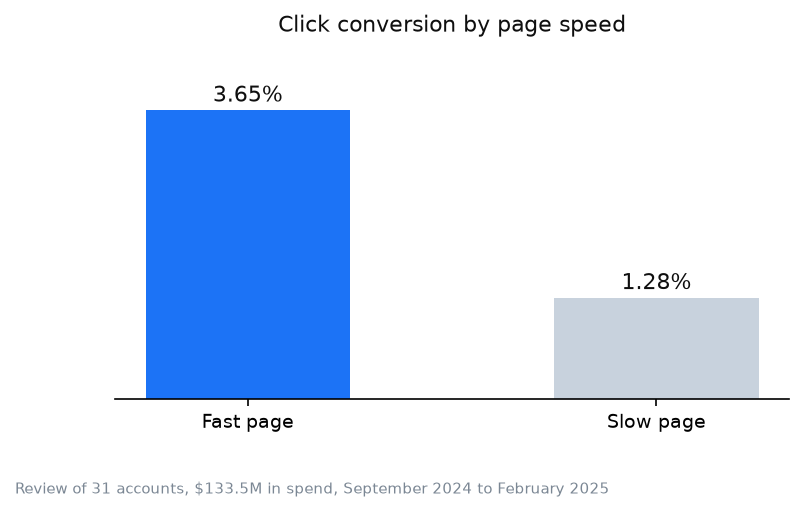
A practical response is to set the target ROAS with a buffer, approximately 15% above the minimum required by the business economics, then validate the result against actual revenue and profit. The analysis covered $133M in advertising spend.
Google Ads conversion tracking FAQ
Why are Google Ads conversions different from GA4?
Google Ads and GA4 can use different attribution settings, conversion windows, reporting dates, time zones, and channel scopes. Google Ads focuses on interactions with Google advertising, while GA4 evaluates activity across the channels included in the property.
A difference of 10-30% may be normal. Investigate the setup when the gap changes suddenly, grows consistently, or appears only for one conversion action.
How long does it take for Google Ads conversions to show?
The first event can appear within several hours after the tag fires. The tracking status should update after Google Ads processes the first valid conversion.
A campaign may need 2-4 weeks of active traffic before it has enough representative data for reliable automated bidding. The required time depends on conversion volume, reporting delay, and the stability of the conversion action.
What is the difference between primary and secondary conversions?
Primary conversions appear in the main Conversions column and directly influence conversion-based bidding strategies such as Target CPA and Target ROAS.
Secondary conversions are recorded for observation. Events such as adding a product to the cart, viewing a key page, or beginning a form can be useful diagnostics, but they should not compete with purchases or qualified leads unless that is an intentional bidding decision.
Do I need to assign a conversion value in Google Ads?
It is not mandatory for every conversion action. Target CPA can optimize without monetary values, but Target ROAS requires them.
Values are especially important when transactions vary significantly. Without accurate values, the system cannot distinguish a 50$ customer from a 5000$ customer.
Why does Google Ads say no recent conversions?
This normally means that the conversion action has not recorded an event recently. Common causes include:
- An incorrect Google Tag Manager trigger
- A changed thank-you page URL
- A form that no longer redirects to the expected page
- A consent banner preventing the tag from firing
- A tag published in the wrong container
- A conversion label copied from a different action
- A real decline in completed actions
Use Google Tag Manager Preview mode and Google Tag Assistant to complete the action yourself. Confirm that the tag fires once, sends the correct conversion ID and label, and is not blocked before consent is granted.
What to do next
After the first conversion is recorded, complete these checks before changing bids:
- Perform a real test conversion on desktop and mobile.
- Confirm that the event appears only once.
- Check that the conversion value and currency are correct.
- Verify that purchases include a transaction ID.
- Compare Google Ads data with form records, ecommerce orders, phone logs, or CRM records.
- Decide which actions should be primary and which should be secondary.
- Confirm that the attribution window matches the normal sales cycle.
- Monitor performance before moving campaigns to Target CPA or Target ROAS.
The next useful improvements are connecting Google Ads with GA4, tracking form submissions separately, calculating customer lifetime value, importing qualified leads or offline sales, and building a regular conversion-tracking audit.
When this does not apply
- A tag firing does not prove that measurement is correct. Reloading a thank-you page or using the wrong trigger can create duplicate or false conversions.
- Importing the same GA4 event while also measuring it with a separate Google Ads tag can cause double counting if both actions are primary.
- A website tag cannot measure sales completed by phone, in a CRM, or offline. Those outcomes require call tracking or imported conversions.
- Enhanced Conversions can improve attribution, but they cannot provide complete measurement when consent, browser, device, or data-quality limitations prevent matching.
- A thank-you page trigger is unsuitable when visitors can reach the page without completing the action or refresh it to fire the event again.
Ads in other niches
What the “Awaiting conversions” status (formerly “No recent conversions”) means and when it is not a broken tag is covered separately: