
New advertisers often confuse ad quality with keyword Quality Score. That can lead a business owner to optimize a reassuring label in the interface while missing weak sales. Here is how the two measures differ, how Quality Score relates to click costs, and why it should be read alongside CTR, conversions, and ROI.
What Quality Score means
Google Ads shows two similarly named assessments, but they have different practical value.
- Ad quality tells you how well the ad itself has been completed. A high rating does not guarantee savings or sales.
- Keyword Quality Score runs from 1 to 10. It is related to click costs and can help explain why advertisers pay different prices for comparable traffic.
The second measure deserves attention when you want to understand why a campaign may be overpaying. In some cases, the gap in click cost can reach a factor of 8 or 10.
Ad quality in Google Ads
Ad quality indicates how completely and appropriately you have built an ad. You see the assessment while completing an ad in the Keywords and ads area at ad group level. It may be poor, average, good, or excellent.
Why I do not rebuild an account for a score
I do not split ad groups merely to improve a visible rating. If a new structure does not change the ad copy, the intent behind the query, or the page experience, rearranging account entities solves nothing. I use the components of Quality Score to find a meaningful gap, but I make the decision based on conversions and economics.
Google also notes in its documentation that account structure by itself does not affect ad quality.
In the interface, ad quality appears as a circle. A fuller circle represents a higher rating. Google also displays recommendations for improving the ad.
What affects ad quality
Start with three basic improvements:
- Add as many distinct headlines as you can. Google Ads allows up to 15 headlines.
- Use keywords in the headlines. This makes the ad more relevant to the query.
- Add different descriptions. Ideally, complete all 4 options.
Dynamic keyword insertion can raise the assessment quickly:
- Click any headline.
- Open a curly bracket.
- Select Dynamic keyword insertion.
- Complete the Default text field.
- Close the curly bracket.
Google can then place words from a user’s search query into the headline. This is a simple way to make the ad more relevant.
Use ad extensions as well. They give the ad more visible space and may improve CTR. CTR, in turn, affects keyword Quality Score.
How ad quality affects campaign performance
The visible ad quality rating says little about business performance. An ad with a low rating can work well, while one with a high rating can fail to produce profit.
- CTR shows how often people click after seeing the ad. It measures how search users become website visitors.
- Conversion rate shows how visitors become leads, customers, or buyers.
CTR and conversions provide the practical view of ad performance. If the quality rating is high but people neither click nor buy, the campaign is not meeting its business objective.
Conclusion about ad quality
Improving an ad is useful, but earning an excellent rating at any cost is not. Google’s recommendations can serve as a helpful checklist for a beginner. An experienced practitioner may depart from them when the objective is clear and the campaign produces strong business results.
The ad quality assessment does not determine campaign success or budget efficiency. Keyword Quality Score is the more useful diagnostic.
Keyword Quality Score
Keyword Quality Score is related to the price of traffic. In the scale used for this explanation, the effect looks like this:
- at 1 out of 10, a click costs about 4 times more;
- at 5 out of 10, the click cost does not change, while a newly created ad receives 6 points;
- at the maximum 10 out of 10, a click becomes about half as expensive.
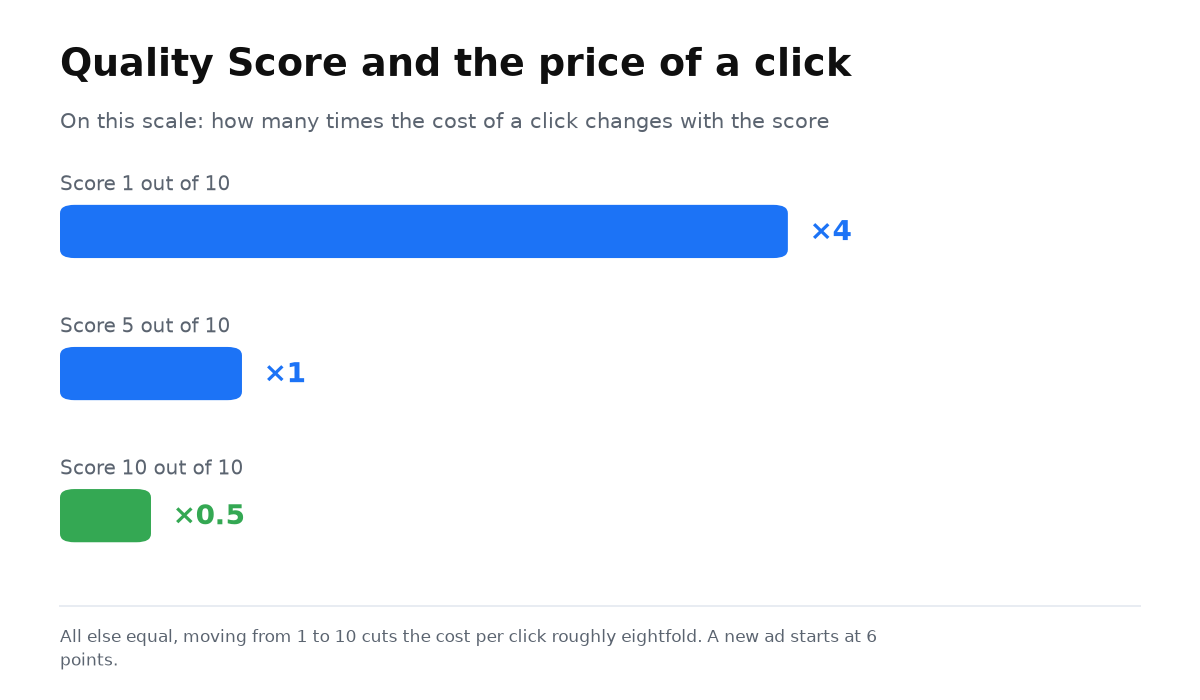
With all other factors equal, moving from 1 to 10 can reduce the click cost by a factor of 8. An advertiser with a high score may therefore pay less for the first position than a competitor pays for the second.
A simplified model says that Ad Rank equals the click bid multiplied by Quality Score. Ad Rank and the bid affect whether the ad wins the auction.
Keywords with a score of 7 or higher have an easier path to top positions. A high rank also increases the chance that an ad will appear with extensions, giving it more visibility, more attention, and more room to present the offer.
You can now separate a decorative ad rating from keyword diagnostics and identify where the campaign may be paying too much.
A campaign built by the manual still does not guarantee leads. My e-book “19 Google Ads Secrets” shows how to get the most out of Google Ads without draining your budget, drawn from real campaigns and tests.
See the book →How to check keyword Quality Score
Open Search keywords, select Columns, and add four measures:
- Quality Score.
- Expected CTR.
- Ad relevance.
- Landing page experience.
You may see a minus sign instead of a number. That means Google does not yet have enough statistical data because too few people have searched for that exact combination of words.
Several years ago, Quality Score was treated as the main test of a properly configured campaign. A business should give more weight to conversion volume, conversion cost, and return on advertising investment. Treat Quality Score as a symptom. A why clicks bring no leads can show where a campaign is overpaying and which check should come first.
What affects keyword Quality Score in Google Ads
The score has three components:
- Expected CTR.
- Ad relevance.
- Landing page experience.
Improving each component can raise the overall score. A perfect 10 is not always possible or necessary. If the campaign produces profitable conversions, do not damage it merely to improve a number in the interface.
Expected CTR
Google compares the CTR of your ad with the CTR of competitors using the same keyword. The result may be above average, average, or below average.
Do not increase CTR when doing so hurts performance. A tire service could promise free service in the ad and attract more clicks. That would not create more sales because visitors would not find the promised free offer on the website.
Likewise, do not advertise the latest iPhone for $300 if that offer does not exist. Click volume may rise, but conversions and trust will fall. The ad must reflect reality.
Improve CTR with better ad copy, cleaner search queries, and careful selection of keywords and negative keywords.
Sometimes a business deliberately lowers CTR to increase profit. A premium provider can state an above market price in the ad. Fewer people will click, but those who reach the site are more likely to accept that price.
Landing page experience
Google expects to find the keyword in the page Title, the Description, and the page copy, including paragraphs and H1-H3 headings.
Keywords alone are not enough. Landing page experience also depends on the following:
- support for smartphones and tablets;
- a convenient interface with clear buttons, a form, and contact details;
- information about delivery, warranties, returns, and payment options;
- fast page loading.
You cannot meet every condition literally. A website should not reproduce a misspelling from a search query. An everyday phrase such as “home loan” may lead to a page using the more precise term “mortgage lending.” You also cannot place a competitor’s name in your website tags merely because it appears in a keyword.
In such cases, the landing page assessment may be below average. That is not a reason to panic when traffic remains relevant and conversions fit the economics of the business.
Ad relevance
Google considers an ad relevant when the keywords appear in its headline and description. Sometimes you cannot use the exact wording. For example, mentioning a trademark may require special permission. The assessment can fall in that situation, but this is a normal constraint in search advertising.
Conclusion about keyword Quality Score
Understanding the three components can help reduce traffic costs and improve the path to the right page. A score of 10 is useful, but not at the expense of results. If a campaign with an average score delivers a good ROI and an acceptable conversion cost, the advertising is doing its job.
How to improve Quality Score: checklist
- Group keywords by intent. One ad group should address one narrow topic.
- Put the keyword in the headline manually or with dynamic keyword insertion.
- Send people to a landing page that answers their exact query, not to a generic home page.
- Check loading speed. A slow page can receive a weak assessment even when its copy is excellent.
- Improve CTR through ad copy and extensions, but do not use inflated promises.
- Review search queries regularly and add negative keywords so irrelevant impressions do not pull expected CTR down.
- Check expected CTR, ad relevance, and landing page experience separately. This reveals the specific weak point.
Student question: the checklist is complete, but Quality Score is low
“I followed every recommendation, but Quality Score remains low. What should I check?”
Look beyond ad settings. First, examine what people do after the click. Google sees how a visitor interacts with the page, so diagnosis does not end with a matching keyword, ad, and page.
Second, check website speed. It is a combined measure influenced by many factors, so one cosmetic change may not fix it.
Third, consider the platform on which the website was built. In my practice, a page on Tilda could follow every recommendation and still receive a lower assessment than expected. A practical test is to try another platform and compare the result.
Student question: the manufacturer ranks above the store
“When I search for a coffee machine, Google increasingly puts the manufacturer’s page first. Should the store raise its bid, optimize the feed, or do something else?”
First, check which results you are viewing. If a search for a model such as the Delonghi EC685 shows the manufacturer’s website, where the product cannot be purchased, Google may consider the query informational. The first result may then be organic rather than a product listing.
For a cleaner experiment, add “buy” to the query and examine the shopping results. Stores compete there, and performance depends on the bid, feed, and other Shopping and Performance Max settings. There is no secret button that puts a store above the manufacturer tomorrow. Improvement is sequential. Test the bid, feed, and offer one at a time.
Student question: how to fund the account
“Does funding Google Ads once a month or in small daily amounts affect ad quality, the algorithms, or account trust if I cannot deposit a large amount at once?”
There is no difference in ad quality. Fund the account in the way that works for your business. The important point is to keep enough money available so ads do not stop at a zero balance. Even frequent deposits do not interfere with the algorithms while the campaign runs continuously.
Account trust is a separate issue. If policy violations ever occur, payment history may influence how firmly Google responds. In a hypothetical case, funding from a corporate account or paying one invoice monthly, or at least weekly, may look more stable than making many deposits each day. If a large deposit is not possible, however, that alone does not impair campaign performance. Prevent a zero balance, and the ads can continue normally.
Two keyword statuses driven by Quality Score have their own guides: